SSOGEN / MCP Gateway / MCP Permissions: How to Decide Which Agent May Call Which Tool
SSOGEN
MCP Permissions: How to Decide Which Agent May Call Which Tool
Sort tools into read, write and money groups, give each its own scope, and enforce it at four points, with a person's approval where it counts.
MCP permissions answer one question on every tools/call: may this agent, acting for this person, run this tool now? The Model Context Protocol leaves the answer to the server. Its tools specification (revision 2026-07-28, read 2026-10-08) states two rules:
- Servers. Servers must implement proper access controls and rate limit tool calls.
- Clients. Clients should ask for confirmation on sensitive operations.
The specification defines no permission model, so you design one. This page covers how to decide MCP permissions per tool, how to enforce them on every call, and how SSOGEN does it.
The worked table uses the fictional Acme Corp.
Decide permissions from the tool, not from the agent
Start with the tools the server advertises, and sort each one by what happens when it runs.
- Read tools return data and change nothing:
list_invoices,get_purchase_order. - Write tools change a record someone can undo:
update_vendor_note. - Irreversible or money tools cannot be undone, or they move value:
approve_invoice,release_payment.
Give each group its own scope. ebs.invoices.read, covering two read tools, is easy to reason about; ebs.all is a blanket grant.
The MCP authorization section asks clients to follow least privilege and request only the scopes they need, which works only when the scopes are narrow.
Then decide who gets each scope:
- The agent. An agent gets invoice-reading access only if its job involves invoices.
- The person. A person delegating to it can narrow the grant further.
- Real access. It is the smaller of what the agent holds and what the person can reach.
Four enforcement points
A permission that lives only in a spreadsheet does nothing. Enforce it at four points:
| Point | What it stops | MCP specification support |
|---|---|---|
| Token audience | A token meant for another service | Servers must accept only tokens issued for them |
| Scope on the tool call | An agent calling a tool it was never granted | 403 with error="insufficient_scope" and the needed scope |
| Approval at the moment of use | An automatic run of a high-impact tool | Clients should confirm sensitive operations with a person |
| Limits inside the server | The right tool used with wrong arguments | Servers must validate inputs and implement access controls |
The fourth point is the one teams most often miss. A scope decides whether a tool can be called, not what it is called with.
An agent with the approve_invoice scope can approve any invoice the server allows, so put amount and record limits in the server and in the back-end account it uses.
The standard 403 also tells a well-behaved client which scope to request. This is how step-up works. MCP authentication shows the exact headers.
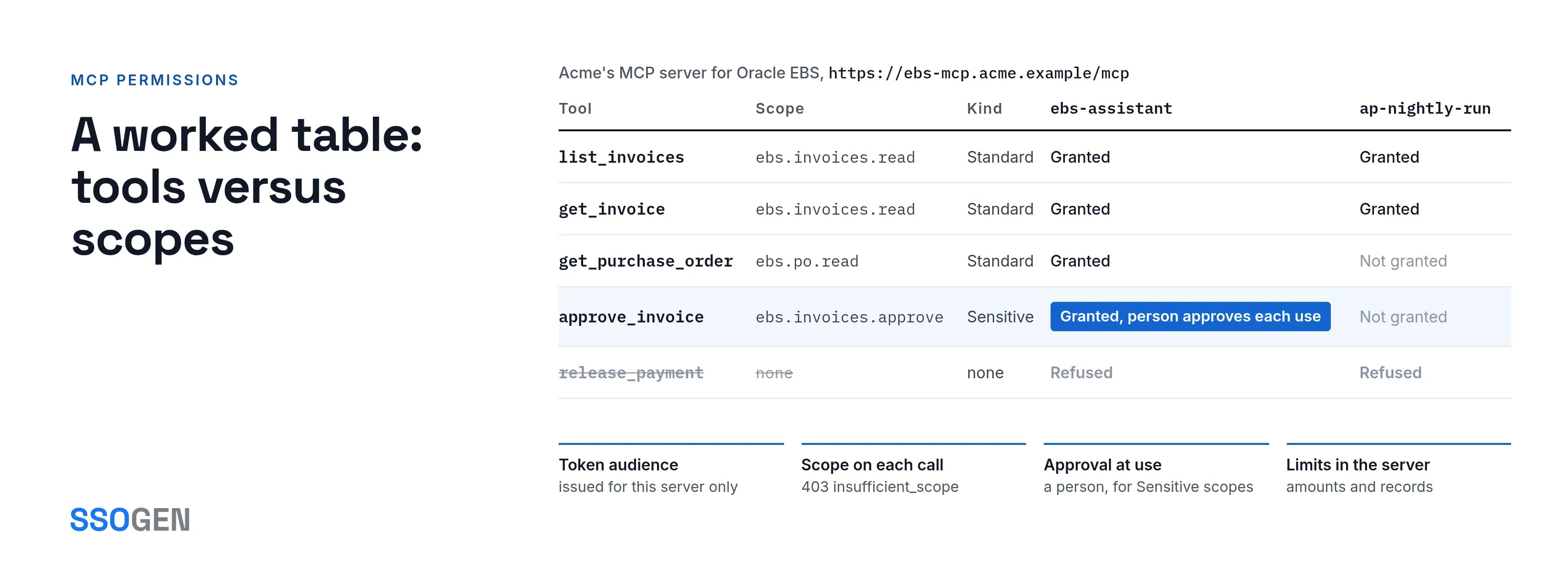
A worked table: tools versus scopes
Acme Corp runs an MCP server for Oracle E-Business Suite at https://ebs-mcp.acme.example/mcp.
The table lists the tool names the server advertises and the scopes mapped to them in SSOGEN. The names are Acme’s, not product defaults.
| Tool | Scope | Kind | What it allows | ebs-assistant |
ap-nightly-run |
|---|---|---|---|---|---|
list_invoices |
ebs.invoices.read |
Standard | Read supplier invoices | Granted | Granted |
get_invoice |
ebs.invoices.read |
Standard | Read one invoice | Granted | Granted |
get_purchase_order |
ebs.po.read |
Standard | Read purchase orders | Granted | Not granted |
approve_invoice |
ebs.invoices.approve |
Sensitive | Approve an invoice for payment | Granted, person approves each use | Not granted |
release_payment |
none | none | Not exposed to any agent | Refused | Refused |
The last row is a design choice. A tool named in no scope gets a 403, so a dangerous tool left out of every scope is blocked for all agents, with no extra rule.
How SSOGEN enforces tool permissions
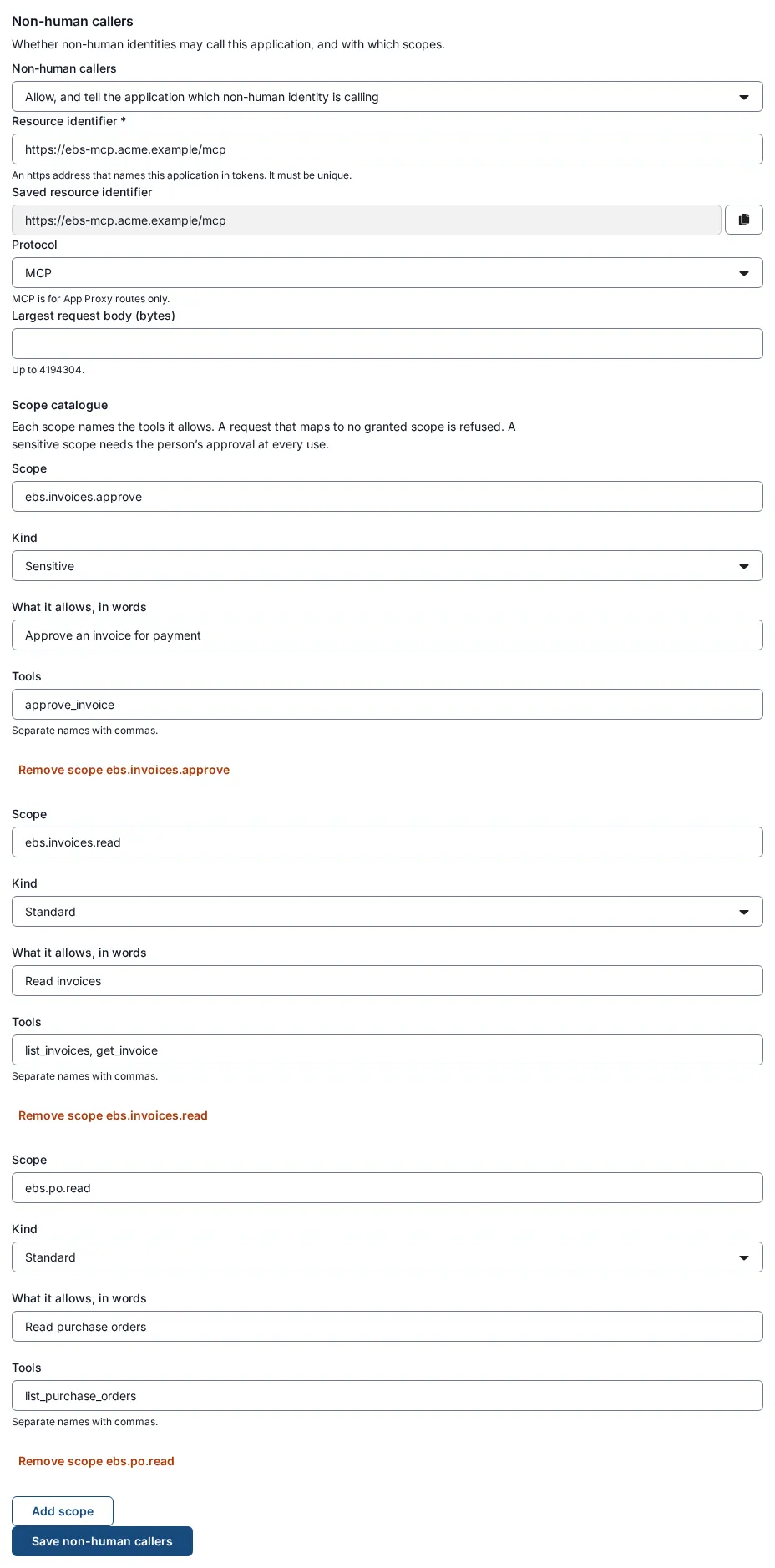
In SSOGEN, an MCP server is an application whose Non-human callers tab is set to the MCP protocol. Setup takes three steps:
- Set the Resource identifier to the server’s address.
- Select Add scope for each permission.
- Fill each scope’s Tools box with the exact tool names the server advertises, separated by commas, and choose its kind: Standard or Sensitive.
The MCP Gateway reads the outer envelope of each message, the method and the tool name, and never the tool’s arguments or results.
On a tools/call, it allows the call only if a scope the agent holds names the tool. The other rules:
-
A tool named in no scope, or one the server never advertised, gets a
403. -
initialize,ping,tools/listand notifications need only a valid token for the resource. -
Batched messages (a JSON array) are refused. A body over the limit gets a
413. -
A refused tool call returns
insufficient_scopeand names the scope it needs. -
Token. It is bound to the agent’s key through DPoP and lasts 270 seconds at most.
-
Removal. A permission removed from a grant stops working within minutes.
Approvals for Sensitive scopes
A Sensitive scope is never part of the delegation a person approves once. The flow has four parts:
- Request. For
ebs.invoices.approve, the agent sends a backchannel authentication request to/oauth2/bc-authorizethat names the scope, the resource and the delegation. - Options. The request can add a
binding_messageof up to 64 characters, shown to the person as “The agent says”, and arequested_expiryof 600 seconds at most. - Decision. The person decides on their Approvals page. Each approval works once and gives the agent a short window, up to 270 seconds, to use that scope.
- Coverage. The approval covers the scope for that window, not one specific operation, and SSOGEN does not see what the agent does with it. The limits in the server cover that part.
Check permissions before any agent runs
Open the agent and select Test access. SSOGEN asks the policy exactly what a real request would ask, then reports Would be allowed or gives the reason for a refusal, without issuing anything.
After real calls, the agent’s Activity tab lists each decision: the agent, the person, the scope, the tool name and the result.
Changing or removing a permission
| You want to | Do this | Takes effect |
|---|---|---|
| Stop one tool for every agent | Remove the tool from its scope in Non-human callers, then select Save non-human callers | At the next Gateway refresh, up to about five minutes |
| Stop one agent | Suspend it | New tokens stop at once, issued tokens within five minutes |
| Stop one person’s delegation | Revoke delegation, or the person selects Withdraw | New tokens at once, issued tokens within five minutes |
| Stop every agent of a type | AI Agents, Kill switches, Engage for AI agent | As above |
What the Gateway checks and what the server handles
- Tool lists come from the server. The Gateway does not filter the
tools/listanswer to the agent’s scopes. The MCP specification lets a server vary that list by authorization, so build hidden tools into the server. - Scopes govern tools. Scopes authorize tool calls; MCP resources and prompts are not authorized by scope.
- Tool names match exactly. The tool name in the scope must match what the server advertises. The specification suggests tool names of 1 to 128 characters, using letters, digits, underscore, hyphen and dot. Keep Acme’s names inside that.
Questions people ask
What is the difference between a scope and a tool permission?
A scope is a named permission. In SSOGEN, you attach tool names to it, and an agent that holds the scope can call those tools.
Should every tool have its own scope?
No. Group tools with the same risk and the same audience. Anything that moves money or changes records gets its own scope.
Can I require a person to approve a tool call?
Yes. Mark the scope Sensitive. The agent asks for approval, and the person decides on the Approvals page every time.
Does the MCP specification define permissions?
It defines how a server reports a missing scope (403 with insufficient_scope) and requires proper access controls. The permission model is yours.
Where to go next
- Policy enforcement point. The decision and enforcement roles explained.
- MCP Gateway. How it checks each call.
- AI agent identity. How each agent gets an owner and a key.
- Oracle EBS MCP guide. The full setup.
- MCP SSO. For sign-in.
Sources, all read 2026-10-08: Model Context Protocol tools specification, revision 2026-07-28.