SSOGEN / MCP Gateway / MCP SSO: How Single Sign-On and Identity Work for MCP Servers
SSOGEN
MCP SSO: How Single Sign-On and Identity Work for MCP Servers
The person signs in once at the authorization server, approves what the MCP client can do, and the client gets a token for that one server.
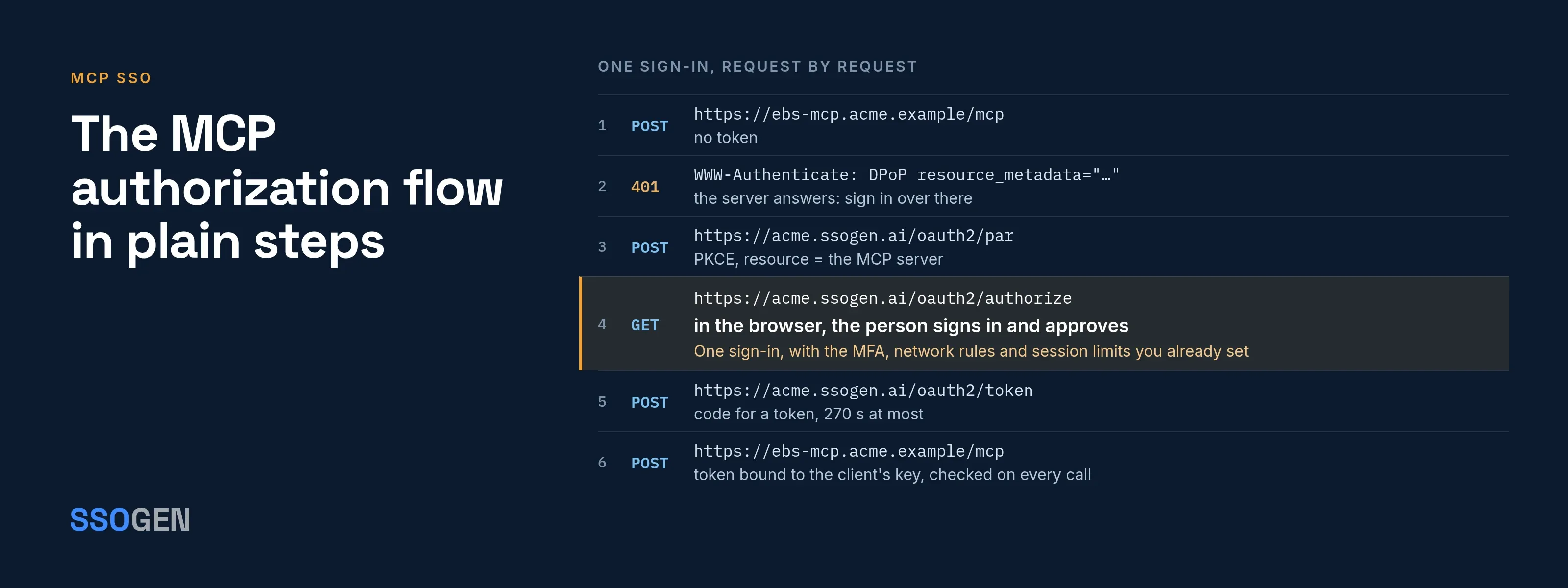
MCP SSO means an MCP server uses the same sign-in as everything else you run. A person signs in once at the authorization server and approves what the MCP client can do, and the client receives a token for that one server.
The Model Context Protocol has no login system of its own. Its authorization section (MCP specification, authorization, revision 2026-07-28, read 2026-10-08) names three roles:
- MCP server. An OAuth resource server.
- MCP client. An OAuth client.
- Authorization server. A separate server that talks to the user and issues tokens.
SSO happens at that authorization server, which can be your identity provider. This page covers the flow, then what SSOGEN adds.
Where SSO sits in the MCP flow
The MCP server never sees the password and runs no login page. It only checks tokens.
The authorization server handles sign-in, so the policies you already set there cover MCP clients too:
- Multi-factor authentication. Applies to MCP clients.
- Network rules. Apply to MCP clients.
- Session limits. Apply to MCP clients.
This is the value of SSO: one place decides who the person is.
Two parties need an identity:
- The person, who signs in at the authorization server.
- The client acting for the person, which an agent or coding assistant uses to call tools. It needs an identity too, so the MCP server knows which software is calling.
The MCP authorization flow in plain steps
This is the specification’s flow, shortened. Authorization is optional in MCP and applies to HTTP-based transports. A server using stdio reads credentials from its environment instead.
-
The client calls the MCP server with no token.
-
The server answers
401with aWWW-Authenticateheader that holds aresource_metadataURL. -
The client fetches that metadata (RFC 9728) and reads
authorization_servers. -
The client reads the authorization server’s own metadata (RFC 8414 or OpenID Connect Discovery).
-
The client obtains a client ID: a client ID metadata document, pre-registration or dynamic registration.
-
The client sends the person’s browser to the authorization server with a PKCE challenge and a
resourceparameter naming the MCP server. -
The person signs in and approves. This is the SSO step.
-
The browser returns to the client with a code, and the client exchanges it for an access token, sending
resourceagain. -
The client sends the token on every request in the
Authorizationheader. -
The MCP server checks that the token was issued for it, then runs the tool.
Your identity provider controls step 7 completely. For more on each step, with an annotated 401, see MCP authentication.
What identity an MCP server should end up with
After step 10, the server knows the token is valid for it. It still has to learn who is behind the token. Three common cases:
| Situation | Identity the server should see | Typical credential |
|---|---|---|
| A person using an assistant | The person, and the assistant as the actor | Authorization code flow with PKCE |
| A back-office automation | The agent itself | Client credentials with a key, not a shared secret |
| One agent calling for a person through another agent | The person, plus the chain of agents | Token exchange |
Without this, “the agent did it” is all your audit log can say. The non-human identity page covers why agents need identities of their own.
What SSOGEN adds
SSOGEN is a complete identity provider and acts as the authorization server in the flow above. The MCP Gateway, a capability of the SSOGEN Gateway, sits in front of your MCP server as the checkpoint. An MCP route works like this.
The 401 challenge and metadata
- Challenge. A request with no token gets
401withWWW-Authenticate: DPoP resource_metadata="...". - Metadata. The document names the SSOGEN sign-in server in
authorization_serversand your scopes inscopes_supported. - Token rules. It also says tokens are DPoP-bound and header-only.
Sign-in for the person
- Request. When an agent acts for a person, it pushes its authorization request to
/oauth2/par, then opens/oauth2/authorizein the person’s browser. - Policy. The person signs in under the application’s normal policy.
- Consent. A consent screen shows who owns the agent, what it says it does, the scopes and how long the permission lasts.
- Decision. The person can shorten the period, then select Approve or Deny.
- Limit. A delegation lasts 30 days at most, and never past the agent’s own expiry. The person can withdraw it in My Account.
A stricter token
- DPoP-bound by default. SSOGEN accepts tokens bound to the agent’s key through DPoP. For an MCP client that cannot do DPoP, an administrator can choose DPoP or Bearer for that one MCP server.
- Header. They go in
Authorization: DPoPwith a fresh proof on each request. Elsewhere, aBearertoken is refused. - Lifetime. An access token lives about four minutes, 270 seconds at most.
- Registration. An administrator registers every agent, with one to five human owners, instead of dynamic client registration.
Identity delivered to your server
- Verified identity. The Gateway accepts no identity from the caller and attaches its own verified one.
- Content. It states whether the caller is an agent or a person, which agent it is and, for a delegated call, the delegation chain and the person the agent acts for.
- Headers. Your server receives identity headers, not a token.
- Mapping. The MCP server maps the delegated person to a user in the back-end system.
Per-call checks and a record
- Method and tool name. The Gateway reads the method and the tool name, not the arguments.
- Scope check. It allows a
tools/callonly if a scope the agent holds names the tool. - Audit. Every decision, allowed or refused, goes in the audit log.
Setup, step by step, with Acme’s Oracle E-Business Suite as the example, is in the MCP authorization guide. For the Gateway overview, see MCP Gateway.
What MCP SSO covers
-
Identity and access for your MCP server. You supply the MCP server for Oracle EBS or any other system; SSOGEN signs people and agents in and checks every call to it.
-
Decisions by method and tool name. The Gateway does not look inside tool arguments. A scope that allows
approve_invoiceallows any invoice the server lets that agent approve. -
Limits in the server. Put limits in the server too.
-
Clients that send DPoP proofs. An SSOGEN MCP route accepts MCP clients that send DPoP proofs and, when they act for a person, push their authorization request.
-
Client documentation. Check your client’s documentation first.
-
Scope checks on tool calls. Scopes authorize
tools/call. The Gateway does not filter thetools/listanswer by scope, and it does not authorize MCP resources or prompts by scope.
Questions people ask
Can an MCP server use my existing single sign-on?
Yes, if your identity provider can act as the OAuth authorization server and issue tokens with the MCP server as the audience. Sign-in then follows your normal policy.
Does the MCP server see the user’s password?
No. The person signs in at the authorization server. The MCP server only gets a token it can verify.
Do I need dynamic client registration?
The MCP specification lists three ways to get a client ID: client ID metadata documents, pre-registration and dynamic registration. It marks dynamic registration as deprecated. SSOGEN uses administrator registration.
How do I log out an agent?
Suspend the agent, revoke the person’s delegation, or flip a kill switch. New tokens stop at once. Tokens already issued stop within five minutes.
Where to go next
- MCP Gateway. How it checks each call.
- AI agent identity. How it works.
- Which agent may call which tool. How to decide.
- A2A vs MCP. The two agent protocols compared. Agents that call other agents, not tools, use a different standard.
- SSO for coding assistants. Coding assistants sign in to your tools too.
Sources, all read 2026-10-09: Model Context Protocol specification, authorization (revision 2026-07-28).