SSOGEN / SSO architecture: where each SSOGEN component runs and which ports it opens
SSOGEN
SSO architecture: where each SSOGEN component runs and which ports it opens
Four reference topologies for engineers: the Web Agent on an Oracle web tier, the Gateway in front of internal apps and servers, AI agents through the MCP gateway, and self-hosted or hosted SSOGEN.
An SSO architecture with SSOGEN has one decision point and up to three enforcement points. SSOGEN signs people and agents in and decides access. The Web Agent enforces on your web server, the Gateway enforces in front of internal apps, servers and MCP tool servers, and every component reaches SSOGEN over HTTPS.
Four topologies at a glance
| Topology | Enforcement point | Where it runs | Inbound port it needs |
|---|---|---|---|
| Oracle EBS, PeopleSoft, JD Edwards | SSOGEN Web Agent | Inside Apache or Oracle HTTP Server on the web tier | None beyond the web server’s own |
| Internal web apps | Gateway, App Proxy | Enterprise Linux host in your network | 9943/tcp, the Gateway listener |
| Servers over SSH, RDP and VNC | Gateway, Remote Access | The same Gateway | 9943/tcp |
| Apps in a closed network | Outbound Connector | Inside that network | None: it dials out |
| AI agent to an MCP server | Gateway, MCP route | The Gateway in front of the tool server | 9943/tcp |
Oracle EBS, PeopleSoft and JD Edwards: the Web Agent on the web tier
The Web Agent is an Apache module. It runs inside the web server that already fronts the application, so the topology adds no new host and no new inbound port.
| From | To | Protocol | Purpose |
|---|---|---|---|
| Browser | Web tier (Apache or OHS) | HTTPS, the application’s port | The person opens the application |
| Browser | SSOGEN | HTTPS | Sign-in under the application’s policy |
| Web tier | SSOGEN | HTTPS, outbound | Code exchange, signing keys, discovery |
| Web Agent | Application | Local, inside the web server | Passes the signed-in person |
- Supported web servers. Apache 2.4 and 2.2, and Oracle HTTP Server 11g, 12c R1 and 12c R2.
- One outbound rule. The web server must reach SSOGEN over HTTPS, directly or through an outbound proxy.
- Through your load balancer. A TLS-terminating proxy in front of SSOGEN passes the agent’s calls, as long as it forwards the authorization header unchanged.
Internal apps and servers behind the Gateway
One SSOGEN Gateway program carries several roles. Each role has a fixed port and direction, and the installer never changes a firewall rule.
| Role | Inbound | Outbound |
|---|---|---|
| App Proxy and Remote Access | 9943/tcp from users or your load balancer; 9946/tcp when Outbound Connectors dial in | SSOGEN over HTTPS, your applications and hosts, DNS |
| Directory Connector | 9945/tcp from the SSOGEN server only | SSOGEN over HTTPS, your directory |
| Outbound Connector | Nothing | SSOGEN over HTTPS, its Gateway on 9946/tcp, the applications it reaches |
| Relay | 443/tcp and 9946/tcp | SSOGEN over HTTPS |
- Gateway to SSOGEN. Mutual TLS, straight to SSOGEN’s own HTTPS port. A proxy that terminates TLS cannot sit on this path.
- Admin port. 127.0.0.1:9942 stays local and is never opened in a firewall.
- No inbound port at all. An Outbound Connector inside the network, a relay in front of the Gateway, or both.
- Tunnel ports. A device in front of 9946 must be a plain TCP forward.
Details: Gateway ports, firewall and sizing and Publish an internal app with the App Proxy. Teams with nginx, Traefik or Envoy in place can keep it: forward auth behind your own proxy.
An AI agent calls an MCP server through the Gateway
The MCP server sits behind an App Proxy route and accepts connections from the Gateway only. The agent gets a short-lived, key-bound token from SSOGEN and presents it on every tool call.
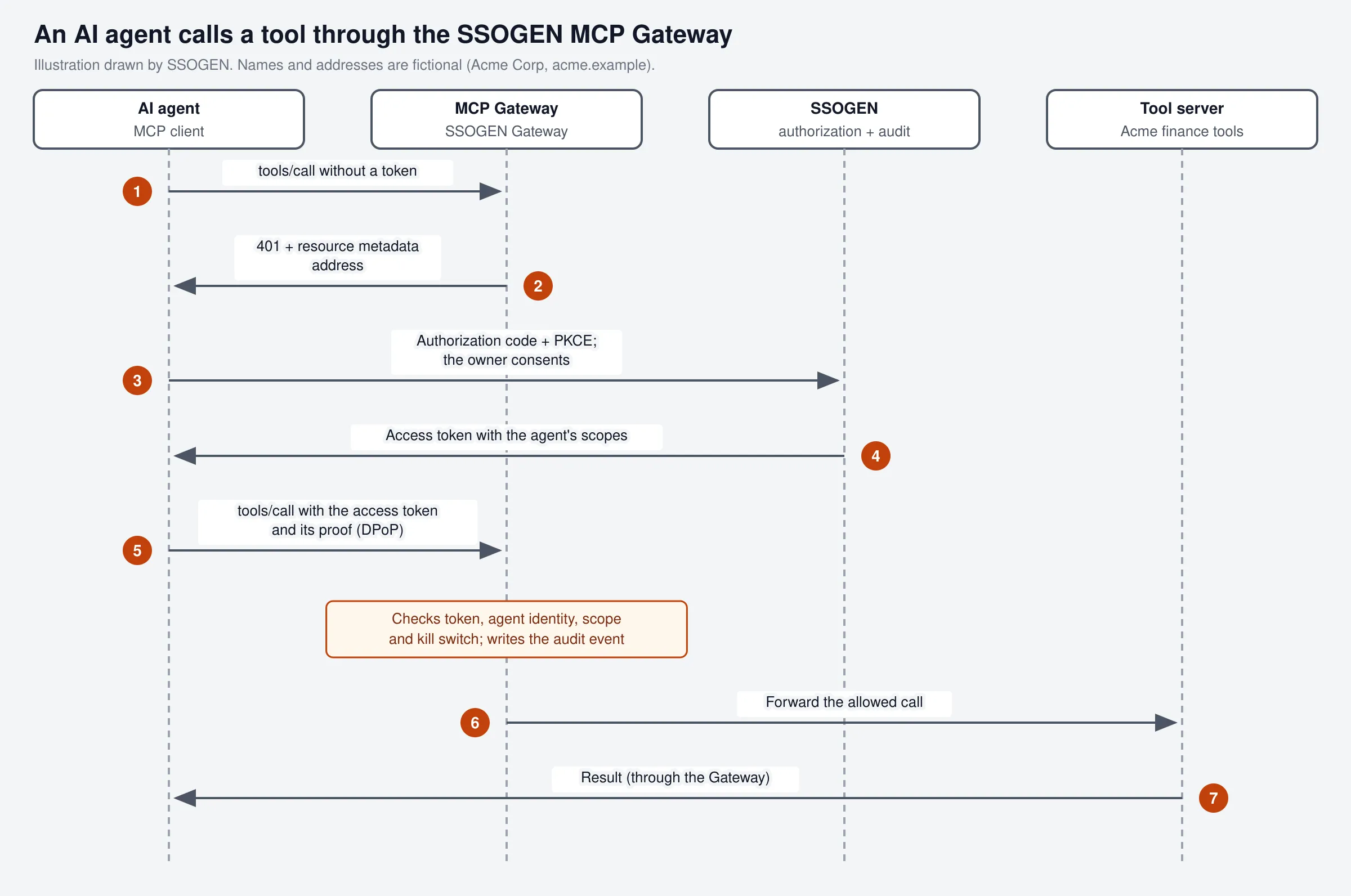
- Token. DPoP-bound by default, at most 270 seconds.
- Per-call check. Signature, key proof, audience and the tool name against the agent’s scopes.
- Credential isolation. The MCP server receives the agent’s identity and, when it acts for a person, that person. It never receives the token.
- Audit. Every allowed or refused call is an audit event in SSOGEN.
Details: MCP gateway and connect an AI agent to Oracle E-Business Suite with MCP.
Self-hosted or hosted by SSOGEN
The topologies above are the same in both models. What moves is the SSOGEN server itself.
| Self-hosted | Hosted by SSOGEN | |
|---|---|---|
| SSOGEN server | Your Enterprise Linux 8, 9 or 10 hosts, PostgreSQL 15 or later | Operated by SSOGEN |
| Address | Your own, fixed at install | <name>.ssogen.ai, fixed at creation |
| SSOGEN port | 9941/tcp, HTTPS only; behind a proxy on 443 | The hosted address over HTTPS |
| Gateways and Web Agents | Your hosts, dialing your SSOGEN | Your hosts, dialing the hosted address; never shared |
| Directories | Your directories, on your own network | Public LDAPS (636, 3269) or StartTLS (389, 3268) |
| Features | Set by your administrators | Switched on per organization by SSOGEN |
See self-hosted or hosted and your hosted SSOGEN organization.
Availability facts
- Gateway groups. Two or more instances behind a load balancer stay reachable while one restarts or upgrades. Every instance receives the same signed configuration.
- SSOGEN nodes. The load balancer probes
/health/readywith SSOGEN’s own host name. Sticky sessions are not needed. - Draining. A stopped SSOGEN node finishes requests in flight for up to 20 seconds; set the drain time to at least that.
- Outbound Connectors. Each holds 2 tunnel connections to every live Gateway instance and notices a dead path in about 45 seconds.