SSOGEN / Kerberos SSO for Web Applications
SSOGEN
Kerberos SSO for Web Applications
The browser hands Windows proof of sign-in to SSOGEN, and the Gateway uses Kerberos to reach older back ends that only understand Windows authentication.
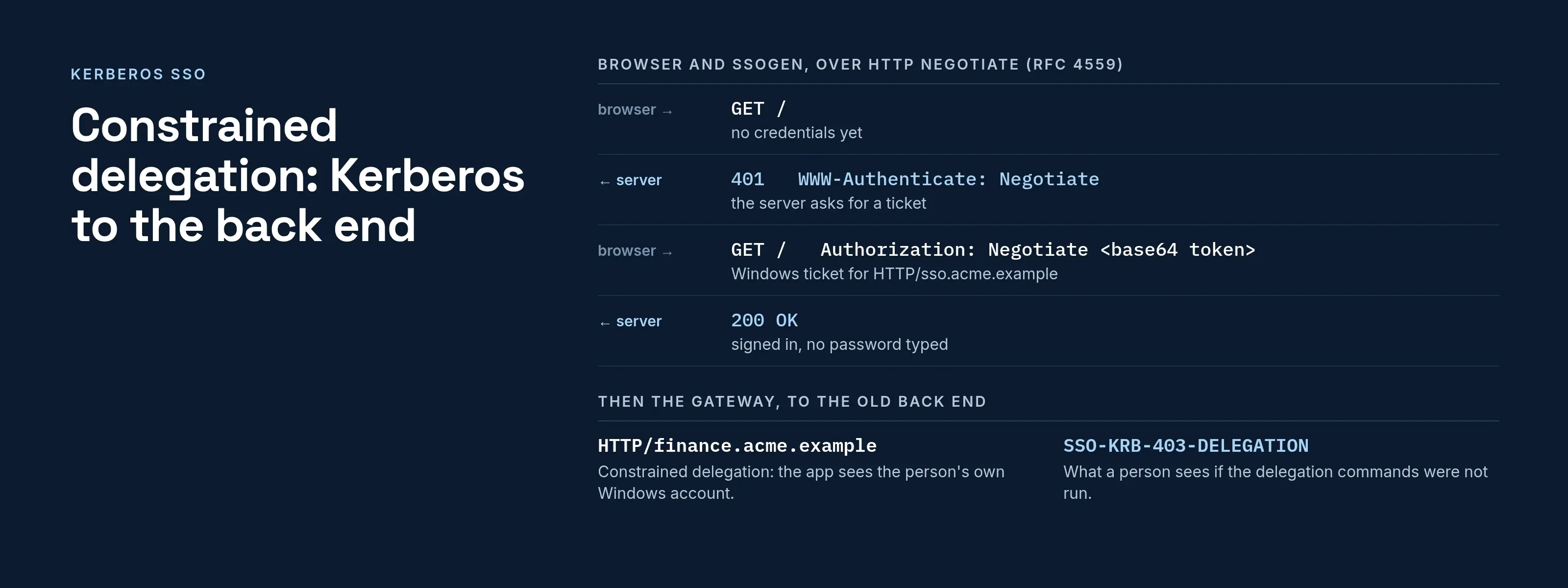
Kerberos SSO works because Windows already holds proof that the person signed in. The browser hands that proof to the web server, the server checks it, and nobody types a password.
Two separate jobs are involved, and they are often confused:
- Signing the person in to the identity layer (SSOGEN, or the app itself).
- Signing them in to an old back-end app that only understands Windows authentication.
SSOGEN handles both, each with its own settings: Windows sign-in to SSOGEN, and Kerberos to the back end through the SSOGEN Gateway.
How the browser proves who the person is
Kerberos is the ticket system built into Active Directory. It uses two exchanges between client and KDC, defined in RFC 4120, section 3:
- Ticket-granting ticket. A person signs in to a domain-joined computer, and the domain controller (the Key Distribution Center) issues this ticket.
- Service ticket. To reach a web site, Windows trades the ticket-granting ticket for a service ticket for that site’s service name.
The browser then sends the service ticket over HTTP using the Negotiate scheme. RFC 4559, section 5 describes the sequence:
| Step | What happens | HTTP |
|---|---|---|
| 1 | The browser asks for a protected page with no credentials. | GET / |
| 2 | The server answers that it wants Negotiate. | 401 with WWW-Authenticate: Negotiate |
| 3 | The browser builds a SPNEGO token holding the Kerberos ticket and retries. | Authorization: Negotiate <base64 token> |
| 4 | The server checks the ticket with its own key. If the exchange needs more steps, it answers 401 again with more data. |
401, then repeat |
| 5 | When the security context is complete, the server returns the page. | 200 |
RFC 4559 says the mechanism is limited to SPNEGO with Kerberos and NTLM (read 2026-10-08).
That limit matters in practice: if the service name is wrong, the browser silently falls back to NTLM, and the server never sees a Kerberos ticket.
Why Kerberos SSO fails, and where to look
Three things break most deployments, in this order:
- The service name. The ticket is issued for a service principal name such as
HTTP/sso.acme.example. Register it on exactly one account. People must open the site by that exact host name, not an address or an alias. - The clock. RFC 4120, section 3.2.3 gives an allowable clock skew, for example 5 minutes, and an error when a ticket falls outside it.
- Header size. A person in many groups carries a large ticket, and a proxy that caps header size cuts it off. When only some people fail, check this first.
Constrained delegation: Kerberos to the back end
Many internal apps, such as IIS sites with Windows authentication, ask for a Windows identity on every request and cannot be changed. A gateway signs people in to them by acting for the user.
Per Microsoft’s documentation on Kerberos constrained delegation (read 2026-10-08):
- Constrained delegation. It restricts the services to which a given server can act on a user’s behalf.
- S4U2Proxy. This extension lets a service use its service ticket for a user to obtain a ticket to a back-end service.
- Protocol transition. A bit named Trusted-to-Authenticate-for-Delegation controlled it. It lets a service get a ticket for a person who did not sign in with Kerberos.
- The rule. Delegate only to the named back end, never everywhere.
What SSOGEN does with Kerberos
| Windows sign-in to SSOGEN | Kerberos to the back-end application | |
|---|---|---|
| Purpose | A person on a managed Windows computer opens My Apps or a protected application with no password page. | The SSOGEN Gateway signs in to an application that uses Windows authentication, as the person’s own Windows account. |
| Where it is set | A sign-in connection with protocol KERBEROS, created through the administration API as a draft. |
The route’s Sign-in to the application section in the Admin Console, under App Proxy routes. |
| Service name | HTTP/ plus SSOGEN’s host name, for example HTTP/sso.acme.example, with a keytab uploaded to SSOGEN. |
HTTP/ plus the application’s host name, for example HTTP/finance.acme.example, with a keytab on the Gateway. |
| Strength | Counts as single factor. A policy that needs a second factor still asks for it; a policy that needs a passkey is never met. | The application sees each employee’s own Windows account. |
| Limits | Offered only on the network zones you list; AES keys only. | Runs on the Enterprise Linux RPM or the container image with the Kerberos helper; AES only. |
Windows sign-in to SSOGEN, in order
- In Active Directory, create a service account just for SSOGEN, with AES support, no delegation of any kind and no other service names.
- Register the name with
setspn -S HTTP/sso.acme.example svc-ssogen, then check withsetspn -Qthat exactly one account holds it. - Export the keytab with
ktpassusing/crypto AES256-SHA1. - Set the browser policy
AuthServerAllowlisttosso.acme.examplefor Chrome and Edge, ornetwork.negotiate-auth.trusted-urisin Firefox. - Create the connection, validate it, run the real-ticket test from a domain-joined computer, then activate it. The test page shows the Windows account SSOGEN received and the person it would sign in, and creates no session.
- List Windows sign-in in the providers of each authentication policy that should accept it.
Two notes apply to these steps:
- Delegation. Do not set
AuthNegotiateDelegateAllowlist. SSOGEN does not need the person’s credentials forwarded and discards them. - Sign-out pause. SSOGEN remembers a failed attempt or a sign-out for twelve hours in that browser. A missing automatic sign-in after sign-out is therefore a deliberate pause, not a fault.
The full steps and error table are in the form fill and Kerberos sign-in guide and the Windows desktop sign-in guide.
Back-end Kerberos on the Gateway
For the second case, the route form generates four commands for a domain administrator:
setspn. Registers the service name.ktpass. Exports the keytab.Set-ADUser. FillsmsDS-AllowedToDelegateTowith the application’s service name only.Set-ADAccountControl -TrustedToAuthForDelegation $true. Turns on protocol transition.
The commands never turn on unconstrained delegation.
When a sign-in fails, the employee sees a code such as SSO-KRB-403-DELEGATION. It means the delegation commands were not run, or the service name differs from the route.
The administrator sees the reason in the app’s Last sign-in column.
Questions people ask
Does Kerberos SSO work outside the office network?
Not on its own. The browser must reach a domain controller for tickets. In SSOGEN, Windows sign-in is offered only on the network zones you list. Everyone else sees the normal sign-in page.
Is Kerberos SSO the same as multi-factor authentication?
No. SSOGEN treats a Windows sign-in as single factor, because it cannot tell how Windows itself verified the person. Where you need more, add MFA through a policy.
Can Kerberos protect an application that has no SSO support?
Yes, if it uses Windows authentication. The Gateway presents the ticket for the person. For others, use the Web Agent or a form-fill route.
Where to go next
- Kerberos as an authentication method. See the method in SSOGEN.
- SSOGEN Gateway. The back-end side.
- Adaptive authentication. Decide which policies accept Windows sign-in.
- What is Kerberos. Explains tickets and realms, and has a free klist reader.
Sources, all read 2026-10-09: RFC 4120, RFC 4559, Microsoft Kerberos constrained delegation overview.