SSOGEN / SSOGEN and Oracle Access Manager compared
Compare
SSOGEN and Oracle Access Manager compared
An Oracle Access Manager alternative for the same web tier: the agent still sits on the web server and passes the user, with a paste-in setup and SSOGEN behind it.
The calendar
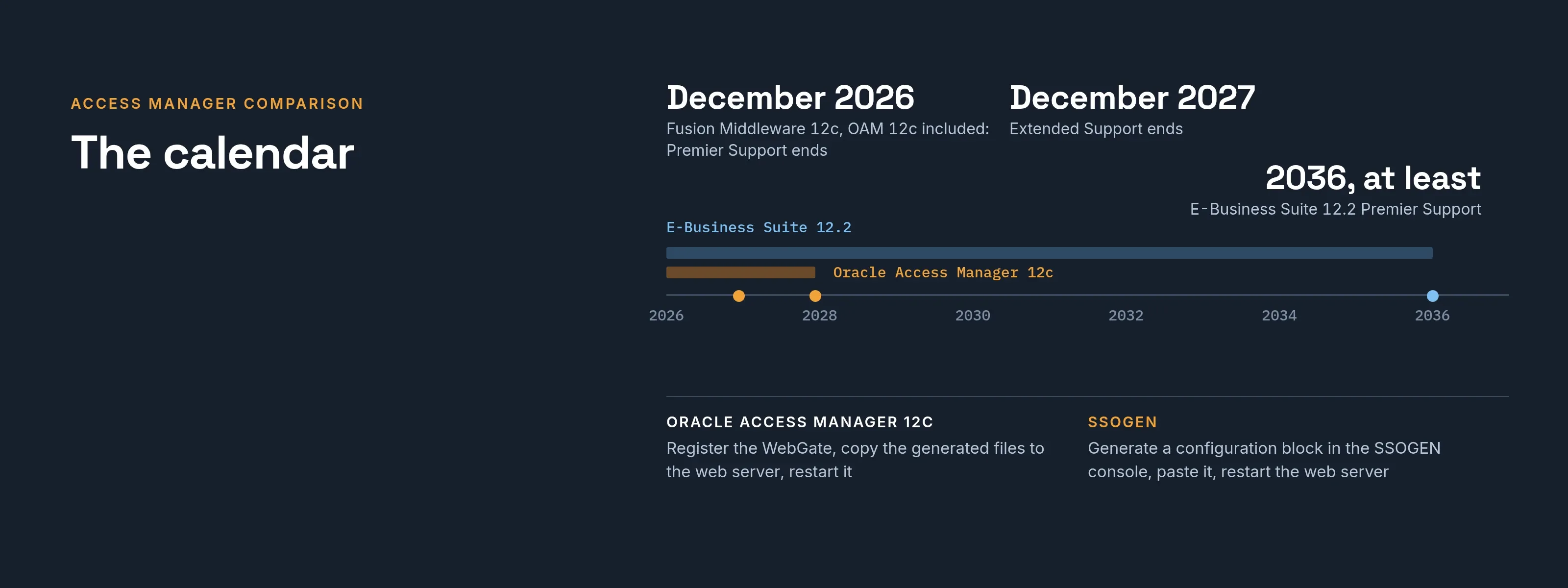
Oracle states that E-Business Suite 12.2 has Premier Support through at least 2037 (Oracle announcement). Oracle’s published Fusion Middleware 12c lifecycle, which includes Oracle Access Manager 12c, ends Premier Support in December 2026 and Extended Support in December 2027 (Oracle Fusion Middleware support dates). Check your own product and version with Oracle. For what each support phase includes and how the 14c upgrade, Extended Support and replacement compare, read OAM 12c end of support.
Sources: Oracle E-Business Suite Premier Support announcement and Oracle Fusion Middleware end of support page, read 2026-11-12.
Side by side
| Oracle Access Manager 12c | SSOGEN | |
|---|---|---|
| Agent on the web server | WebGate on Oracle HTTP Server, Apache or IBM HTTP Server | The Web Agent on Apache 2.2, Apache 2.4 or Oracle HTTP Server |
| Setting up the agent | Register the WebGate in the OAM console or with the remote registration tool, copy the generated files to the web server, restart it | Generate a configuration block in the SSOGEN console, paste it, restart the web server. For E-Business Suite, PeopleSoft and JD Edwards, run the SSOGEN package on the web tier |
| The server behind the agent | Oracle Access Management on Fusion Middleware Infrastructure, in a WebLogic domain with its own database schemas | SSOGEN on Enterprise Linux with PostgreSQL, installed from one archive with a guided installer; or hosted by SSOGEN |
Oracle facts come from Oracle’s public documentation: the WebGate installation guide and the Oracle Access Management installation guide for 12.2.1.4, and the support announcements linked above.
What stays the same
- The shape at the web server. A module in front of the application checks the sign-in and passes the user. The application code does not change.
- The identity the application reads. SSOGEN’s Oracle profile hands E-Business Suite, PeopleSoft and JD Edwards the user in the form they expect. User name case is set per site.
- Your directory. Active Directory or LDAP stays the source of people.
What SSOGEN adds behind the agent
- Multi-factor sign-in. Push approval with number matching, passkeys, authenticator codes and step-up, chosen per application in a policy you can read.
- Sign-in sources. Microsoft Entra ID, Okta and any SAML or OpenID Connect provider, plus Active Directory, LDAP, SCIM and CSV.
- One audit trail. Every sign-in and administrative change, chained, sealed daily and checked every night.
- Rules you can test before they apply. The What if screen names the policy that applies to a person and an application, and each reason.
- Room beyond Oracle. SSOGEN also signs people in to SaaS applications, publishes internal web applications and opens servers in the browser.
What to check first
- There is no policy importer. Access rules are re-created as sign-in policies and group assignments, a design step done with you.
- Full directory names. If an application reads the person’s full directory distinguished name from Oracle Access Manager, review it with us before that application moves.
- E-Business Suite needs more than a paste. The package runs as the applications owner with the APPS password, updates the EBS sign-in profile options, and deploys the AccessGate application into WebLogic. EBS 12.1 also needs a separate WebLogic server for an external AccessGate. The migration playbooks set out each product.
Moving one application at a time
During a move, each application moves on its own. Its old path stays available until the new path is proven, and then that application is complete. Before the first cut-over, work through the Oracle audit checklist.
Oracle, Oracle Access Manager, WebLogic, E-Business Suite, PeopleSoft and JD Edwards are trademarks of Oracle and its affiliates. IBM is a trademark of IBM. SSOGEN is an Oracle partner, but Oracle has not reviewed or endorsed this page. SSOGEN is not affiliated with IBM. Oracle details are from Oracle’s public documentation and may change; check them for your own version.