Learn
What is PKI?
Public key infrastructure (PKI) is the set of roles, keys and rules that let a client trust a public key it has never seen. Your browser uses it on every HTTPS page.
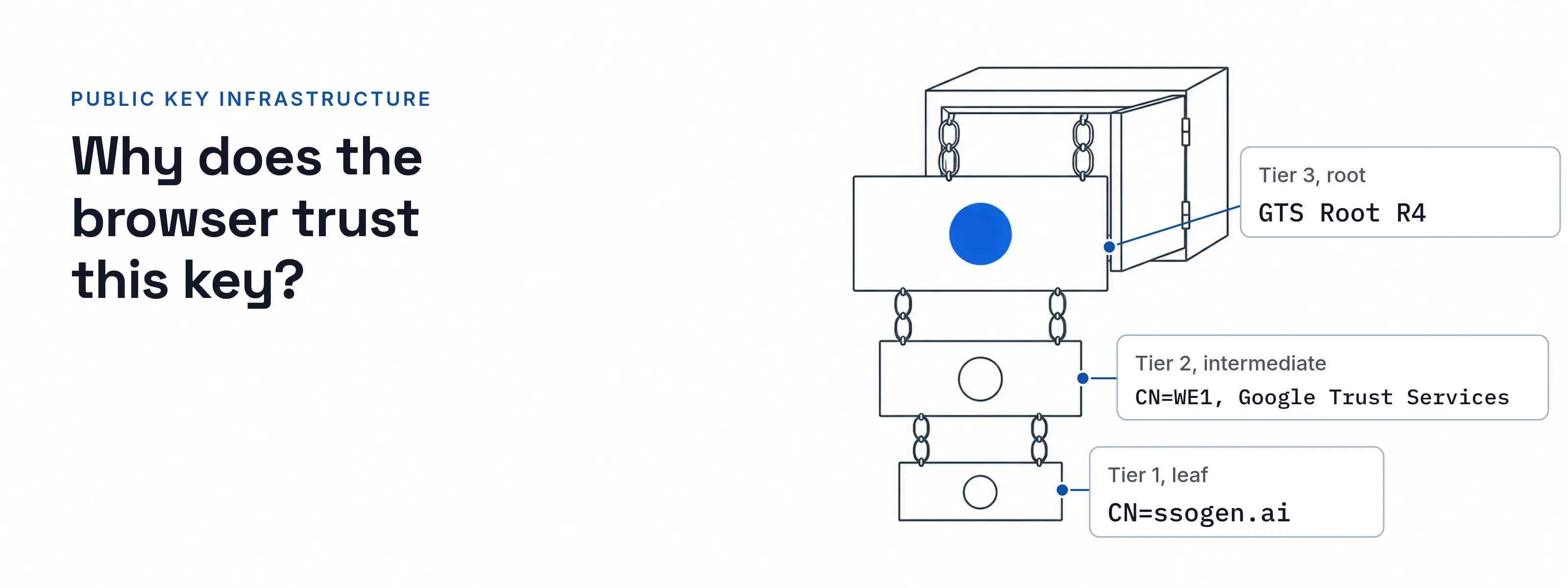
When you open ssogen.ai, your browser checks two signatures before the page loads. A root signed the intermediate CA, and the intermediate signed the site’s certificate. The browser stops at the first key it already trusts.
Here is what PKI is: a set of roles, keys and rules that let a client trust a public key it has never seen. A certificate authority signs the key, the client checks the signatures back to a root it holds, and expiry or revocation ends the trust.
The chain behind one website: root, intermediate, leaf
I read this chain from the ssogen.ai TLS handshake. Each tier below shows what it signs, who keeps its private key and where a client finds it.
$ openssl s_client -connect ssogen.ai:443 -servername ssogen.ai -showcerts 0 s:CN=ssogen.ai i:C=US, O=Google Trust Services, CN=WE1 a:PKEY: EC, (prime256v1); sigalg: ecdsa-with-SHA256 v:NotBefore: Nov 15 17:03:22 2026 GMT; NotAfter: Feb 13 18:03:19 2027 GMT 1 s:C=US, O=Google Trust Services, CN=WE1 i:C=US, O=Google Trust Services LLC, CN=GTS Root R4 a:PKEY: EC, (prime256v1); sigalg: ecdsa-with-SHA384 v:NotBefore: Dec 13 09:00:00 2023 GMT; NotAfter: Feb 20 14:00:00 2029 GMT 2 s:C=US, O=Google Trust Services LLC, CN=GTS Root R4 i:C=BE, O=GlobalSign nv-sa, OU=Root CA, CN=GlobalSign Root CA a:PKEY: EC, (secp384r1); sigalg: sha256WithRSAEncryption v:NotBefore: Nov 15 03:43:21 2023 GMT; NotAfter: Jan 28 00:00:42 2028 GMTVerification: OK- Subject
- CN=ssogen.ai
- Issuer
- CN=WE1, Google Trust Services
- Valid
- 2026-11-15 to 2027-02-13 (90 days)
- Names (SAN)
- ssogen.ai, *.ssogen.ai
- CA
- no
- Revocation
- CRL URL only, http://c.pki.goog/we1/_Rl-cMo1ja4.crl
- Signs
- nothing. The leaf ends the chain.
- Private key
- on the host that terminates TLS for ssogen.ai. It is never sent.
- Found
- sent first by the server.
- Subject
- CN=WE1, O=Google Trust Services
- Issuer
- CN=GTS Root R4
- Valid
- 2023-12-13 to 2029-02-20
- CA
- yes, pathlen:0
- Signs
- leaf certificates such as the one above. Path length 0 means it cannot issue further CAs.
- Private key
- with the CA operator.
- Found
- sent second by the server. The leaf’s CA Issuers URL,
http://i.pki.goog/we1.crt, covers a client that lacks it.
- Subject
- CN=GTS Root R4, O=Google Trust Services LLC
- Issuer
- CN=GlobalSign Root CA
- Valid
- 2023-11-15 to 2028-01-28
- CA
- yes
- Signs
- intermediates such as WE1.
- Private key
- with the CA operator.
- Found
- in the client’s trust store. The server also sent a copy signed by GlobalSign Root CA, a cross-signature. A client holding GTS Root R4 stops here; one holding only GlobalSign Root CA takes one more step.
Paste any block into the certificate decoder to read every field. The X.509 certificate page explains what each field means.
Who does what in a PKI
Four roles carry the system.
| Role | What it does |
|---|---|
| Certificate authority | Signs certificates and publishes its own. WE1 issued the leaf above. What a CA checks before it signs is on the certificate authority page. |
| Subscriber | Owns the name, makes the key pair and keeps the private key. |
| Relying party | Checks signatures, dates, names and status before it trusts the key, as a browser does. |
| Status publisher | Tells relying parties which certificates ended early. The leaf above points to a CRL, covered below. |
From key pair to certificate in five steps
The private key never leaves the requester. Only a certificate signing request (CSR) travels to the CA.
Generate a key pair
The private key stays on the machine that uses it.
Build a CSR
It holds the public key and the names you want, signed with the private key (PKCS #10, RFC 2986).
The CA checks the request
For a public site, that means proof that you control the names.
The CA signs
It returns the certificate, with the intermediates a client needs.
Install and renew
The server gets the certificate and intermediates. ACME (RFC 8555) lets a CA and an applicant automate verification, issuance and revocation.
Revocation and expiry: how a bad certificate stops working
A certificate ends in one of three ways. Only the first needs nobody to act.
| Mechanism | How the client learns | Weakness |
|---|---|---|
| Expiry | The notAfter date inside the certificate |
Fixed at issuance, so it cannot end a certificate early |
| CRL (RFC 5280) | A signed, time-stamped list of revoked serial numbers at a URL in the certificate | The client needs a suitably recent list; RFC 5280 leaves “suitably recent” to local policy |
| OCSP (RFC 6960) | The client asks a CA responder about one certificate | The CA learns which site each client visits, the reason Let’s Encrypt gave for ending it |
OCSP is no longer the default. Baseline Requirements ballot SC-063 made OCSP optional and required CRLs, effective 15 March 2024. Let’s Encrypt turned off its OCSP responders on 6 August 2025. The ssogen.ai leaf lists a CRL URL and no OCSP URL.
Maximum validity of a public TLS certificate falls from 398 days to 47 days by 2029; the dated schedule is on the certificate authority page.
The ssogen.ai leaf, issued on 15 November 2026, runs 90 days.
Public PKI and private PKI
The mechanics are the same. The trust anchor decides who writes the rules.
- Public PKI. The CA/Browser Forum Baseline Requirements and the browser root programs set the rules. The CA holds the root, and browsers and operating systems ship it, so no client installs anything.
- Private PKI. You set the rules. You hold the root and place it in the truststore of every client that must trust it. You choose the lifetimes. Typical uses are LDAPS directories and internal services.
Your own root for internal services
A private root in each caller’s truststore lets services prove themselves to each other.
Before: the caller lacks your root. It finds no anchor for the service’s certificate, and the handshake fails.
After: the root is in the caller’s truststore, and the connection opens. For a Java caller that is the cacerts file.
SSOGEN works both sides of this:
- Add your own CA. SSOGEN trusts the public certificate authorities by default. Add your internal CA as a CA certificate in PEM form, and directories signed by it connect over LDAPS without a restart. Adding and removing an authority is audited, and an amber badge shows from 90 days before expiry. See trusted certificates.
- A workload CA for machines. SSOGEN runs a workload CA that issues certificates to machines instead of passwords. SSOGEN Gateways use them. Gateways and the load balancers in front of them use mutual TLS, and a listener matches an exact SAN identity.
Where a chain breaks
A chain is only as strong as the CA’s issuance checks and key custody.
- DigiNotar, 2011: Mis-issuance. On 29 August 2011 Mozilla reported a fraudulent certificate for Google sites issued by DigiNotar. DigiNotar revoked it, and Firefox removed trust in its root.
- Symantec, 2017: Oversight. On 11 September 2017 Google announced that Chrome would distrust Symantec certificates issued before 1 June 2016, starting with Chrome 66. Symantec had let other organizations issue certificates without enough oversight.
- Any root you add: Policy. RFC 5280 says choosing a trust anchor is a matter of policy. Every connection that uses a truststore trusts all of it, so add roots on purpose.
Questions people ask
What is PKI and how does it work?
PKI binds a public key to its owner with a signed certificate. The owner sends a CSR, and a CA signs the certificate. A client verifies the signature chain to an anchor it holds, then checks dates, names and revocation status. Every check passes, or the client refuses the key.
Is PKI secure?
PKI is as secure as the CA’s issuance checks, its key custody and the roots you choose to trust. DigiNotar and Symantec are cases where issuance or oversight failed. Short certificate lifetimes and revocation limit the damage, and every root you add to a truststore widens what a client accepts.
What is an example of PKI?
Every HTTPS site is one. The ssogen.ai chain above has three tiers: the leaf for ssogen.ai, the WE1 intermediate and the GTS Root R4 root. An LDAPS directory signed by your own CA is the private version.
How do I get a PKI certificate?
Send a CA a certificate signing request. For a public site, you generate a key pair, build the CSR, prove control of the domain and receive the certificate, usually through ACME. For an internal service, you make the same request to your private CA and install its root on each client.
Sources, all read 2026-11-17:
- RFC 5280 (section 3.3, section 6), RFC 6960, RFC 2986 and RFC 8555, at rfc-editor.org.
- CA/Browser Forum, TLS Baseline Requirements, section 6.3.2 and revision history through version 2.3.1; ballot SC-081v3.
- Let’s Encrypt blog, 2024-12-05 and 2025-08-06; Mozilla Security Blog, 2011-08-29; Google Online Security Blog, 2017-09-11.
- OpenSSL capture of the ssogen.ai handshake, 2026-11-17 22:23 EST.
Updated