SCIM vs SAML is not an either-or choice; the two protocols do different jobs:
- SCIM (System for Cross-domain Identity Management) creates, updates and removes user accounts in an application. It runs in the background, server to server.
- SAML 2.0 asserts who a user is at the moment of sign-in. It runs through the browser while the user waits.
For single sign-on you need SAML; for clean offboarding you need SCIM.
What is the difference between SCIM and SAML?
| SCIM 2.0 | SAML 2.0 | |
|---|---|---|
| Job | Provisioning: keep accounts and groups in step | Authentication: assert who is signing in |
| When it runs | When something changes in HR or the directory, with nobody present | Each time a person opens the application |
| Who talks to whom | Server to server over HTTPS and JSON | Browser carries an XML message between two servers |
| Carries | Users, groups, active flag |
An assertion: identity, attributes, how and when they signed in |
| Is a password involved | Not normally | No, the application never sees it |
| Specification | RFC 7643 and RFC 7644 | OASIS SAML 2.0 standard |
| Leaves behind | An account that exists, or no longer does | A session in the application |
The last row is the key difference. SAML decides whether a session starts but says nothing about whether the account should still exist. SCIM covers that.
Can SAML create accounts?
Only as a side effect. Many applications create an account the first time a SAML assertion arrives, which is called just-in-time (JIT) provisioning.
- Creation only. JIT covers creation only.
- Never runs on exit. It never runs when someone leaves, because a user who has left no longer signs in.
- What remains. The account stays, along with everything attached to it: an API key, an email forwarding rule, a service-desk seat you still pay for.
The reverse also holds: SCIM can deactivate an account, but it cannot sign anyone in.
If HR disables Maria Lopez and the application has no SCIM, her SAML sign-in may keep working until the identity provider stops issuing assertions for her.
How do SCIM and SAML work together?
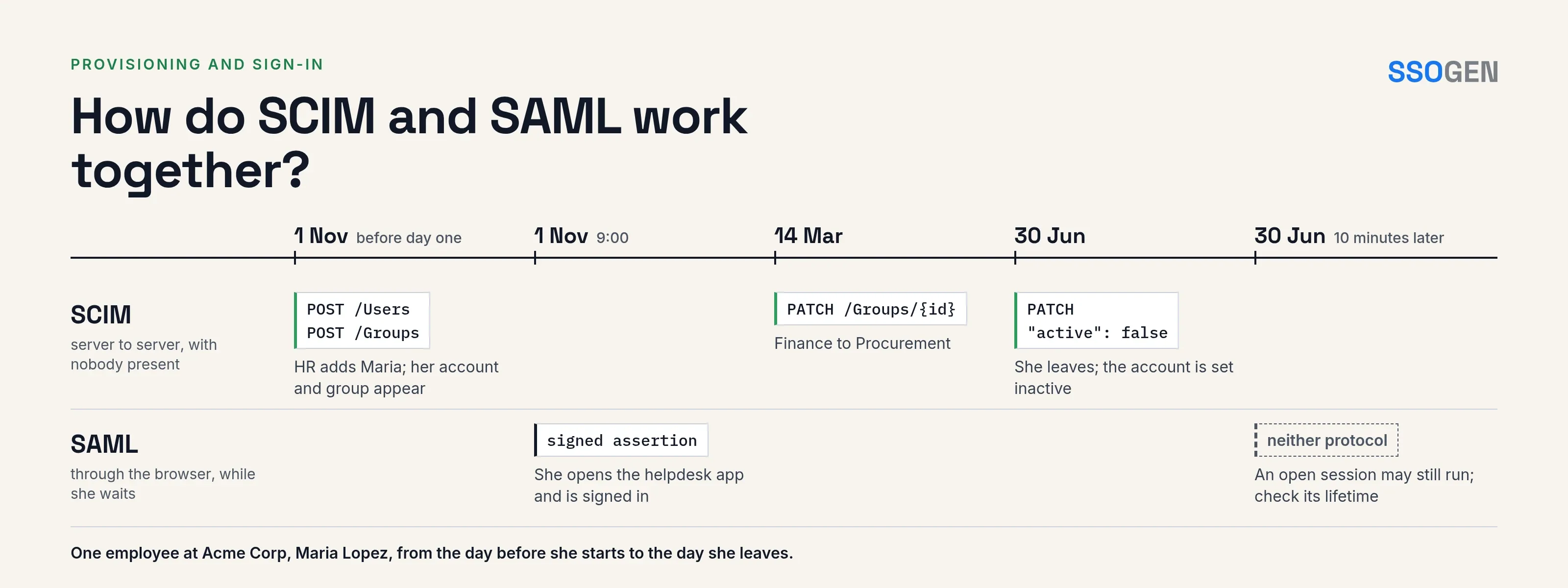
The table follows one employee’s lifecycle at the fictional Acme Corp, with the protocol behind each step.
| When | Event | Protocol |
|---|---|---|
| 1 Nov, before day one | HR adds Maria Lopez. The identity system creates maria.lopez and her department group in the helpdesk application. |
SCIM POST /Users, POST /Groups |
| 1 Nov, 9:00 | Maria opens the helpdesk application. It redirects her to the identity provider, which signs her in and sends an assertion. The application finds her account and starts a session. | SAML |
| 14 Mar | She moves from Finance to Procurement. Group membership changes in the application. | SCIM PATCH /Groups/{id} |
| 30 Jun | She leaves. The account is set inactive. | SCIM PATCH with active false |
| 30 Jun, 10 minutes later | Her browser still holds a session. Whether it ends depends on the session lifetime in the application and the identity provider. | Neither: check session settings |
The last row is often overlooked. Deprovisioning stops new sign-ins and access through the account.
A session that is already open may continue. Set a session lifetime that matches how quickly leavers must lose access.
Which one do you set up first?
Start with SAML to remove passwords from the application; start with SCIM to stop leavers keeping access.
For any one application you will usually configure both, and they must agree on the identifier that links an account to a user:
- SAML sends a name identifier or an attribute, such as the email address.
- SCIM sends
userNameandexternalId.
If SAML sends maria.lopez@acme.example and SCIM created maria.lopez, the application may treat them as two users and create a second account at first sign-in.
Choose one value, use it as userName in SCIM and as the name identifier in SAML, and test with a real user before rollout.
What to check when they disagree
- Duplicate accounts after the first sign-in. The identifier mismatch described above.
- User can sign in but has no access. SAML worked, but SCIM never added the user to the group, or the group names differ.
- Leaver can still sign in. The account was never set inactive, or the application ignores the inactive flag for SAML sign-ins. Test this deliberately with a spare account.
- Everything created twice. The SCIM client did not look the user up first. See what SCIM provisioning is for the lookup request.
- Application supports SAML but not SCIM. This is common. Accounts then need another route, such as just-in-time creation plus a manual or scripted leaver process.
What does SSOGEN do?
SSOGEN covers both halves.
Sign-in. SSOGEN is a SAML identity provider and OpenID Connect provider for your applications, and it can also accept sign-ins from your existing provider.
The guide to registering a SAML application lists the values to exchange.
Provisioning.
- Inbound. A SCIM endpoint at
/scimaccepts users and groups from an HR system. - Outbound. SSOGEN pushes accounts to applications that offer SCIM 2.0.
- Leavers. Outbound provisioning switches leavers off once you turn on Deactivate leavers for that application. SSOGEN sets the account inactive rather than deleting it.
Questions people ask
Does SCIM replace SAML?
No. SCIM cannot authenticate anyone, and SAML cannot manage the account lifecycle.
Can I use SCIM without SSO?
Yes. Accounts are provisioned and users keep signing in with local passwords; you lose single sign-on.
Is SCIM more secure than SAML?
They protect different things. SAML assertions are signed, while SCIM relies on TLS and a token, so protect that token like an administrator password.
What is the difference between JIT and SCIM provisioning?
JIT creates an account at first sign-in. SCIM creates it in advance and can also update and remove it.
Where to go next
- The basics. Learn about SCIM provisioning.
- Policies on top of sign-in. Read about the step-up policies that sit on top of sign-in.
- Try requests. To try SCIM requests against a server, use the free SCIM tester.
- Back to the hub. Return to the Learn hub.
Sources, all read 2026-10-09: OASIS SAML 2.0, RFC 7643, RFC 7644.