SSOGEN / Okta Access Gateway Alternative: Header, Kerberos and Form Sign-In Compared
Compare
Okta Access Gateway Alternative: Header, Kerberos and Form Sign-In Compared
An Okta Access Gateway replacement must do four things for on-prem apps, and the SSOGEN Gateway and Web Agent do all four with SSOGEN as identity provider.
Okta describes Access Gateway as a virtual appliance that protects on-premises apps that do not support federation (Introduction to Access Gateway, read 2026-10-09).
Teams look for an Okta Access Gateway alternative for one of two reasons:
- They want the same protection for legacy web apps without running a separate virtual appliance.
- They are moving the identity provider as well.
SSOGEN handles both. The SSOGEN Gateway and the SSOGEN Web Agent protect the same header, Kerberos and form-based apps, and SSOGEN itself is the identity provider.
The sections below set each Access Gateway job beside the SSOGEN component that does it.
What Access Gateway does in your estate
Okta describes Access Gateway as a virtual appliance that protects on-premises apps that do not support federation with Okta’s authentication and single sign-on (Introduction to Access Gateway, read 2026-10-09).
Its documentation lists these pieces:
- An Okta org that manages apps, users, single sign-on and MFA.
- A virtual appliance, downloaded from that org’s Admin Console and deployed in a virtual environment.
- Protected apps of the header, SAML, custom web, Kerberos and other types.
- Policies based on group membership, IP address location and other factors.
Okta says it integrates with legacy apps using “HTTP headers and Kerberos tokens” and offers “URL-based authentication” (same page, read 2026-10-09).
Okta also says Access Gateway talks only to web-based apps.
The Okta org manages users, single sign-on and MFA, and the appliance enforces access in front of the apps. An alternative therefore has two halves:
- An identity provider. It manages users, single sign-on and MFA.
- A component that enforces. It sits in front of the apps.
What an alternative must cover
| Access Gateway job | What an alternative needs |
|---|---|
| Intercept every request to the legacy app | A reverse proxy in front of it, or an agent in its web server |
| Authentication by request headers | Identity headers the app trusts, with client copies stripped |
| Kerberos | A Windows ticket for each person without a typed password |
| URL-based authorization | Rules per hostname and path |
| Group and IP-location policies | Policies that use groups and network position |
| SSO and MFA from the identity provider | Either the same provider, or a new one |
| Operating the appliance | A defined way to run the proxy |
How SSOGEN covers each item
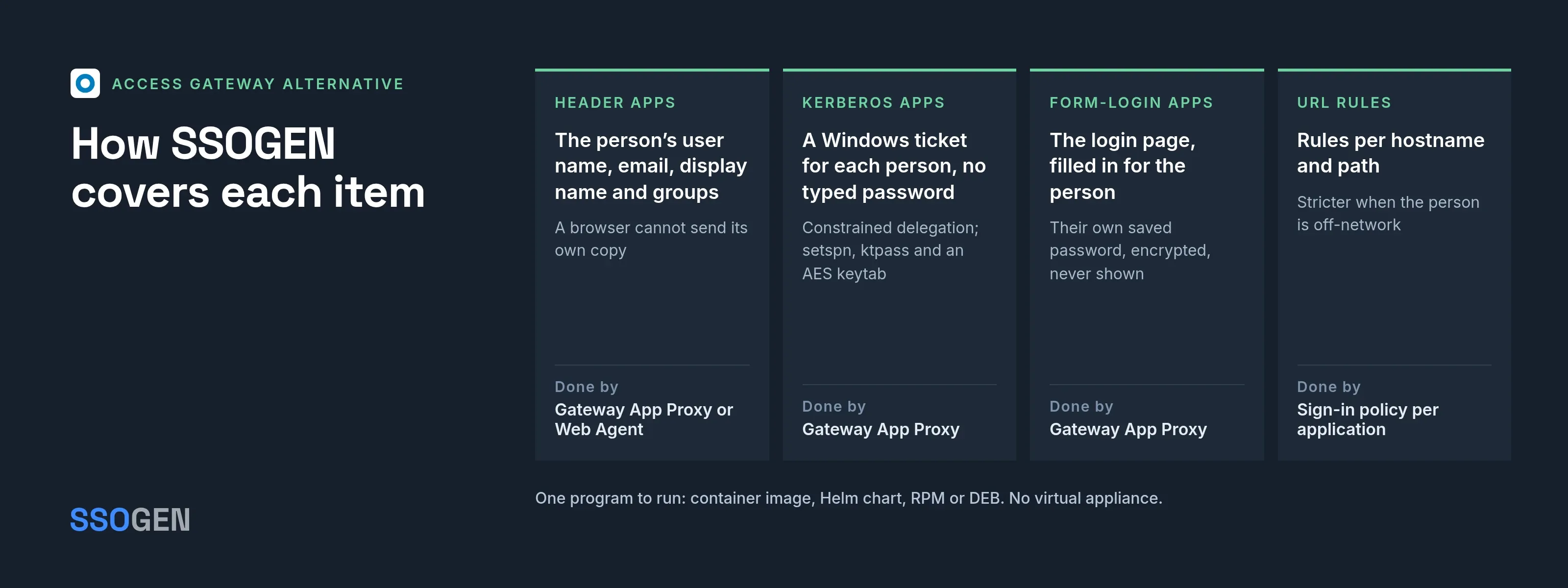
Intercepting requests. The App Proxy feature of the SSOGEN Gateway confirms that the person is signed in to SSOGEN and allowed in, and only then forwards the request.
Inside the web server. For applications behind Apache or Oracle HTTP Server, the Web Agent runs the same check inside the web server.
Headers. The gateway sends a fixed set of identity headers: the person’s user name, email, display name and groups, the sign-in strength, and the application and route. A browser cannot supply its own copy.
Oracle user names. The Web Agent passes the user name to Oracle applications such as PeopleSoft and JD Edwards the way each already reads it, in capitals. Any other application receives it unchanged.
Kerberos. The App Proxy requests a Windows ticket for the person from the domain controller (constrained delegation with protocol transition). The app sees each person’s own Windows account.
Kerberos packaging. The gateway runs from the Enterprise Linux RPM or the container image with the Kerberos helper, with an AES keytab. The guide lists the setspn, ktpass and PowerShell steps.
Form login. For apps that only have a login page, the gateway fills it in. Each person can use their own saved password, which SSOGEN stores encrypted and never displays.
Policy. Every application has a sign-in policy, and a hostname can have its own. Rules become stricter when the person is off-network, and step-up rules apply as well.
The identity provider. SSOGEN is a complete identity provider, and the Gateway signs people in through it.
Operations
The gateway is one program, shipped as a container image, Helm chart, RPM or DEB:
- Enroll once. Group gateways that share configuration.
- Signed configuration. Publish changes as signed configuration.
- Safe refusal. A bundle that fails verification is refused whole, and the last good revision keeps running.
Steps are in Publish an internal app through the App Proxy.
What each SSOGEN component covers
- The Gateway signs people in through SSOGEN. Policies and MFA live in one place.
- The Web Agent runs in Apache and Oracle HTTP Server. It runs in SSOGEN mode, where users in an LDAP directory sign in through SSOGEN, or in standalone SAML or OIDC mode. Applications on other web servers go through the App Proxy.
- Routes match exact hostnames. One wildcard certificate covers many hostnames. The gateway speaks HTTP/1.1 to browsers.
- Kerberos runs on the Enterprise Linux RPM and the container image that the SSOGEN contact names for Kerberos. Every other feature runs on every package.
Where Access Gateway fits
These cases describe Access Gateway with Okta as the identity provider:
- Okta company-wide. Access Gateway is built to extend exactly that to on-prem apps.
- One org. Policies and MFA come from the same Okta org.
- One console. Your administrators already work in it.
SSOGEN connects to Okta as an upstream identity provider. Access rules for applications behind the SSOGEN Web Agent or Gateway are then set in SSOGEN, while Access Gateway keeps all rules in the Okta console.
SSOGEN fits these cases:
- You are changing providers. SSOGEN is the new identity provider.
- You want the Oracle-specific agent approach. The Web Agent runs in the web server.
- You need Remote Access. SSOGEN brings it.
- Networks accept no inbound connection. SSOGEN brings an Outbound Connector.
- You need a Directory Connector. It is in the same gateway.
Moving one app at a time
- Inventory apps by sign-in type: header, Kerberos, form, URL.
- Connect Okta to SSOGEN as an upstream identity provider, so people sign in at Okta during the move. The Oracle EBS with Okta page shows Okta signing people in to an Oracle application.
- Enroll a gateway and publish one header-reading app on a new hostname. Compare the headers it reads with the ones Access Gateway sent.
- Do Kerberos apps next, once the keytab and delegation commands are done.
- Move DNS for each app after a pilot group signs in.
- Check each application’s sign-in source and policy. A change of sign-in source is a separate step.
Questions people ask
Is SSOGEN a virtual appliance?
No. It is a single program you install as a container, Helm chart, RPM or DEB.
Can SSOGEN protect apps without a proxy?
Yes, for Apache and OHS, with the Web Agent.
Does it cover Kerberos apps?
Yes, through the App Proxy, with the requirements above.
Where to go next
Read what the gateway does, compare identity-aware proxy approaches, or see secure remote access. For a row-by-row reference, see the Okta Access Gateway vs SSOGEN comparison.
About this comparison. SSOGEN Corporation prepared this page from Okta, Inc.’s public documentation and web pages, last read on 2026-10-09.
We took care to be accurate, but products, plans and prices change, and we may have misread or missed something, so some statements may be wrong or out of date. This page is for general information only and comes without any warranty.
SSOGEN is not responsible for errors, omissions or decisions made from it. Check the vendor’s own pages and test the products yourself before you decide. If you see a mistake, tell us and we will correct it.
Okta, Okta Access Gateway, Oracle, Oracle HTTP Server, Oracle E-Business Suite, PeopleSoft, JD Edwards, Apache, Windows, Kerberos and Helm are names or trademarks of their respective owners. SSOGEN is an Oracle partner, but Oracle has not reviewed or endorsed this page.
Except for Oracle, the owners named are not affiliated with, endorsed by or sponsored by SSOGEN.
Sources, all read 2026-10-09: Okta, Introduction to Access Gateway.