SSOGEN / Entra Application Proxy Alternative: Publish Internal Apps Outbound-Only
Compare
Entra Application Proxy Alternative: Publish Internal Apps Outbound-Only
The Outbound Connector reaches an internal web app through a relay, and the App Proxy covers networks that can take inbound traffic, with sign-in checked first.
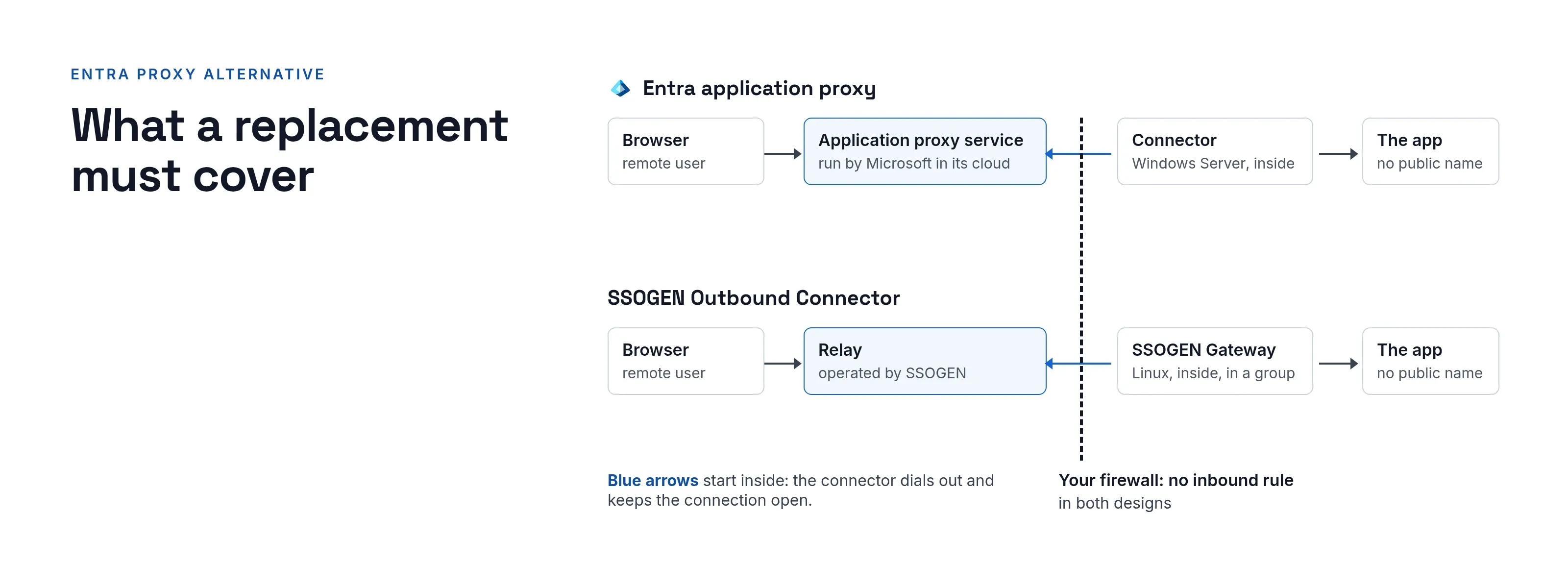
Microsoft Entra application proxy publishes on-premises web apps to remote users through a cloud service and a connector, with nothing open inbound. The SSOGEN Outbound Connector is an Entra application proxy alternative that delivers the same result, with or without Entra as the identity provider.
This page compares the two designs, then shows how SSOGEN covers each item and which setup fits.
The Microsoft page we read on 2026-10-09 has no retirement notice for the product.
What Entra application proxy does in an estate
Microsoft calls it secure remote access to on-premises web applications.
After signing in to Microsoft Entra ID, users reach cloud and on-premises apps through an external URL or an internal portal (Publish on-premises apps with Microsoft Entra application proxy, read 2026-10-09).
It has two parts, with Entra ID as the identity provider:
- Application proxy service. It runs in the cloud.
- Private network connector. A lightweight agent on a Windows Server inside your network.
What the same page documents:
- Outbound-only connectors. Connectors connect outbound over ports 80 and 443. No inbound firewall ports.
- Pre-authentication. For apps set up with preauthentication, traffic without a valid token never reaches the back end.
- Conditional Access policy controls before connections to the network are established, plus multifactor authentication for on-premises applications.
- Sign-in to the application. Integrated Windows Authentication through Kerberos constrained delegation, and form-based apps.
- Apps that read headers. Apps that read identity from headers use PingAccess, a non-Microsoft partner service.
- Partner scenarios. Microsoft says password-based and SAML authentication are supported “with non-Microsoft partners in specific configuration scenarios.”
- Other uses: Remote Desktop Services, web APIs, and native client apps built with the Microsoft Authentication Library. Microsoft also lists applications that connect through WebSockets.
- Scope. Microsoft says it replaces VPNs or reverse proxies for remote users and is not designed for internal users on the corporate network.
The design point to plan around is where the proxy runs: Microsoft runs it as a cloud service, and you run the connector.
What an alternative must cover
| Entra application proxy item | What an alternative needs |
|---|---|
| No inbound firewall rule | An outbound-only path from the private network |
| External URL per app | A hostname and certificate people can reach |
| Pre-authentication | Refuse unauthenticated requests before the app |
| Conditional Access and MFA | Policies on strength, network position, step-up |
| Kerberos constrained delegation | A ticket per person for Windows-authenticated apps |
| Form-based and password sign-in | A filled login page, ideally with per-person passwords |
| Remote Desktop Services publishing | Browser desktop access |
| Native client apps and APIs | Token-based access for non-browser clients |
| Connector high availability | More than one connector for the same app |
On the last row, Microsoft’s private network connectors page (read 2026-10-09) says to use at least two connectors in each group for high availability.
How SSOGEN covers each item
Network path
No inbound rule. The Outbound Connector is a feature of the SSOGEN Gateway. A gateway inside the private network dials out to an SSOGEN-operated relay and keeps the connection open.
Return path. Traffic for the application comes back down it. The app needs no public hostname, and the firewall needs no inbound rule.
Relay address. The relay address and its key file come from SSOGEN. See Outbound Connector routes.
Connector group. A connector group is the set of gateway instances serving the same private routes. If one instance fails, the app keeps running.
When inbound is acceptable. The App Proxy, the other feature, puts a gateway you run in front of the application. The listener can be internal or external, with its own certificate per exact hostname.
Listener. It runs in your network, so your users or your load balancer reach the listener directly.
Sign-in and policy
Pre-authentication. Selecting an application’s tile starts a sign-in to SSOGEN under the application’s sign-in policy. On the App Proxy, the gateway then forwards only signed-in, allowed requests. Without a decision, it refuses them.
Policy. Each application has a sign-in policy. A hostname can follow its own policy, and rules can use network zones.
Step-up. This is SSOGEN’s own policy engine, with step-up rules per application.
Entra signals. Conditional Access conditions and Entra ID Protection signals belong to Entra and do not carry over.
Kerberos. The gateway supports Kerberos constrained delegation with protocol transition, so each person shows up as their own Windows account.
Form login. The gateway also supports form login with each person’s saved password or a shared account.
Gateway host and other routes
Gateway host. The gateway runs on Linux (Enterprise Linux and Debian-family packages, or a container image).
Kerberos packages. Kerberos back-end sign-in works only on the Enterprise Linux RPM and the container image that includes the Kerberos helper.
Setup commands. The guide covers setspn, ktpass and the delegation commands.
Remote Desktop. Remote Access opens SSH, RDP and VNC in the browser for the servers you list. It adds approvals, file transfer rules and session limits.
Headers. Identity reaches the app as seven fixed headers that carry the user name, email, groups and four other values. They come from the gateway itself, with no partner service. The publishing guide has the full procedure.
Apps you can touch. For a site on Apache or Oracle HTTP Server, the Web Agent does the check inside the web server, with no proxy tier. This is how SSOGEN protects Oracle E-Business Suite, PeopleSoft and JD Edwards.
What each SSOGEN component covers
- The SSOGEN Gateway runs in your network, under your control. You decide on updates, certificates and capacity. The console shows each gateway’s health and certificate expiry.
- The App Proxy and Outbound Connector publish browser traffic.
- SSOGEN policies decide sign-in for SSOGEN applications. Conditional Access and Entra ID Protection signals stay in Entra.
- The gateway runs on Linux servers, in place of the Windows Server that hosts an Entra connector.
- Each route hostname is exact. Put the wildcard on the certificate.
Where Entra application proxy fits
These cases describe where Entra application proxy fits:
- Entra ID. It is already your identity provider.
- Browser and Windows apps. Your apps are browser-based and Windows-authenticated.
- Microsoft runs the proxy. You want Microsoft to run the proxy tier.
It is strongest in two places:
- Conditional Access. Where your Conditional Access policies already exist.
- Remote Desktop and APIs. Where you publish through Remote Desktop Services or expose APIs to native clients.
Where SSOGEN fits
SSOGEN fits when:
- No single cloud provider. Identity must not depend on one. SSOGEN runs hosted by SSOGEN or on your own servers.
- One gateway. It should publish web apps, reach remote servers and connect a directory.
- Oracle and older apps. Oracle systems and older web apps suit an agent or header approach.
SSOGEN has run in production since 2016, and Microsoft lists SSOGEN in the Microsoft Entra gallery.
Questions people ask
Does SSOGEN need inbound ports?
Not for the Outbound Connector. The App Proxy needs a reachable listener.
Is there a connector for high availability?
Yes. Gateway instances in a connector group serve the same routes.
Where to go next
Start with what the gateway does, then the identity-aware proxy overview. For a row-by-row reference, see the Entra application proxy vs SSOGEN comparison.
Sources, all read 2026-10-09: Microsoft Entra application proxy overview, private network connectors.
About this comparison. SSOGEN Corporation prepared this page from Microsoft’s public documentation and web pages, last read on 2026-10-09.
We took care to be accurate, but products, plans and prices change, and we may have misread or missed something, so some statements may be wrong or out of date. This page is for general information only and comes without any warranty.
SSOGEN is not responsible for errors, omissions or decisions made from it. Check the vendor’s own pages and test the products yourself before you decide. If you see a mistake, tell us and we will correct it.
Microsoft, Microsoft Entra, Entra application proxy, Microsoft Entra ID Protection, Conditional Access, Microsoft Authentication Library, Windows Server, Remote Desktop Services, Kerberos, PingAccess, Qlik Sense, Apache, Oracle and Oracle HTTP Server are trademarks of their respective owners.
SSOGEN is an Oracle partner, but Oracle has not reviewed or endorsed this page. Except for Oracle, the owners named are not affiliated with, endorsed by or sponsored by SSOGEN.