SSOGEN / SiteMinder Alternative: Inventory, Policy Mapping and Migration Order
Compare
SiteMinder Alternative: Inventory, Policy Mapping and Migration Order
Take the inventory, map seven SiteMinder jobs to SSOGEN and see how each application reads the same user.
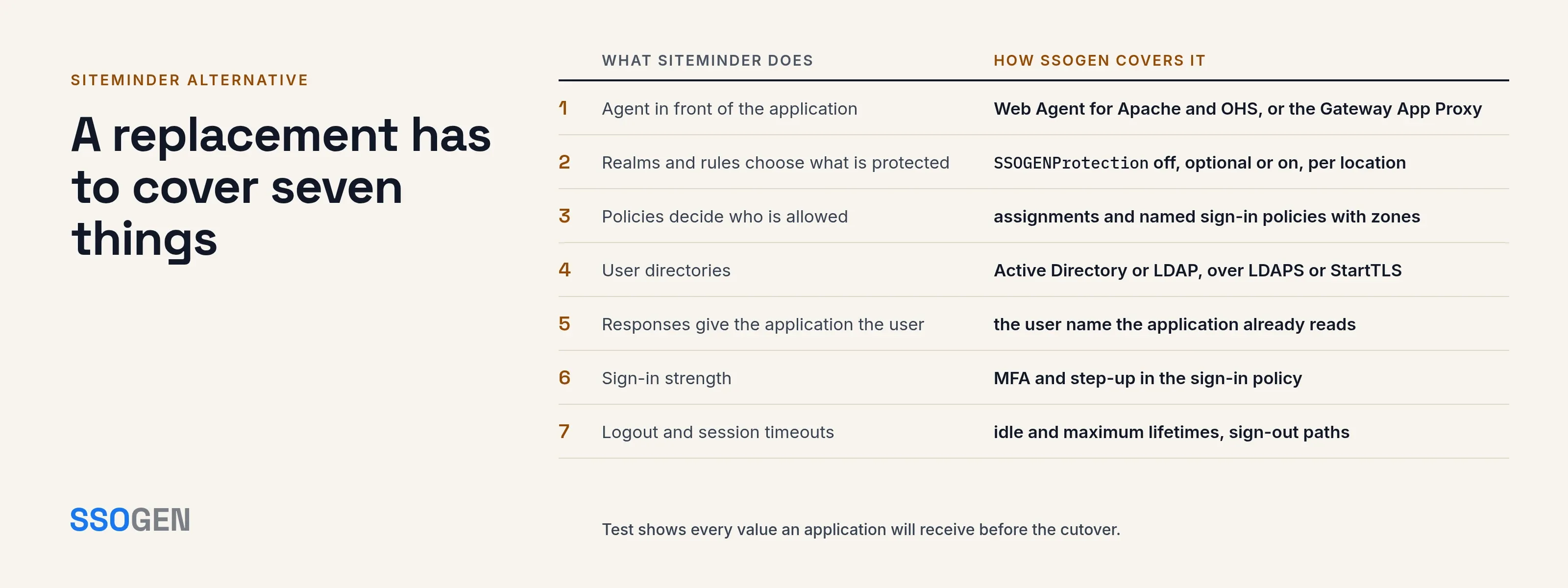
A SiteMinder alternative has to take over three things for every protected application: the agent in front of it, the policy that decides who gets in, and the response that tells the application who the user is. SSOGEN covers all three, so a migration from Broadcom SiteMinder is an inventory job, not a rebuild.
Each step below maps a SiteMinder object to its SSOGEN counterpart, so you can prove the match before you cut over.
SiteMinder facts below come from Broadcom’s archived CA SiteMinder 12.5 and 12.51 documentation and from the SiteMinder 12.8 TechDocs, read on 2026-10-09:
- 12.5 and 12.51 archive. The policy overview, the rules page and the page on generated user attributes.
- 12.8 TechDocs. The pages Web Agents Overview and Generated User Attributes.
The guides differ by release, so compare them with the version you run.
What SiteMinder does in your estate
Broadcom’s SiteMinder 12.51 policy overview describes the request path. A request is “intercepted by the CA SiteMinder Web Agent”, which “gathers the user’s credentials and passes them to the Policy Server”.
The Policy Server “authenticates the user against native user directories, then verifies if the authenticated user is authorized for the requested resource based on rules and policies contained in the Policy Store”.
The 12.8 Web Agents Overview says: “The Web Agent intercepts user requests for resources and checks with the Policy Server to see if the requested resource is protected.”
These are the objects to inventory (definitions from the 12.51 overview):
- Policies: “a Policy Server object that binds users, rules, responses, and optionally, time restrictions and IP address restrictions together”.
- Policy domains: “a logical grouping of one or more user directories, administrators, and realms”.
- Realms: “a Policy Server object that identifies a group of resources”.
- Rules: “a Policy Server object that identifies a resource and the actions that will be allowed or denied for the resource”. The rules page adds that rules “can also be used to trigger responses when authentication or authorization events take place”.
- Responses, which Broadcom defines as “a Policy Server object that determines a reaction to a rule.” Broadcom’s guide lets you specify user attributes as response attributes for Web Agent responses.
One response detail matters most for a migration:
- The header. Broadcom’s 12.8 page says the web agent places the user name in an HTTP header variable for all requests (12.8).
- When it is not set. The archived page adds that it is not set when a user does not provide a user name, such as with certificate-based authentication, or when a user name is not known.
- What SSOGEN does. Applications written for SiteMinder often read that header, and the SSOGEN Web Agent passes the user name the way those applications already read it.
An alternative has to cover seven things
| # | What SiteMinder does | What to inventory | How SSOGEN covers it |
|---|---|---|---|
| 1 | Agent in front of the application | Which web server, which application, which agent version | The Web Agent for Apache 2.4, Apache 2.2 and Oracle HTTP Server; the Gateway App Proxy for applications that cannot host a module; SAML or OpenID Connect where the application supports them |
| 2 | Realms and rules choose what is protected | Protected paths and the public ones | SSOGENProtection off, optional or on per location, and a registered application per site |
| 3 | Policies decide who is allowed | Users, groups, time and IP restrictions | Assignments, named sign-in policies and rules with conditions such as network zones |
| 4 | User directories | Which user directories the Policy Server connects to | Active Directory or LDAP over LDAPS or StartTLS, local accounts and CSV import, with users and groups in one directory |
| 5 | Responses give the application the user | Which headers or cookies each application reads | Identity sent to app attributes as request headers or cookies; the user name the application expects |
| 6 | Sign-in strength | Which applications need a second factor | MFA and step-up in the sign-in policy |
| 7 | Logout and session timeouts | Idle and maximum lifetimes | Configurable idle and maximum session lifetimes in the Web Agent, and sign-out paths |
Mapping policies to SSOGEN, step by step
Each SiteMinder policy maps to an SSOGEN application, assignment and sign-in policy. You move one application at a time, so every step is tested before the next:
- Export or list the realms and rules for the application and write down what each rule allows.
- Create the people and groups in SSOGEN, or connect the directory SiteMinder uses today.
- Register the application under Applications, then Web Agent, with its client URL, and choose which attribute names the person to the application.
- Choose or create a sign-in policy that matches the old rule’s strength, then assign the same groups.
- Run Test for a real person. For a Web Agent application it lists each value the agent would send, before anyone signs in.
For applications that read the SiteMinder user header, set the Web Agent to pass the user name unchanged on the Apache site. The agent then sends the name the way those applications already read it.
The default Oracle type upper-cases the name and sends the legacy Oracle values that Oracle E-Business Suite and PeopleSoft expect. You set the type per site, so each application receives exactly what it reads today.
SiteMinder as the SAML provider during a move
Users and applications do not have to move at once. SSOGEN accepts SiteMinder as a SAML 2.0 identity provider, so people sign in through SiteMinder while the applications move behind SSOGEN.
See SiteMinder SSO with SSOGEN for the checklist:
- A signed assertion
- A stable NameID
- The exact attribute names
After the last application moves, you decide separately whether SSOGEN also takes over where people authenticate.
A migration order that limits risk
- Inventory first. Every agent, application, URL, realm, rule, response and directory, with an owner for each.
- Pick a pilot with few users and a clear owner, ideally an internal tool.
- Connect the directory and, if needed, SiteMinder as an upstream provider, so nobody needs a new password.
- Register the pilot in SSOGEN and test it on a separate hostname or a non-production copy before touching the live site.
- Compare what the application receives against what it gets from SiteMinder today, user name first.
- Cut over the pilot, keep the old path available to roll back, and watch the audit log.
- Move ERP and the most sensitive applications last, after the pattern is proven. For Oracle estates read Oracle EBS SSO and PeopleSoft SSO.
- Close out each application once it has run cleanly on SSOGEN through a full business cycle, like a month-end.
What each SSOGEN component covers
- Policies move as SSOGEN applications, assignments and sign-in policies, one application at a time, each one tested with Test before it goes live.
- The Web Agent runs in Apache and Oracle HTTP Server. Applications behind other web servers use the Gateway, or SAML or OpenID Connect.
- Directories stay where they are: in
ssogenmode the Web Agent hands sign-in to SSOGEN, which reads users from Active Directory or LDAP.
Questions people ask
Does a move from SiteMinder happen all at once?
No. SSOGEN registers applications one at a time and accepts SiteMinder as an upstream SAML provider during the move. Some applications stay on SiteMinder while others move, and a pilot application proves the pattern first.
Do application code changes come with a migration?
Usually not, for Web Agent applications. The Web Agent passes the user name unchanged, the way a SiteMinder application already reads it. The application keeps working once the attribute matches, and Test shows the exact values before cutover.
Where do I start?
Start with the inventory table above and the guide to choosing how to connect an application.
Where to go next
For background, read what SiteMinder is and the wider web access management overview. Then the Web Agent configuration guide, see single sign-on software for the full product, or request a trial with your application list. For a row-by-row reference, see the SiteMinder vs SSOGEN comparison. If your web agents come from ForgeRock instead, the ForgeRock Access Management alternative maps the same move.
Sources, all read 2026-10-09: Broadcom CA SiteMinder 12.5 and 12.51 archived guides and SiteMinder 12.8 TechDocs (linked above).
About this comparison. SSOGEN Corporation prepared this page from Broadcom’s public documentation and web pages, last read on 2026-10-09.
We took care to be accurate, but products, plans and prices change, and we may have misread or missed something, so some statements may be wrong or out of date. This page is for general information only and comes without any warranty.
SSOGEN is not responsible for errors, omissions or decisions made from it. Check the vendor’s own pages and test the products yourself before you decide. If you see a mistake, tell us and we will correct it.
SiteMinder, CA SiteMinder, Policy Server, Web Agent, Broadcom, Oracle E-Business Suite, PeopleSoft, Oracle HTTP Server, Apache and Active Directory are trademarks of their respective owners. SSOGEN is an Oracle partner, but Oracle has not reviewed or endorsed this page.
Except for Oracle, the owners named are not affiliated with, endorsed by or sponsored by SSOGEN.