SSOGEN / PingAccess Alternative: Mapping Sites, Agents and Rules to SSOGEN
Compare
PingAccess Alternative: Mapping Sites, Agents and Rules to SSOGEN
Sites, agents, applications, rules and identity mappings map one to one onto Gateway routes, the Web Agent and sign-in policies, listed object by object.
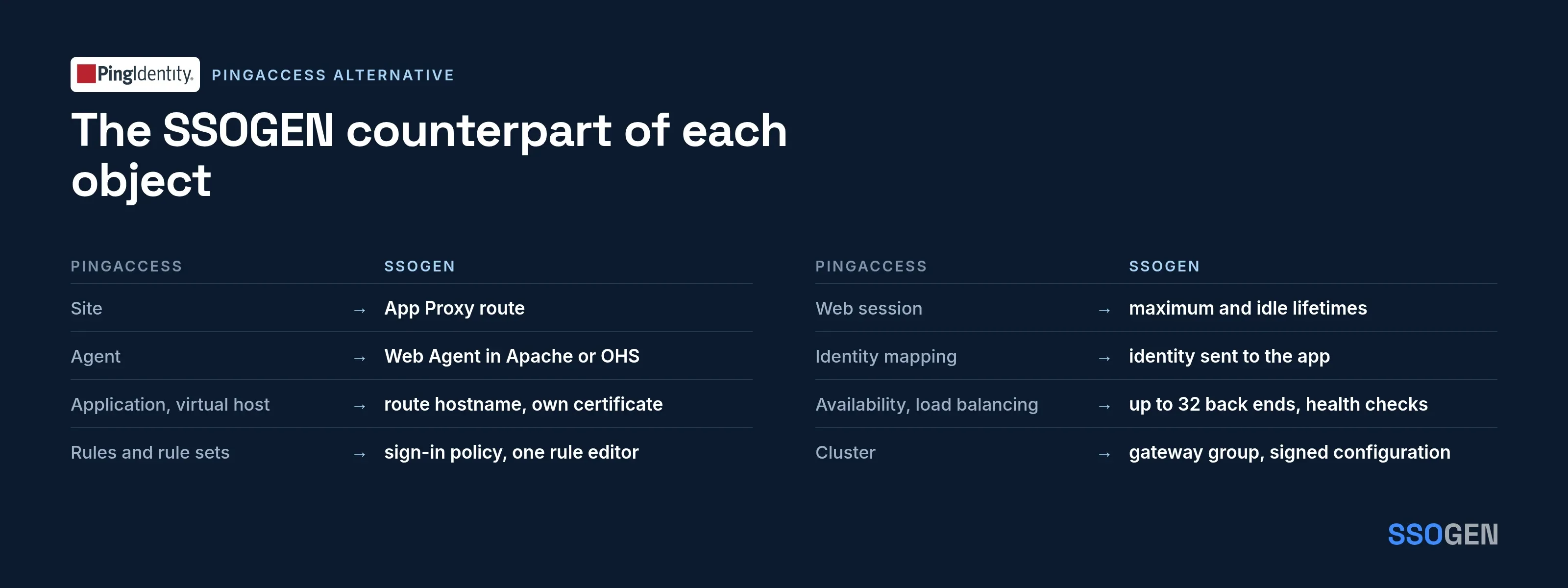
PingAccess is configured through a set of named objects, and the clearest way to judge a PingAccess alternative is to walk those objects one by one. SSOGEN covers them with two components and a complete identity provider behind them:
- the Gateway and its App Proxy, for web applications published by hostname;
- the Web Agent, which enforces inside Apache and Oracle HTTP Server.
Each object below comes from Ping Identity’s documentation, with the SSOGEN counterpart beside it.
How PingAccess is built, per its own documentation
Ping’s overview of what you can configure in PingAccess 9.1 lists these objects (What can I configure with PingAccess, read 2026-10-09):
- Two deployment models. Ping’s words: “In a gateway deployment, the target application is specified as a site” and “In an agent deployment, the application destination is an agent.” Agents are “web server plugins that are installed on the web server hosting the target application”, and they communicate with the PingAccess policy server through the PingAccess Agent Protocol.
- Applications, which represent the protected web applications and APIs. Ping says applications are composed of one or more resources, have a common virtual host and context root corresponding to a single target site, and use a common web session and identity mapping.
- Rules, rule sets and rule set groups. Ping calls rules “the building blocks for access control and request processing”; rule set groups can contain rule sets or other rule set groups.
- Web sessions, which “define the policy for web application session creation, lifetime, timeouts, and their scope”, and identity mappings, which “make user attributes available to back-end sites that use them for authentication”.
- Sites and site authenticators (Ping says PingAccess supports site authenticators “that range from basic username and password authentication to certificate and token-based authentication”), with availability profiles, which define how PingAccess classifies a back-end target server as failed, and load balancing strategies, which distribute load between multiple back-end target servers. Also token providers, which Ping describes as “a method of providing credentials for secure access to a given target”, and auth token management, whose settings Ping says “define the issuer and signing configuration used by JSON Web Token (JWT) identity mappings”.
- Virtual hosts (“defined by the host name and host port”), certificates and key pairs, listeners (“PingAccess can place listeners on ADMIN, ENGINE, and AGENT ports”), and clustering with administrative, replica administrative and engine nodes.
What a replacement must cover
| PingAccess object | What the replacement needs |
|---|---|
| Site | A way to forward authenticated requests to back-end servers |
| Agent | Enforcement inside the application’s own web server |
| Application and virtual host | A hostname per application, with its own certificate |
| Rules and rule sets | Reusable access control on identity, groups, network position |
| Web session | Session lifetime and idle timeout |
| Identity mapping | Identity delivered to the back end the way it expects |
| Availability profile and load balancing | Health checks, several servers, session persistence |
| Cluster | More than one enforcement node on shared configuration |
| API protection and token provider | Token-based access for APIs |
The SSOGEN counterpart of each object
Site and application
- Route. An App Proxy route joins a hostname and path prefix to an application and its back-end servers.
- Registration. The application itself is registered in the Register application wizard.
- Wizard steps. General, Access mode, Connection, Sign-in policy, Identity sent to app, Launch, Test, Review and activate.
- Hostnames. A route can have several hostnames, each on an internal or an external listener.
- Listener rule. A listener is internal or external, and an internal and an external hostname never share one.
The docs walk through it in Publish an internal app through the App Proxy.
Agent
- Agent role. The Web Agent plays the agent role. It is a module that runs inside Apache or Oracle HTTP Server.
- Protection. Protection is set per location as
SSOGENProtection off|optional|on. - Sign-in. It swaps a PKCE sign-in for a signed grant, and verifies the signature, audience and time window.
- Session. It sets its own session cookie.
- Supported servers. The Web Agent runs on Apache 2.4, Apache 2.2 and Oracle HTTP Server.
- Other servers. Applications on any other web server go through the App Proxy, with nothing installed beside them.
See the configuration guide.
Rules
- Sign-in policy. In SSOGEN the control is a named sign-in policy per application, with step-up rules.
- Hostname policy. A hostname’s policy can be required to deny sign-in from outside your network zones.
- One rule editor. Policy rules and the organization-wide access rules use one rule editor, with conditions on group, network zone, time and sign-in risk score.
- Migration. Review complex request-processing rules before you plan a move, and map each one to a policy or a route.
Session, identity, availability, cluster and certificates
Web session. For the Web Agent, you can set both the maximum and idle lifetimes. The session cookie is signed, HttpOnly and Secure.
Identity mapping. The gateway sends a fixed set of identity headers (user, email, display name, groups up to 64, assurance, application, route ID). A browser cannot supply its own copy.
Web Agent mapping. The Web Agent maps identity to the headers Oracle applications expect, or passes the user name unchanged for other applications.
Mapping compared. PingAccess lets you define the mapping. The Gateway sends a fixed set, so every back end reads the same names.
Availability and load balancing. Up to 32 back-end servers per route, a health check on each route, and optional sticky sessions.
Cluster. Several gateways that share a configuration form a gateway group. Settings are published as signed configuration. The gateway checks the signature before it uses anything and keeps the previous configuration so it can roll back.
Fleet health. The Gateways screen shows each server’s health and revision.
Certificates. Uploaded in App Proxy certificates and attached to hostnames, with expiry warnings.
What each SSOGEN component covers
- API protection. Ping lists token providers and auth token management among PingAccess’s configurable objects, and the table above treats API protection as something a replacement must cover. In SSOGEN, an App Proxy route accepts non-human callers (AI agents, automation and services) with scopes mapped to HTTP methods and path prefixes. The back end receives identity headers naming the caller, not a JWT.
- Rule building. One rule editor serves sign-in policies and access rules, as above.
- Other web servers. The Web Agent covers Apache and Oracle HTTP Server, and the App Proxy covers every other web server, as above.
- Hostnames. Route hostnames are exact (a certificate can be a wildcard certificate). The gateway speaks HTTP/1.1 to browsers and load balancers.
When PingAccess is the better fit
Pick PingAccess in these cases:
- You already run PingFederate or PingOne and your policy depends on its rule sets.
- APIs are in scope as well as web applications, and they rely on PingAccess token providers.
- You want an agent on a web server other than Apache or Oracle HTTP Server (check Ping’s agent documentation for what it covers).
When SSOGEN fits
SSOGEN fits in these cases:
- You want the identity provider, MFA, Authenticator, directory connector and the proxy in one product.
- Oracle applications such as E-Business Suite are the main target.
- Servers need Remote Access with approvals in the browser.
SSOGEN has protected Oracle applications in production since 2016, and Microsoft lists SSOGEN in the Microsoft Entra gallery.
A mapping-first migration order
- Export a list of PingAccess applications with their site, virtual host and rule set.
- Register each web app in SSOGEN and create its route.
- Reproduce the identity mapping as headers and test what the app reads in the wizard’s Test step.
- Move one virtual host at a time by changing DNS.
Questions people ask
Is the SSOGEN Web Agent the same as a PingAccess agent?
It plays the same role, enforcing at the web server. It runs in Apache and OHS.
Can I use Ping as the identity provider with SSOGEN?
Yes. SSOGEN accepts any SAML or OpenID Connect provider as a sign-in source.
The Web Agent also has standalone SAML and OpenID Connect modes that run directly against providers such as Microsoft Entra ID, Keycloak and Okta, with a license key from SSOGEN.
Ping-specific steps for Oracle EBS are in Oracle EBS SSO with Ping Identity.
Where to go next
- Read what the gateway does, the identity-aware proxy overview, or secure remote access.
- For a row-by-row reference, see the PingAccess vs SSOGEN comparison.
Sources, all read 2026-10-09: PingAccess 9.1 documentation, What can I configure with PingAccess.
About this comparison. SSOGEN Corporation prepared this page from Ping Identity’s public documentation and web pages, last read on 2026-10-09.
We took care to be accurate, but products, plans and prices change.
We may have misread or missed something, so some statements may be wrong or out of date. This page is for general information only and comes without any warranty.
SSOGEN is not responsible for errors, omissions or decisions made from it. Check the vendor’s own pages and test the products yourself before you decide. If you see a mistake, tell us and we will correct it.
PingAccess, PingAccess Agent Protocol, PingFederate, PingOne, Ping Identity, Microsoft Entra ID, Keycloak, Okta, Oracle E-Business Suite, Oracle HTTP Server and Apache are trademarks of their respective owners.
SSOGEN is an Oracle partner, but Oracle has not reviewed or endorsed this page.
Except for Oracle, the owners named are not affiliated with, endorsed by or sponsored by SSOGEN.