SSOGEN / F5 APM Alternative: SSOGEN and BIG-IP Access Policy Manager Compared
Compare
F5 APM Alternative: SSOGEN and BIG-IP Access Policy Manager Compared
The Gateway and Web Agent handle sign-in, MFA, policy and identity headers for internal web apps, with App Proxy for access without a VPN client.
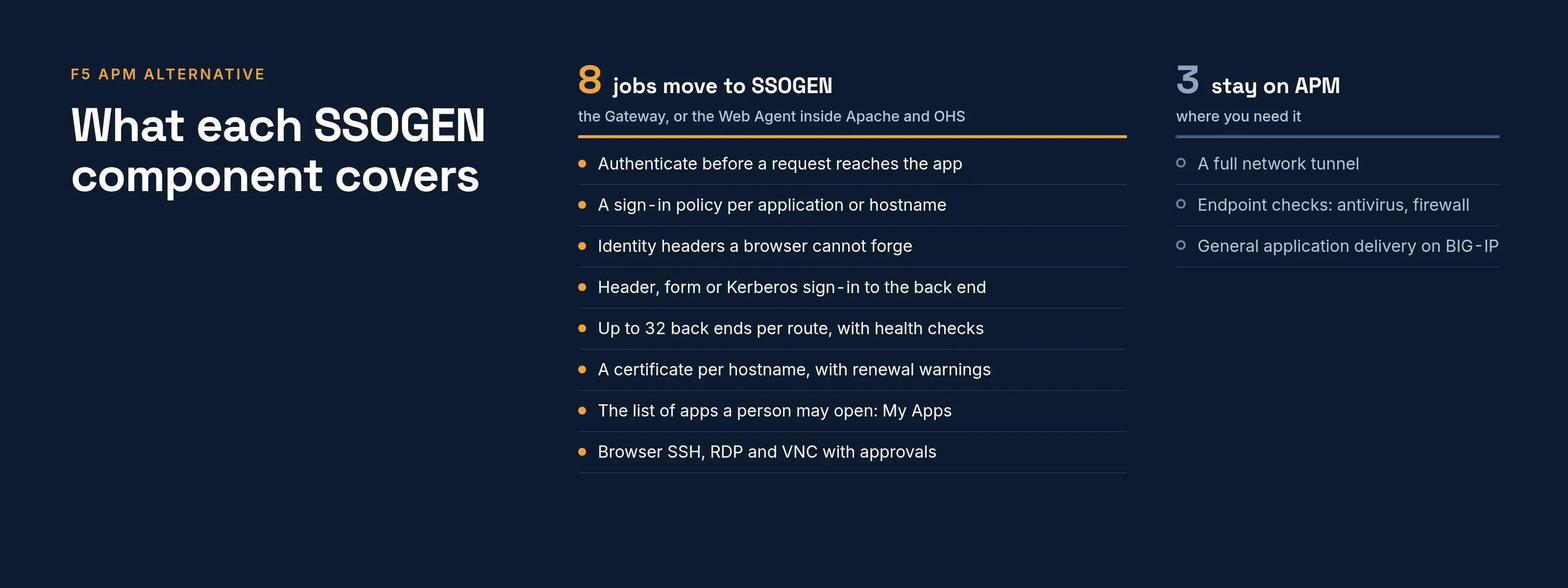
BIG-IP Access Policy Manager (APM) is a module on F5’s BIG-IP system, and it does more than one job, as F5’s list of access types below shows. An F5 APM alternative starts by splitting those jobs apart.
The largest job in most estates is authenticating people in front of internal web apps. The SSOGEN Gateway and the SSOGEN Web Agent cover that job directly.
This page maps each web-app job to the SSOGEN component that covers it.
What APM does in an estate
F5’s documentation calls APM a software component of the BIG-IP system. It gives users secured connections to Local Traffic Manager virtual servers, specific web applications, or the whole corporate network (F5 APM 11.4 manual, introduction, read 2026-10-09).
That manual covers an older release, so newer ones may differ. It lists these capabilities:
- Policy editor. A Visual Policy Editor.
- Access types. Four: network access, portal access, application access and web access management.
- Webtop. A webtop.
- Authentication. Several methods, including LDAP, Active Directory, RADIUS, RSA SecurID, HTTP and certificates.
- Client checks. Client-side security checks, including antivirus, firewall and integrity checking.
- Audit. Audit trails and reporting.
F5 also explains the policy model that shapes how people design with APM. In F5’s words, APM “executes per-session policies when a client attempts to connect to the enterprise,” and after a session starts, “a per-request policy runs each time the client makes an HTTP or HTTPS request” (F5 documentation, about per-request policies, read 2026-10-09).
The practical question is therefore not “what replaces APM?” but “which of these jobs am I moving?”
What an alternative must cover
Use this as the checklist for the web-app jobs.
| Job to cover (web-app part) | What an alternative needs |
|---|---|
| Authenticate before a request reaches the app | A reverse proxy or agent that refuses unauthenticated requests |
| Access policy per application | A policy per application or hostname, including MFA and step-up |
| Pass identity to the app | Trusted request headers the browser cannot forge |
| Single sign-on to the app | Header, form fill or Kerberos sign-in to the back end |
| Spread load and check back ends | Several servers, health checks, session persistence |
| Certificates and TLS | Per-hostname certificates and renewal |
| Resource list for users | A portal that lists the applications a person may open |
| Remote desktop and terminal access | Browser RDP, SSH or VNC with approvals |
| Full network tunnel, endpoint checks | A VPN client and posture agent |
How SSOGEN covers each item
The App Proxy in the SSOGEN Gateway sits in front of a web application. It sends a person to SSOGEN to sign in, applies the app’s policy, then forwards the request.
Without a sign-in decision, the gateway refuses the request and never passes it through.
-
Access policy. Each app gets a sign-in policy in the Register application wizard. A hostname can carry its own, for example a stricter rule off-network. Each is a named policy with a strength such as Plus a second factor, which is faster to read and review than a graph of nodes.
-
Identity to the app. The gateway sends a fixed set of identity headers: the person’s user name, email, display name and groups (at most 64 groups), the sign-in strength, and the application and route. A browser cannot supply its own copy.
-
Sign-in to the back end. Pick identity headers only, form login (each person’s own saved password, or a shared account), or Kerberos constrained delegation with protocol transition. With Kerberos the app sees each person’s own Windows account. See form fill and Kerberos sign-in.
-
Load and health. Up to 32 back-end servers per route, an HTTP or connection health check with set intervals, and optional sticky sessions.
-
Certificates. Upload a chain and a PKCS#8 key per hostname, check which certificate each gateway serves, and rotate. You get a warning at 30 days.
-
Resource list. Each person sees their published apps on My Apps.
-
Remote desktop and terminal. Remote Access gives you SSH, RDP and VNC in the browser, with approvals and an audit trail.
-
Apps that can host a module. For Oracle E-Business Suite, PeopleSoft, JD Edwards and other sites behind Apache or Oracle HTTP Server, the Web Agent does the check inside the web server.
The full publishing procedure is in Publish an internal app through the App Proxy.
Two details APM users ask about:
- Exact hostnames. The gateway terminates TLS on exact hostnames. A route hostname is exact; the wildcard goes on the certificate.
- Forwarded address. A listener behind your load balancer trusts the forwarded client address only when the balancer presents its own client certificate.
What each SSOGEN component covers
Put these scopes in the project plan.
-
The Gateway publishes applications, not networks. It is not a VPN and forwards no arbitrary network ports. It reaches only the hostnames, back ends, remote hosts and directory connections in its signed configuration.
-
Access decisions rest on identity. SSOGEN decides on the person, the sign-in strength and the network zone.
-
The App Proxy carries web traffic. The gateway speaks HTTP/1.1 to browsers and load balancers.
-
Load balancing serves each route. The gateway balances across a route’s back ends.
-
Policy is a set of named rules. A Visual Policy Editor flow maps to sign-in policies and rules.
Where APM fits
APM fits these cases:
- Tunnel. Remote users need a full network tunnel.
- Endpoint checks. You rely on endpoint inspection before granting access.
- Existing BIG-IP. The same BIG-IP already terminates and shapes the traffic, and your team has years of policies in the Visual Policy Editor.
Where SSOGEN fits
SSOGEN fits internal web apps, including old ones that cannot change.
- One product. You get sign-in, MFA, policy and the audit trail in one identity product, which is also a complete identity provider.
- Oracle apps. An agent inside Apache or OHS removes the proxy hop entirely.
- Track record. SSOGEN has protected Oracle E-Business Suite, PeopleSoft and JD Edwards since 2016.
- Entra gallery. Microsoft lists SSOGEN in the Microsoft Entra gallery.
A migration order that limits risk
-
List APM’s virtual servers and sort them: web app, tunnel, remote desktop, other.
-
Enroll a gateway, then publish one low-risk app on its own hostname, using a one-time enrollment token from the Admin Console.
-
Run both in parallel: APM serves the old hostname while the Gateway serves a new one.
-
Compare the headers your app reads. When they match, move DNS.
-
Repeat per app.
Questions people ask
Which BIG-IP APM jobs does SSOGEN cover?
The web-app sign-in layer: sign-in, MFA, policy, identity headers and sign-in to the back end. Remote Access adds SSH, RDP and VNC in the browser.
What is the SSOGEN counterpart of a per-request policy?
A sign-in policy per app, which a hostname can tighten, plus step-up rules. The two products model policy differently. Map each per-request rule to an SSOGEN rule one by one, and test.
Where to go next
- The pattern. See identity-aware proxy for the pattern behind the Gateway.
- Row by row. See the F5 APM vs SSOGEN comparison for a row-by-row reference.
Sources, all read 2026-10-09: F5 APM 11.4 manual, introduction, F5 documentation, about per-request policies.
About this comparison. SSOGEN Corporation prepared this page from F5, Inc.’s public documentation and web pages, last read on 2026-10-09.
We took care to be accurate, but products, plans and prices change, and we may have misread or missed something, so some statements may be wrong or out of date. This page is for general information only and comes without any warranty.
SSOGEN is not responsible for errors, omissions or decisions made from it. Check the vendor’s own pages and test the products yourself before you decide. If you see a mistake, tell us and we will correct it.
F5, BIG-IP, BIG-IP Access Policy Manager, APM, Local Traffic Manager, Visual Policy Editor, webtop, Active Directory, RSA SecurID, Oracle, Oracle E-Business Suite, PeopleSoft, JD Edwards, Oracle HTTP Server, Apache and Kerberos are names or trademarks of their respective owners.
SSOGEN is an Oracle partner, but Oracle has not reviewed or endorsed this page. Except for Oracle, the owners named are not affiliated with, endorsed by or sponsored by SSOGEN.