SSOGEN / Learn / Secrets Management: One Credential From Creation to Revocation
Learn
Secrets Management: One Credential From Creation to Revocation
Programs use credentials through five stages, from creation and storage to use, rotation and revocation, and controlling every stage is secrets management. Each stage fails in a known way, and each has a control that prevents it.
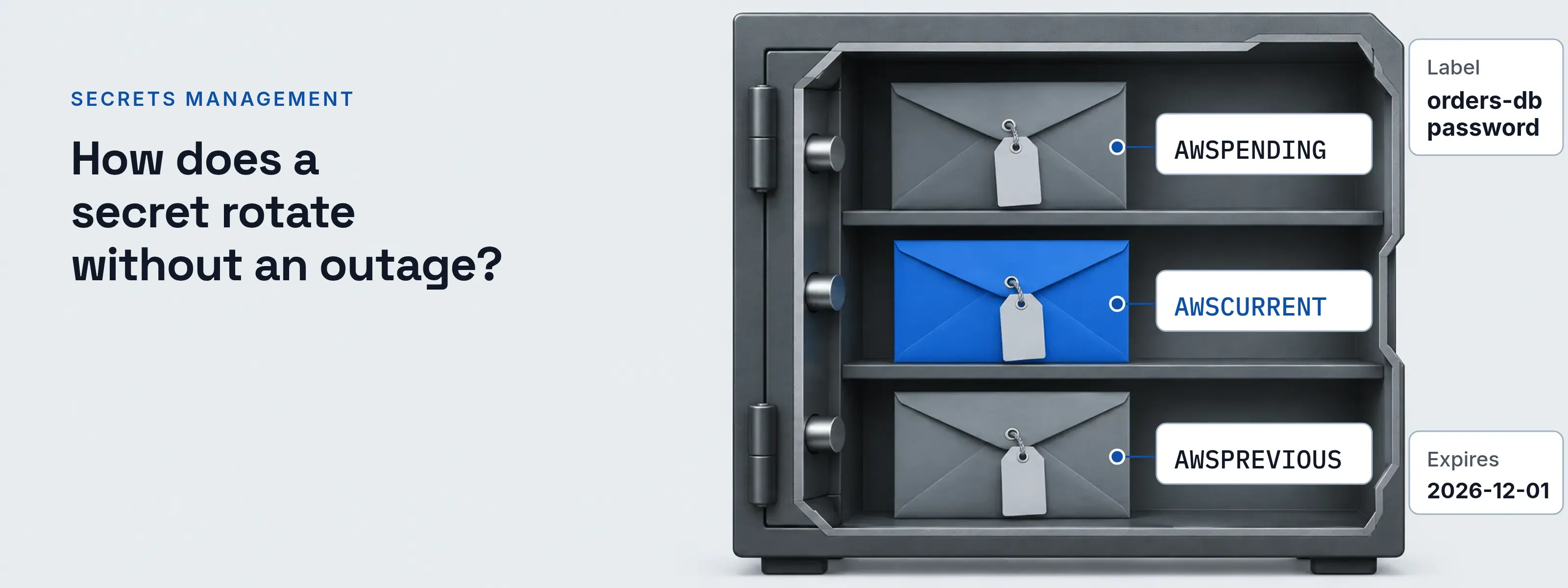
The record below is one example secret, a database password used by two services. The table follows it through the five stages and names the failure that shows up at each one. OWASP lists four lifecycle stages; this page adds storage and use and treats expiration as part of revocation.
- Label
- orders-db password
- Credential
- PostgreSQL login orders_app
- Issued by
- db01.acme.example
- Owner
- Payments engineering team
- Consumers
- orders-api, billing-worker
- Store
- prod/orders-db
- Created
- 2025-03-04
- Last changed
- 2026-08-12
- Expires
- 2026-12-01
| Stage | The failure seen here | The control |
|---|---|---|
| Created | The value is typed into source code, a ticket or a shell, and no one owns it. | Generate it in the store. Record its purpose and owner. |
| Stored | A plaintext .env file, or a CI variable that every job and maintainer can read. |
One store, access granted per secret, every read audited. |
| Used | The value lands in a log line or a crash dump through an environment variable. | Fetch it at run time into memory. Never log it. |
| Rotated | The old value stops working before every consumer has the new one. | Keep two valid versions until the last consumer switches. |
| Revoked | The secret is deleted from the store, but the database still accepts the password. | Revoke at the issuer first, then delete the stored copy. |
What counts as a secret
A secret is anything a program presents to prove it may connect. The identity presenting it is usually a service account.
- Database password. Part of a connection string, so copies spread into config files and deploy scripts.
- API key. A bearer value: whoever holds it is the caller.
- OAuth client secret. Proves the application at the token endpoint.
- TLS private key. Proves a server or client in the handshake. It sits in a PEM file beside the certificate.
- SSH private key. Opens hosts. Copies reach laptops and CI runners.
- Webhook signing secret. Sender and receiver both hold it to compute an HMAC over each payload.
Static secrets and dynamic secrets
A dynamic secret expires on its own. A static one waits for someone to change it.
Static: the password waits for you. The orders-db password was copied to two hosts in March 2025. It still works on both, and on any laptop that copied it. Changing it means finding every copy first.
Dynamic: the login carries its own end date. HashiCorp Vault creates a lease with a TTL for every dynamic secret. When the lease expires, Vault can revoke the login at the database. The consumer renews the lease or requests a new login.
Ending a dynamic secret early takes one command (the Vault CLI reference example):
$ vault lease revoke database/creds/readonly/27e1b9a1-27b8-83d9-9fe0-d99d786bdc83Success! Revoked lease: database/creds/readonly/27e1b9a1-27b8-83d9-9fe0-d99d786bdc83Some workloads need no stored secret at all. With workload identity federation, a token the runtime issues is exchanged for short-lived cloud credentials.
Rotation without an outage
Keep two versions valid until every consumer has switched. AWS Secrets Manager runs rotation as four Lambda steps, and its staging labels show which version is which.
createSecret: store the pending version
A new random value is saved with the label
AWSPENDING. Every consumer still readsAWSCURRENT.setSecret: change the credential at the database
The database is updated to match
AWSPENDING. With the alternating-users strategy, the change goes to a second user, so the login in use stays valid.testSecret: log in with the new value
The function signs in with
AWSPENDINGbefore anything depends on it.finishSecret: promote it
AWSCURRENTmoves to the new version. The old one getsAWSPREVIOUS, the last known good value.Retire the old login on the next turn
Alternating users means the next rotation changes the other user’s password. Until then, both logins work.
The single-user strategy is simpler. AWS notes a short gap between the database change and the secret update, during which calls can be refused, and recommends retries.
The same stages in Vault, AWS and Azure
Each store names the stages differently; the stages stay the same. The table lists documented commands and behavior, read November 18, 2026.
| Stage | HashiCorp Vault | AWS Secrets Manager | Azure Key Vault |
|---|---|---|---|
| Create | vault kv put writes a static secret, a new version in KV v2. Secrets engines generate dynamic ones per request. |
aws secretsmanager create-secret. AWS warns that a value typed on the command line can be read from shell history. |
az keyvault secret set creates the secret or adds a version. |
| Rotate | The consumer renews its lease or requests a replacement secret. | Managed rotation, or a Lambda function in four steps. A schedule can run as often as every four hours. | A new version. Microsoft’s tutorial rotates a SQL password from a function triggered by the near-expiry event. |
| Expire | A lease that is not renewed ends at its TTL. | The rotation schedule sets how long a value lives. Rotation can also run as soon as the secret is stored. | Optional exp attribute. Event Grid sends SecretNearExpiry 30 days before. |
| Delete and recover | vault lease revoke invalidates the underlying secret. vault kv undelete restores deleted KV v2 data. |
Inaccessible at once, deleted after a recovery window of at least 7 days. restore-secret until then. |
Soft delete keeps it 7 to 90 days, 90 by default. az keyvault secret recover. Purge protection is optional. |
Secrets an SSO server keeps
SSOGEN keeps the passwords and tokens it uses to reach directories, mail servers and provisioning targets. They live under Settings, Secrets.
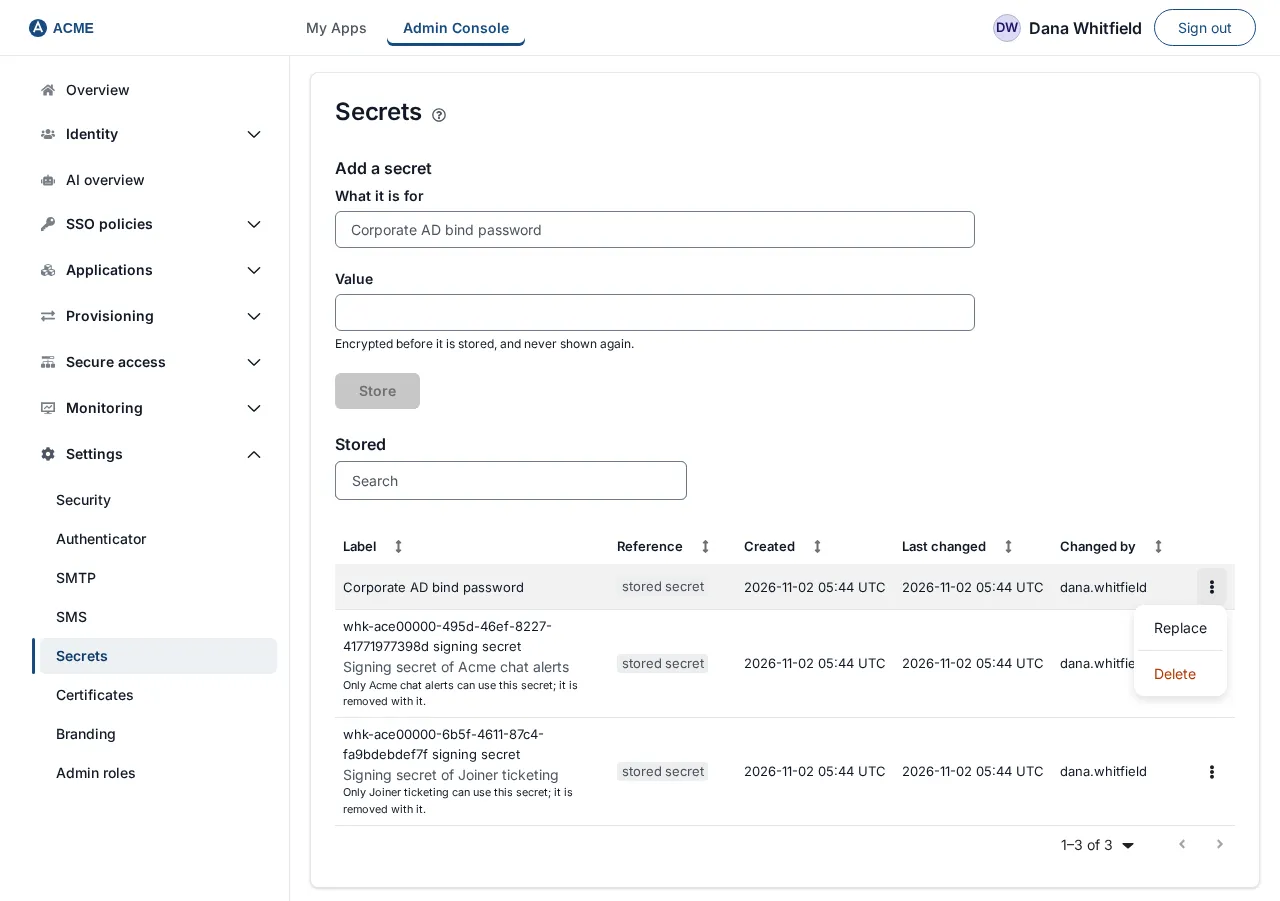
- Reference. Each stored secret has a reference such as
secret://stored/…. The value never travels with the reference. - Shown once. After you save a value, it is never shown again.
- Replace. The Replace action changes the value behind a reference, so everything that uses it keeps working without edits.
- Owned secrets. A secret owned by a directory, provider or application is removed when that object is deleted.
- History. Created, Last changed and Changed by sit in the list. The audit log records
secret.created,secret.replacedandsecret.deleted. - Access. Only a Super admin or an Authentication admin opens the page. The Secrets guide covers every action.
Choosing a store and a rotation period
Which secrets management tool is the best?
The usual choice is the store native to the cloud where the workloads run. OWASP notes that AWS Secrets Manager, Azure Key Vault and Google Secret Manager integrate with their provider’s IAM and audit logging, which reduces operational work inside one cloud. Workloads that span clouds or on-premises hosts need a store tied to no provider, such as HashiCorp Vault.
How often should secrets be rotated?
Rotate machine secrets on a schedule, and at once after any exposure. OWASP sets the lifetime by what the secret protects, from minutes to years. User passwords are the exception: NIST SP 800-63B-4 says verifiers shall not require periodic changes, but shall force one on evidence of compromise. The NIST password guidelines cover the rest.
Check one secret today
Pick one credential you own and fill in the record above for it.
- Owner and consumers. Name the team and every service that reads it. Without that list, rotation is guesswork.
- Last changed and expires. A last-changed date older than your rotation period is a finding.
- Issued by. Know which system revokes it. To find copies that already leaked, run secret scanning.
Sources, all read 2026-11-18:
- the OWASP Secrets Management Cheat Sheet
- HashiCorp Vault: lease, renew and revoke, lease revoke, kv put and kv undelete
- AWS Secrets Manager User Guide: rotation function steps, rotation strategies, rotation schedules, deleting a secret and the create-secret CLI reference
- Microsoft Learn: Key Vault soft delete, secret attributes, Key Vault events, the rotation tutorial and az keyvault secret
- NIST SP 800-63B-4
Updated