SSOGEN / Learn / What Is a Keylogger? Where It Sits and What It Captures
Learn
What Is a Keylogger? Where It Sits and What It Captures
Somewhere between the keyboard and the website, a keylogger records keystrokes: a device on the cable, or a program such as a driver, a browser extension or a phone keyboard. It captures passwords and one-time codes, but a passkey sign-in gives it nothing it can replay.
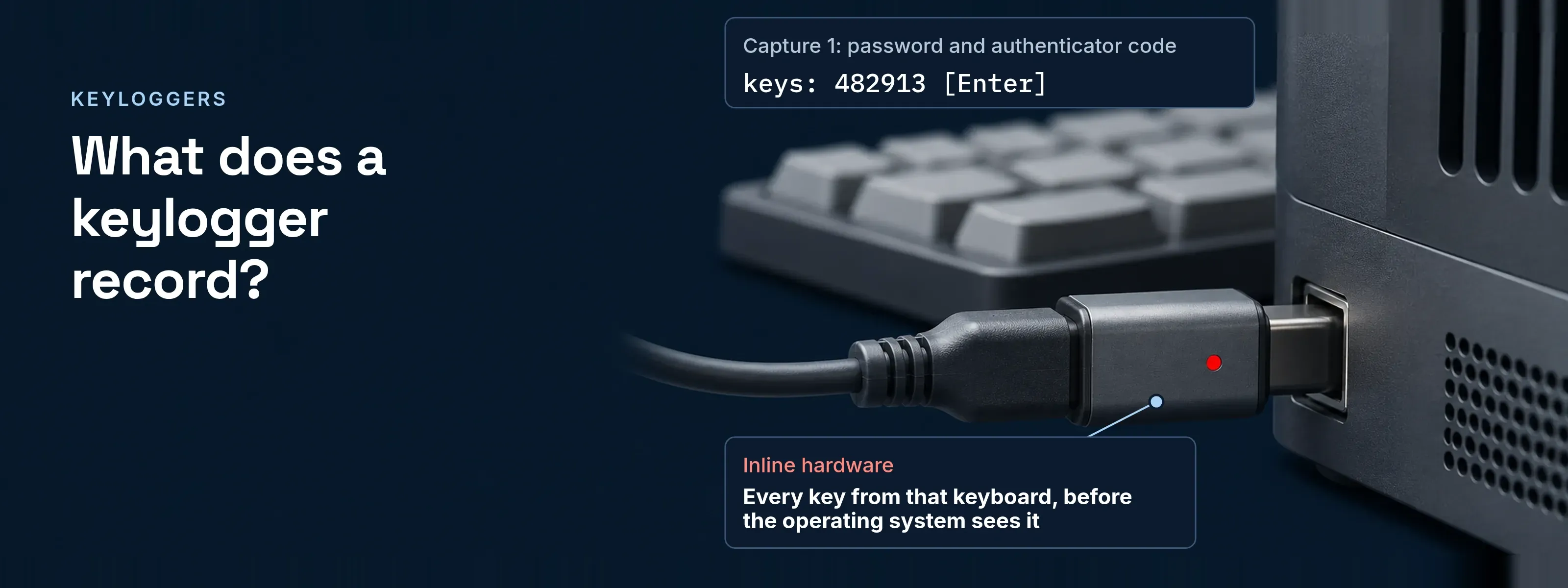
MITRE ATT&CK files keystroke capture as Keylogging (T1056.001) under Input Capture; monitoring products use the same technique. Keystroke logger and keystroke logging are other names for it. Malicious ones usually arrive through a phishing message or a trojan.
Where a keylogger sits, and what it sees
The capture point decides what lands in the log and what never does.
| Capture point | What it records | What it misses | How it gets there |
|---|---|---|---|
| Inline hardware. A plug on the USB or PS/2 keyboard cable, or a circuit inside the keyboard | Every key from that keyboard, before the operating system sees it | Paste, autofill, other keyboards; no software scan sees it | Physical access |
| Kernel driver. A custom driver reading raw keystroke data | Keys in every application | Paste and autofill, which press no keys | Malware with administrator rights |
| User-mode hook. A process that hooks keystroke callbacks or polls key state | Keys in other applications, often tagged with the window title | Paste and autofill | A trojan or an attachment |
| Browser extension. An add-on with host access to your sites | Keys and page content on every site it can reach; Chrome warns “Read and change all your data on all websites” | Other applications | A store listing or a sideloaded file |
| Form grabber. Code inside the browser process | Submitted form fields, pasted and autofilled passwords included; HTTPS encrypts only afterwards | Anything outside the browser | A banking trojan or infostealer |
| Mobile keyboard or accessibility service. A third-party keyboard, or an Android accessibility service | Text typed in apps, read from text-change events | On iOS, a keyboard without open access cannot send keystrokes anywhere | An app the user authorizes |
Paste and autofill beat the three keystroke rows. Extensions and form grabbers read the field, so they catch both.
The replay test: what a captured sign-in is worth
A typed secret replays; a passkey signature does not. One user-mode keylogger on Maria Lopez’s laptop records two sign-ins to sso.acme.example:
2026-11-02 05:42:31 UTC window: Acme sign-in - sso.acme.example keys: maria.lopez@acme.example [Tab] Summer-EXAMPLE-2026 [Enter]2026-11-02 05:42:47 UTC window: Acme sign-in - sso.acme.example keys: 482913 [Enter]2026-11-03 08:15:04 UTC window: Acme sign-in - sso.acme.example keys: maria.lopez@acme.example [Enter]2026-11-03 08:15:09 UTC window: Windows Hello prompt keys: 7391Capture 1 can sign in elsewhere. The password works until Maria changes it. The code is good for one sign-in in its 30-second step, if the attacker submits it first.
Capture 2 signs in nowhere. The username is not secret, the PIN works only on Maria’s laptop, and the next sign-in brings a new challenge.
With a fingerprint, Capture 2 ends after the username. Passkey vs password sets this beside six other attacks.
Why the passkey holds, and where it stops
Each signature answers one challenge, for one site, from one device.
- Fresh challenge. Every sign-in gets a new random challenge, carried in the signed client data. Yesterday’s signature fails today.
- Origin in the signed data. The client data records the origin the browser saw; the server rejects one it does not expect.
- Private key never sent. The server holds only the public key. No keystroke contains the private key.
- PIN checked locally. A Windows Hello PIN is tied to its device and never transmitted. A FIDO2 security key allows at most 8 wrong PINs.
MFA does not stop every keylogger. A typed one-time code is captured like the password. RFC 6238 section 5.2 warns that a code exposed to a third party before it is used can be used by that party within its time step, and recommends 30-second steps. Phishing-resistant MFA compares the methods.
Signals that point to a keylogger
Look on the device and in the sign-in log.
| Signal | Where you see it | What it points to |
|---|---|---|
An adapter on the keyboard cable |
A short plug sits between keyboard and port |
Inline hardware |
A driver or service nobody deployed |
Security log event 4697 (“A service was installed in the system”) or Sysmon event 6 (“Driver loaded”) names software nobody recognizes |
A kernel keylogger |
Keyboard hooking by a background process |
Your EDR flags a non-UI process that hooks or polls keyboard input |
A user-mode keylogger |
An extension outside policy |
An unapproved extension can read all your data on all websites |
A capture point |
A sign-in the user did not make |
A success from an unrecognized address follows the user’s own sign-in by minutes |
A captured password |
A sign-in method the user did not add |
A new authenticator or passkey appears |
Someone holds more than the password |
What SSOGEN shows and enforces
Passkey-only policies and visible sessions take the value out of a stolen password.
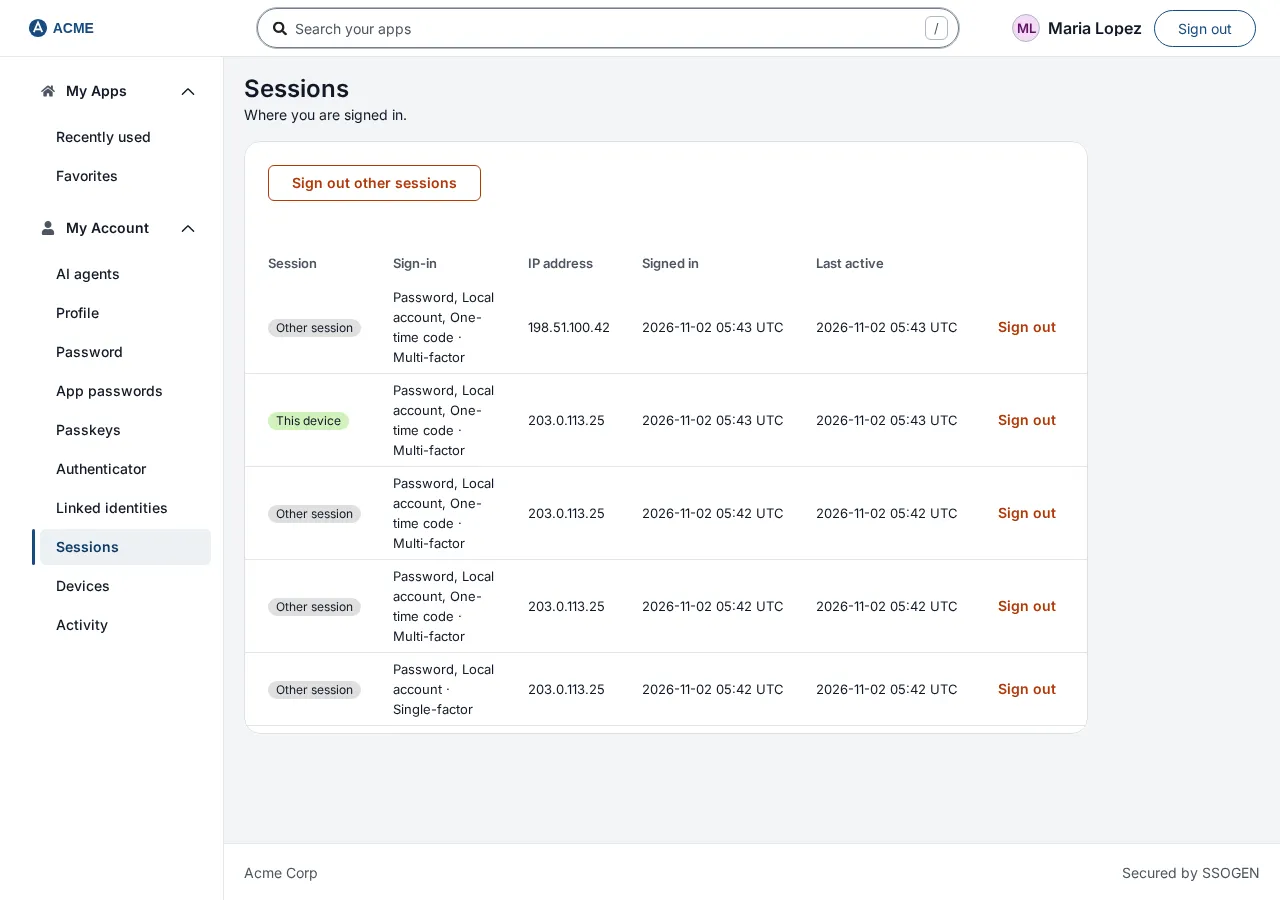
- Sessions. Each session in My Account shows its method, its strength (Single-factor, Multi-factor or Phishing-resistant) and its IP address, with Sign out.
- Passkey only. A passkey counts as both factors. A policy set to Passkey or security key only accepts nothing else, so a captured password opens no application. See passkeys for administrators.
- Second step for changes. Once a person has a second factor, changing an authenticator, passkey or recovery codes needs a second step from the last 5 minutes: “A password alone is not enough.”
- Email on every change. SSOGEN emails the account owner when a sign-in method is added or removed, once outgoing email is set up.
If you find one on a machine
Isolate the device
Take it off the network before anyone signs in on it.Clean or reimage
Remove it with your security tool, or reimage for a driver or anything you cannot identify. Unplug inline hardware.Sign out other sessions
From a clean device, end every session the user did not start.Change the passwords
Change every password typed on that machine, administrator and email accounts first.
Questions people ask
How do I detect if I have a keylogger?
Run a full scan with your endpoint security tool, then check what a scan cannot see. Review browser extensions, startup items, services and drivers, and look for an adapter on the keyboard cable. On a managed fleet, EDR alerts on keyboard hooking find it faster.
Can a keylogger be removed?
Yes. Most software keyloggers come out with a current security tool, and a hardware keylogger comes out by unplugging it. Reimage the machine for a kernel driver or anything you cannot identify. Then change passwords from a clean device and sign out other sessions, because removal does not undo what was already captured.
What is a keylogger in a computer?
In a computer, a keylogger is either a device or a program. The device sits inline on the keyboard cable or inside the keyboard. The program runs as a kernel driver, as a process that hooks keyboard input, or inside the browser as an extension or form grabber.
How do I know if someone is tracking my keystrokes?
Often the screen shows nothing: a keylogger that is tracking keystrokes is built to stay hidden. Check the signals above. On a phone, open the keyboard settings and the accessibility settings and remove apps you did not install on purpose. A sign-in you did not make is often the first sign you can see.
Sources, all read 2026-11-18: MITRE ATT&CK T1056 Input Capture; T1056.001 Keylogging; T1185 Browser Session Hijacking (form grabbing); T1417.001 mobile keylogging; T1539 Steal Web Session Cookie; NIST glossary, key logger; hardware keylogger; RFC 6238, sections 4 and 5.2; W3C WebAuthn Level 3; FIDO CTAP 2.1, section 6.5.2.2; Windows Hello for Business FAQ; event 4697; Sysmon; Chrome extension permissions; Apple custom keyboard guide.
Updated