SSOGEN / Learn / Container Image Scanning, Layer by Layer
Learn
Container Image Scanning, Layer by Layer
In container image scanning, a scanner unpacks each layer of an image, lists the packages in it and matches them against public advisories. The layer a finding sits in tells you who fixes it.
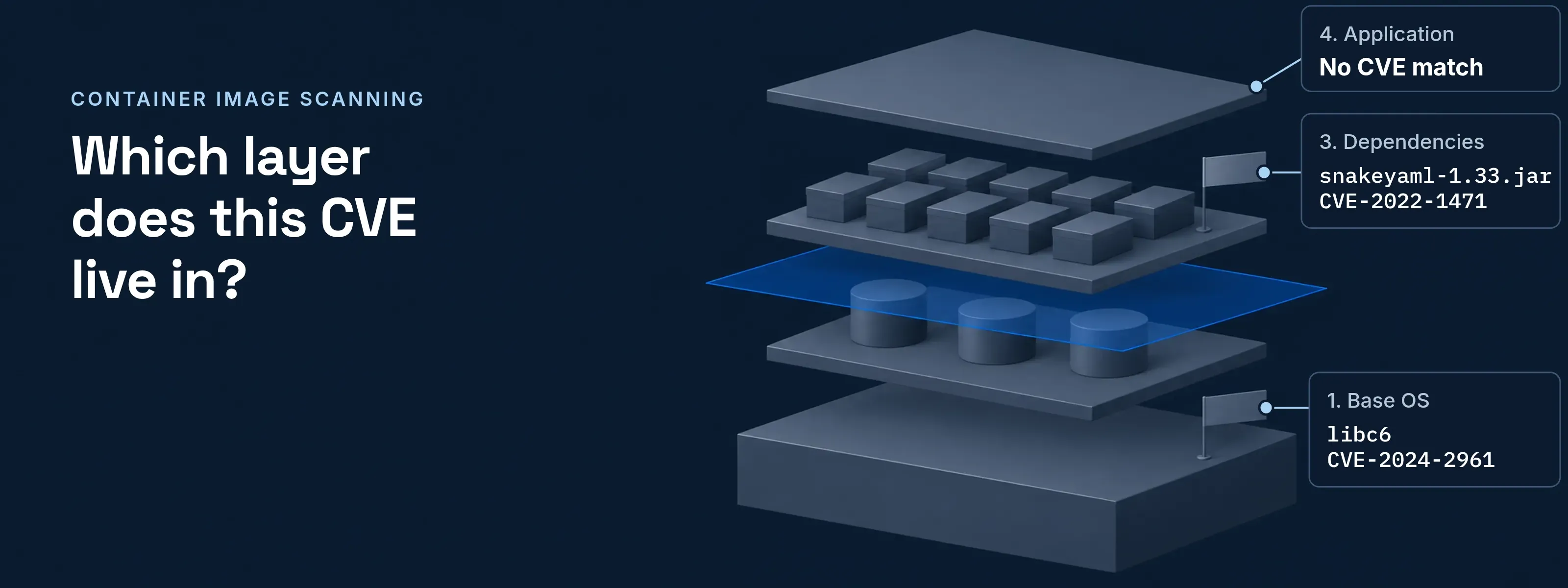
The scanner reads the image the way the container runtime stores it, one layer at a time, so each finding carries the layer that introduced it.
The image never runs. That separates container image scanning from scanning a running host.
Each layer of a Java image needs a different fix
The layer a finding sits in decides who fixes it and how. The image below is a small Java service on Ubuntu 22.04, one Dockerfile instruction per layer, top layer first.
4. Application
Dockerfile instruction
COPY target/app.jar /app/- In the layer
- Your own classes
- Finding
- No CVE match. Code you wrote has no CVE ID.
- Fix the layer needs
- Outside the image scan: code review, and secret scanning for keys left in the jar
3. Dependencies
Dockerfile instruction
COPY target/lib/ /app/lib/- In the layer
snakeyaml-1.33.jar(org.yaml:snakeyaml1.33)- Finding
- CVE-2022-1471:
Constructor()builds any Java type named in untrusted YAML. NVD 9.8, Google as CNA 8.3. Fixed in 2.0. - Fix the layer needs
- Raise the version in the build file and rebuild. A new base image changes nothing here.
2. Java runtime
Dockerfile instruction
RUN apt-get update && apt-get install -y openjdk-17-jre-headless- In the layer
openjdk-17-jre-headless17.0.11+9-1~22.04.1- Finding
- CVE-2024-21147: HotSpot compiler flaw, CVSS 7.4 from Oracle. Ubuntu fixed it in 17.0.12+7-1ubuntu2~22.04 on July 31, 2024.
- Fix the layer needs
- Rebuild with
--no-cacheso apt fetches the fixed package. No code change.
1. Base OS
Dockerfile instruction
FROM ubuntu:22.04- In the layer
libc62.35-0ubuntu3.6- Finding
- CVE-2024-2961: glibc
iconv()writes up to 4 bytes past its buffer when converting to ISO-2022-CN-EXT. Ubuntu priority medium, fixed in 2.35-0ubuntu3.7 (USN-6737-1, April 18, 2024). - Fix the layer needs
- Rebuild with
--pullto take the refreshed base. Your code stays as it is.
Built from public advisory data for an image with these package versions; not output from a scan of a published image. The base layer came from a build cache filled before April 18, 2024, and the other layers were built in July 2024. Each version above is in Ubuntu’s package publishing history or Maven Central.
How a finding points back to its layer
The finding’s Layer.DiffID is the join key. It equals one entry in the image’s rootfs.diff_ids. The history entry in the same position, counting only entries that created a layer, names the Dockerfile instruction.
The field names follow Trivy’s JSON report, because its documentation shows every field this join needs. Other scanners name them differently.
{ "Target": "Java", "Class": "lang-pkgs", "Type": "jar", "Vulnerabilities": [ { "VulnerabilityID": "CVE-2022-1471", "PkgName": "org.yaml:snakeyaml", "PkgIdentifier": { "PURL": "pkg:maven/org.yaml/snakeyaml@1.33" }, "InstalledVersion": "1.33", "FixedVersion": "2.0", "Status": "fixed", "Layer": { "DiffID": "sha256:<layer 3 diff ID>" }, "DataSource": { "ID": "ghsa", "Name": "GitHub Security Advisory Maven" }, ... } ]}"ImageConfig": { "history": [ { "created_by": "<base image: Ubuntu root filesystem>" }, { "created_by": "<base image: CMD>", "empty_layer": true }, { "created_by": "RUN /bin/sh -c apt-get update && apt-get install -y openjdk-17-jre-headless # buildkit" }, { "created_by": "COPY target/lib/ /app/lib/ # buildkit" }, { "created_by": "COPY target/app.jar /app/ # buildkit" } ], "rootfs": { "type": "layers", "diff_ids": [ "sha256:<layer 1 diff ID>", "sha256:<layer 2 diff ID>", "sha256:<layer 3 diff ID>", "sha256:<layer 4 diff ID>" ] }}Values in angle brackets are placeholders, not real digests or strings. Omitted lines are marked ....
Layer.DiffID. The uncompressed digest of the layer that holds the package. Here it is the third entry indiff_ids.history[].created_by. The instruction behind each history entry. Skip entries marked"empty_layer": true; the rest line up withdiff_idsin order, so the third isCOPY target/lib/.ClassandType.lang-pkgsandjarmean a library found inside a jar, not an OS package. The fix belongs in the build file.DataSource. Where the advisory came from. Jars match GitHub’s Maven advisories; OS packages on this image match the Ubuntu CVE Tracker.
Why the report trusts Ubuntu over NVD for OS packages
For a distribution package, the distribution’s tracker decides whether you are affected and which version fixes it. NVD describes the upstream flaw. Ubuntu builds its own packages and backports fixes, so its verdict for 22.04 can differ. How NVD scores a record is covered in reading an NVD entry.
| CVE | NVD says | Ubuntu 22.04 says | What the report shows |
|---|---|---|---|
| CVE-2023-45853, MiniZip in zlib | 9.8, critical | Not affected, zlib 1:1.2.11.dfsg-2ubuntu9.2 |
Nothing. Trivy does not report not_affected findings. |
CVE-2024-2961, glibc iconv() |
Undergoing Analysis, no NVD score (CISA-ADP gives 7.3) | Priority medium, fixed in 2.35-0ubuntu3.7 | A finding with Status: fixed and that fixed version |
The Status value decides the action. Trivy documents eight; five of them appear in reports.
fixed. A fixed version exists. A rebuild or a version bump clears it, so gate CI on these.affected. No patch is released yet. Track it; a rebuild will not clear it.will_not_fix. Affected, with no intention to fix, usually low or moderate impact. Accept it or mitigate it.fix_deferred. Affected, and a fix may come later. Check again at the next rebuild.end_of_life. The package contains the component, but nobody analyzed it. Check whether the base release is still supported.
Scan at build, then again while the image sits still
An unchanged image gains findings when the advisory data changes. Layer 1 shows it: CVE-2024-2961 was published on April 17, 2024 and Ubuntu shipped the fix on April 18, 2024. The image stayed byte for byte the same. Every scan after that day reports the finding.
Build
Scan the image in CI. Fail the build on
fixedfindings above the severity you set, because a rebuild or a bump removes them.Push
A registry with continuous scanning enabled rescans stored images when its advisory data changes.
Deploy
An admission check lets only scanned images into the cluster.
Afterwards
Keep each image’s SBOM and match it again against new advisories. Trivy’s
--sbom-sourcesflag scans from an SBOM attached to the image and skips pulling its layers. What the SBOM file holds is shown in a CycloneDX and SPDX file read field by field.
Ranking what remains, setting deadlines and proving each fix is the work of vulnerability management.
Questions about reading a scan report
How can I inspect a Docker image?
Run docker image inspect for the configuration and docker history for the layers. The inspect output includes RootFS.Layers, the diff IDs a scan report points to. docker history lists each layer with the instruction that created it and its size; add --no-trunc for full commands. A scanner then lists the packages inside each layer.
What is a container in Docker?
A container is a running instance of an image: the image’s read-only layers plus a thin writable layer on top. Every file the container changes goes into that layer, which is deleted with the container. An image scan covers what was built, so a package installed inside a running container never appears in the image report.
Why does a freshly built image still show CVEs?
Some findings have no fixed package yet, and some never will. Trivy marks them affected or will_not_fix, and a rebuild clears neither. Gate the build on fixed findings, which a rebuild or a version bump removes, and track the rest with an owner and a review date. A smaller base image also carries fewer packages to match.
Does an image scanner find flaws in my own code?
No: it matches package names and versions against advisories, and code you wrote has no CVE ID. Layer 4 in the example shows no finding for that reason. Flaws in your own classes need code review and static analysis. Keys and passwords left in the image need a secret scan, which Trivy and similar tools run as a separate check.
Sources
Sources, all read 2026-11-18:
- NVD, CVE-2022-1471 and GitHub advisory GHSA-mjmj-j48q-9wg2 (SnakeYAML, fixed in 2.0)
- NVD, CVE-2024-21147 and the OpenJDK vulnerability advisory of July 16, 2024
- NVD, CVE-2024-2961 and the CVE record with the CISA-ADP score
- NVD, CVE-2023-45853
- Ubuntu CVE tracker: CVE-2024-2961, CVE-2024-21147, CVE-2023-45853; USN-6737-1, April 18, 2024
- Ubuntu package publishing history: glibc and openjdk-17, Ubuntu 22.04 (jammy)
- Trivy documentation: reporting, filtering and status values, container images
- Trivy security advisory GHSA-69fq-xp46-6x23, published March 21, 2026
- Docker documentation: docker image history, docker image inspect, storage drivers and the container layer
Updated