SSOGEN / Learn / What is conditional access?
Learn
What is conditional access?
Conditional access is a set of if-then rules checked at every sign-in. Who is asking, from where, how strongly they signed in and which application they want decide whether they get in, must prove more, or are refused.
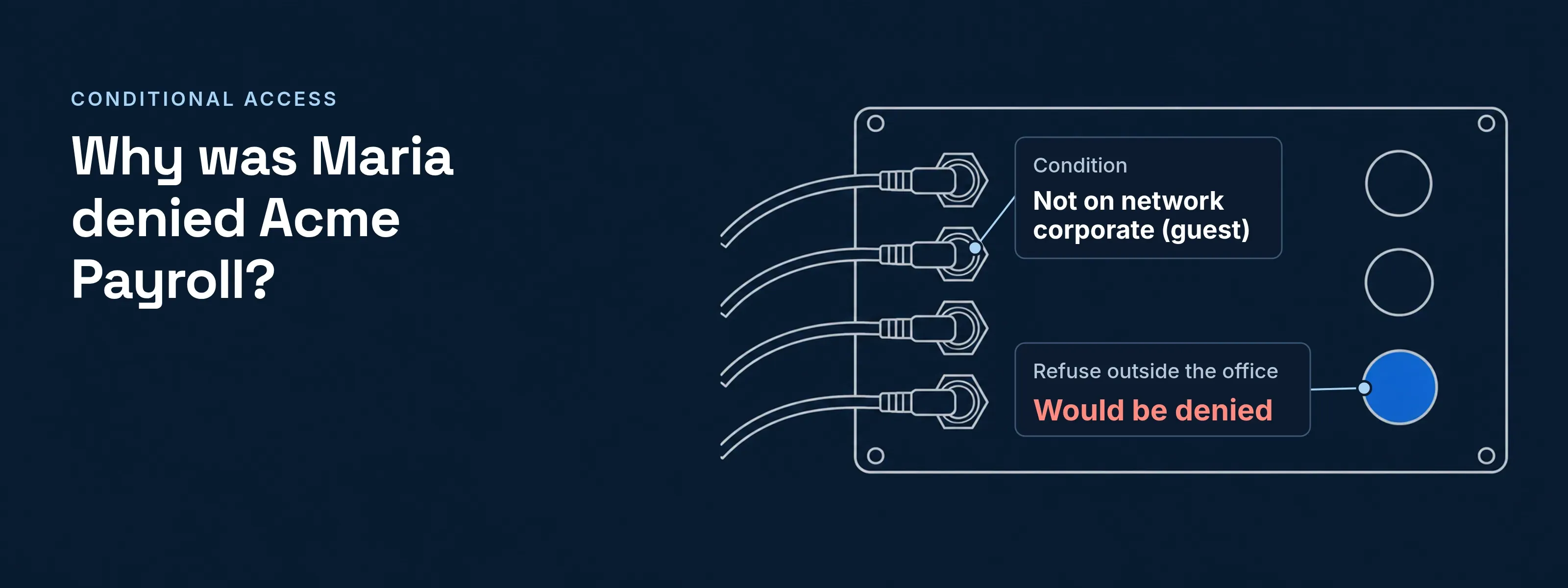
Conditional access decides each sign-in from its context, not from a password alone. A rule reads like “when the person is not on the office network, then deny”, and the identity provider returns one decision each time someone opens an application. Microsoft Entra Conditional Access, whose policies Microsoft calls “if-then statements”, is one implementation; the idea itself is vendor-neutral.
How does conditional access work?
Four steps run at each sign-in: collect signals, check the rules, decide, then enforce and record. NIST SP 800-207 calls the deciding component the policy decision point and the one that applies the decision the policy enforcement point.
Collect signals
Who is asking, from which network, how they signed in, for which application, and when.Check the rules
A rule matches only when all its conditions are true.Decide
In SSOGEN, the first matching rule in each list decides, and across the access rules and the application’s policy the strictest answer wins; a missing fact produces a refusal, never a guess. Microsoft Entra instead requires that all applicable policies are satisfied.Enforce and record
The sign-in goes ahead, is refused, or is sent to prove more. The audit log records the decision and its rule.
What signals does conditional access check?
Conditional access checks who is asking, from which network and device, for which application, how strongly they signed in, how risky the sign-in looks, and when. SSOGEN also checks whether a person, an AI agent, an MCP client or a service is asking. The identity provider gathers these facts during sign-in.
| Signal | Example value | Typical rule |
|---|---|---|
| User or group | Group Contractors | Contractors reach only project applications |
| Network or location | Network zone corporate or guest |
Payroll opens only from the office |
| Device state | Company-issued, encrypted | Finance needs a managed laptop |
| Application | Acme Payroll | Payroll needs more than the intranet |
| Sign-in strength | Password only, or plus a second factor | Administrators must have used a second factor |
| Risk | A score from 0 to 100 | A score of 30 or more asks for a second factor |
| Time | Monday to Friday, 08:00 to 18:00 | Contractors sign in only in working hours |
| Requester type | Person, AI agent, MCP client, service | Agents reach only the applications named for them |
What can a conditional access decision do?
A decision has five common outcomes: allow, deny, require a stronger sign-in, allow with a shorter session, or allow and alert. Microsoft groups them as block access, its most restrictive decision, or grant access with requirements such as multifactor authentication.
- Allow The normal sign-in requirements still apply.
- Deny The application stays closed.
- Require a stronger sign-in For example a second factor: step-up authentication.
- Allow with a shorter session In SSOGEN, the session lasts 15 minutes.
- Allow and alert The decision is marked as an alert in the audit log.
In SSOGEN, a rule can ask for more than the policy requires, never less, so adding a rule cannot open a gap.
What a conditional access decision looks like
A good conditional access decision names the rule that made it. Below is the SSOGEN What if page in a sample Acme deployment, asked about Maria Lopez opening Acme Payroll from the guest network. The policy has two rules:
- Rule 1, “IT admins anywhere”: when in group IT Admins, then allow.
- Rule 2, “Refuse outside the office”: when not on network corporate, then deny.
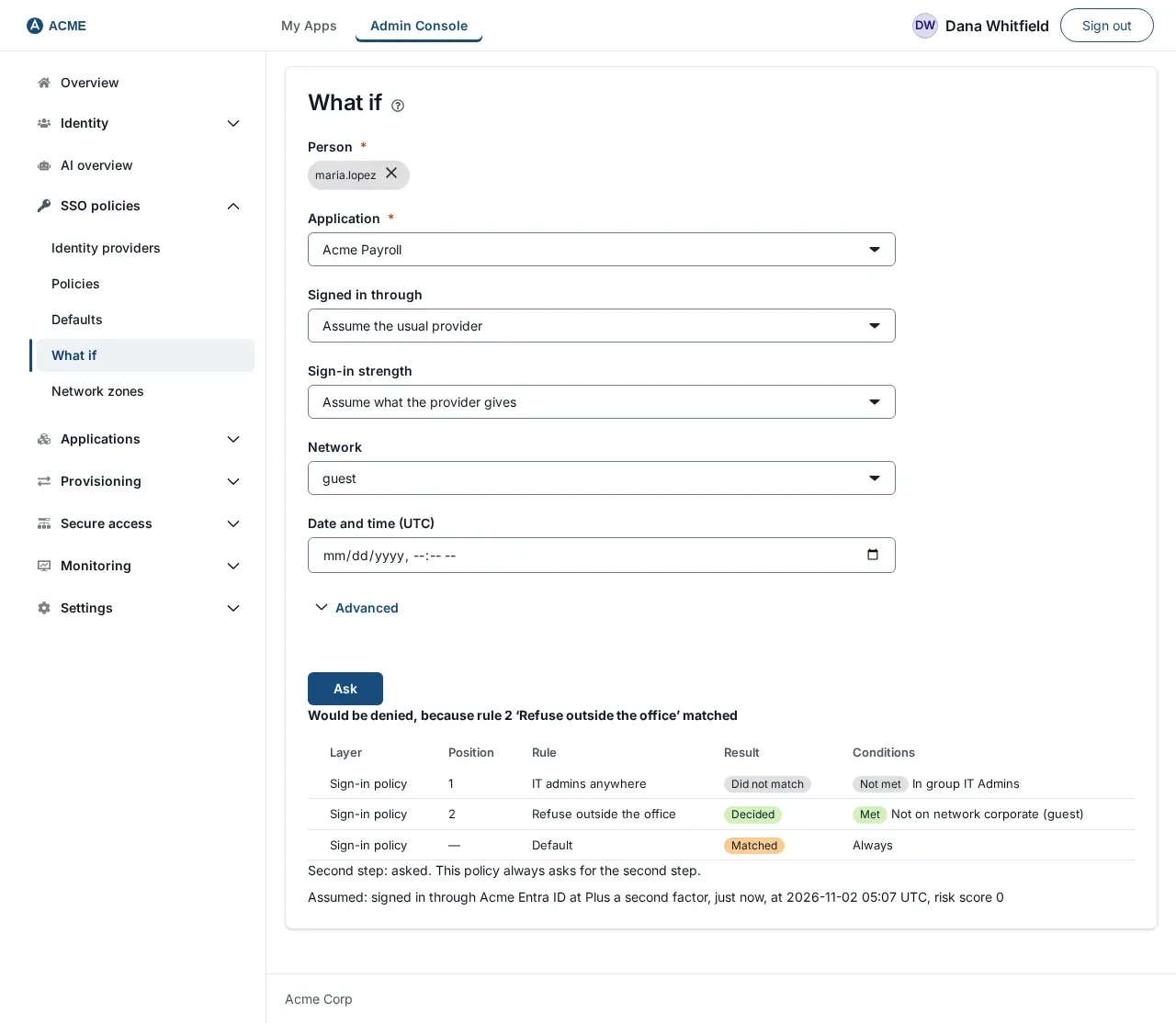
- The first match decides. Maria is not in IT Admins, so rule 1 did not match. Rule 2 shows Decided. The Default row shows Matched, but rule 2 had already decided.
- The headline gives the reason, “Would be denied, because rule 2 ‘Refuse outside the office’ matched”, and the condition row shows the compared value, “Not on network corporate (guest)”.
- The Assumed line lists the facts SSOGEN filled in: signed in through Acme Entra ID at Plus a second factor, just now, risk score 0.
What if signs nobody in, stores nothing, and records each question in the audit log. The rules come from a conditional access policy, and the same question works for any person and application.
Five rules to start with
Microsoft lists administrator MFA, location rules and blocking risky sign-ins among commonly applied policies. Five rules that cover them:
- Administrators need a second factor:when in group IT Admins and signed in with less than a second factor, then require a second factor.
- Payroll only from the office:when the application is Acme Payroll and the network is not
corporate, then deny. - Contractors in working hours:when in group Contractors, Monday to Friday, 08:00 to 18:00 (America/New_York), then allow. A default of deny refuses every other hour, so write what is allowed and let the default refuse the rest.
- Risky sign-ins prove more:when the risk score is 30 or more, then require a second factor.
- Short session on the guest network:when on network
guest, then allow with a shorter session.
Conditional access vs MFA, adaptive authentication and step-up
Conditional access decides; the other terms feed the decision or follow from it.
| Term | What it is | Relation to conditional access |
|---|---|---|
| MFA | Proof from two factor categories | An outcome a rule can require |
| Step-up authentication | Stronger proof after a weaker sign-in | An outcome of one decision |
| Adaptive authentication | A risk score from the sign-in context | A signal rules compare to a threshold |
| RBAC and ABAC | Access by role, or by attributes | Conditional access is attribute checking at sign-in |
Agents and service accounts
Conditional access rules can ask whether a person or an AI agent is making the request:
- When Maria opens Acme Payroll, one identity is checked: her group, network, sign-in strength and risk score.
- When an agent acting for Maria opens Acme Payroll, SSOGEN first signs Maria in under the application’s sign-in policy, and she approves the delegation. Rules match the requester type and the acting agent by name. In a chain of agents, every acting identity must pass.
Microsoft applies the idea to service principals as Conditional Access for workload identities, for example blocking them outside known public IP ranges. For SSOGEN’s model, see AI agent identity.
Where the decision is enforced
Conditional access is enforced where the sign-in happens. For SAML and OpenID Connect applications, that is the identity provider. For applications without built-in SSO, an agent or proxy in front of the application enforces the decision before the request reaches the application.
- At the identity provider, every application that trusts it inherits the rules.
- In front of on-premise applications, the SSOGEN Web Agent runs in Apache or Oracle HTTP Server and signs people in under the application’s sign-in policy, so Oracle E-Business Suite follows the same rules.
- At the SSOGEN Admin Console, a separate policy applies and always asks for a second factor.
Short answers
Does Conditional Access require MFA?
No. Multifactor authentication is one control a rule can require, not a precondition. In Microsoft Entra, “Require multifactor authentication” is one of several grant controls, and policies are enforced after the first factor is complete. A rule can equally allow, deny or shorten a session without asking for a second factor.
What is a Conditional Access policy?
In Microsoft Entra, a Conditional Access policy is “an if-then statement of Assignments and Access controls”. Assignments set who, which applications and under which conditions; access controls block access or grant it with requirements such as MFA. Other products use the same idea under names such as access policy or sign-in policy.
Does Google have Conditional Access?
Yes, under another name. Google Workspace calls it Context-Aware Access: policies that control app access by attributes such as user identity, location, device security status and IP address. Google evaluates core Workspace services continuously after access is granted, while SAML apps are evaluated at sign-in.
What is CAE in Conditional Access?
CAE is Continuous Access Evaluation, a Microsoft Entra feature based on the OpenID Continuous Access Evaluation Profile. Services such as Exchange Online, SharePoint Online and Teams subscribe to critical events, including a disabled account, a password reset or high user risk, and revoke access in near real time instead of waiting for the token to expire.
Build and test the rules in SSOGEN
- Every condition and limit: rules and conditions.
- The evaluation order: how sign-in decisions work.
- Asking a What if question: What if and Test.
- Trying new rules on real sign-ins: monitoring a new rules version, the counterpart of Microsoft’s report-only mode.
- Related concepts: the Learn hub.
Outside sources, each read 2026-11-17: Microsoft Learn, What is Conditional Access?; Microsoft Learn, Build a Conditional Access policy; Microsoft Learn, report-only mode; Microsoft Learn, Continuous access evaluation; Microsoft Learn, Conditional Access for workload identities; Google Workspace Admin Help, Context-Aware Access; NIST SP 800-207, Zero Trust Architecture, sections 2 and 3. Product names are trademarks of their owners; SSOGEN is not affiliated with them.
Updated