SSOGEN / Learn / What Is DAST (Dynamic Application Security Testing)?
Learn
What Is DAST (Dynamic Application Security Testing)?
Black-box testing of a running web application or API is called dynamic application security testing (DAST): a scanner crawls it, sends altered values to every parameter and compares each response with a normal one.
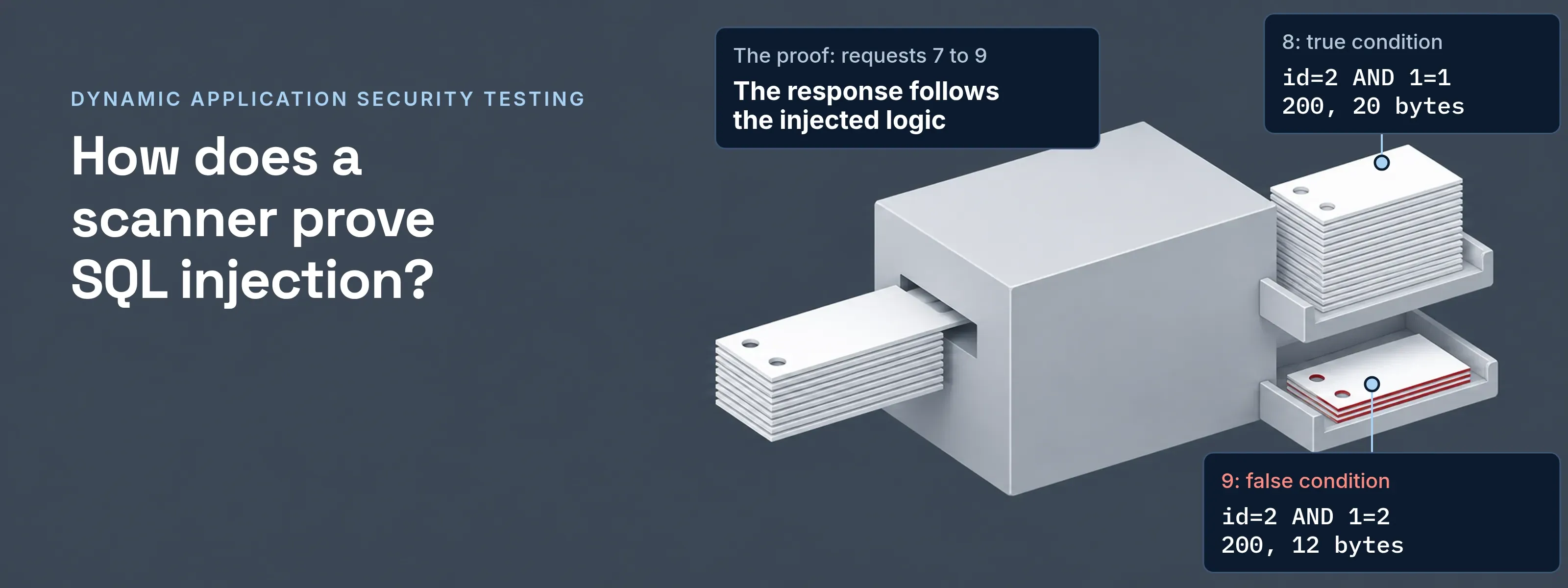
The scanner holds no source code, just a URL and, for a useful scan, a test account. A response that changes with the injected input is a finding.
- Input
- A base URL and a test account
- Method
- Crawl, then attack each parameter
- Output
- URL, parameter, attack and evidence
Thirteen requests to one finding
The log below is a scripted replay of a scanner’s steps, not ZAP output. We ran it on November 18, 2026, against a small Flask test app whose invoice page builds its query by concatenation:
"SELECT id, total FROM invoices WHERE owner = 'dana' AND id = " + request.args["id"]The test app ends each session after six requests, so the replay also shows a session expiring. Query strings are shown decoded.
| # | Phase | Request | Status | Bytes | What it shows |
|---|---|---|---|---|---|
| 1 | Crawl, no session | GET / |
200 | 28 | Home page with one link, to sign in |
| 2 | Crawl, no session | GET /login |
200 | 81 | The sign-in form |
| 3 | Crawl, no session | GET /invoices |
302 to /login |
199 | Every other page redirects, so the crawl ends here |
| 4 | Sign in | POST /login |
302 to /invoices |
205 | Set-Cookie: session=... |
| 5 | Crawl, with session | GET /invoices |
200 | 90 | Links to /invoice?id=1, /invoice?id=2 and /logout |
| 6 | Baseline | GET /invoice?id=2 |
200 | 20 | {"rows":[[2,75.5]]} |
| 7 | Attack | id=3-1 |
200 | 20 | The row for 2: the database did the arithmetic |
| 8 | Attack | id=2 AND 1=1 |
200 | 20 | Same as the baseline (true condition) |
| 9 | Attack | id=2 AND 1=2 |
200 | 12 | {"rows":[]} (false condition) |
| 10 | Attack | id=2' |
500 | 265 | Server error; app log: sqlite3.OperationalError: unrecognized token: "'" |
| 11 | Session expired | GET /invoice?id=2 |
302 to /login |
199 | The logged-out indicator |
| 12 | Session expired | POST /login |
302 to /invoices |
205 | The scanner signs in again |
| 13 | Session expired | GET /invoice?id=2 |
200 | 20 | The scan resumes |
- The proof. Requests 7 to 9. The input
3-1returns the row for 2, and the true and false conditions return 20 and 12 bytes. The response follows the injected logic. - Supporting evidence. The 500 in request 10. An error alone can have other causes.
- The class. SQL injection belongs to Injection, A05 in the OWASP Top 10 2025.
ZAP’s SQL injection rule works the same way. It attacks URL and form parameters with fragments of valid and invalid SQL, using error-based, boolean-based, UNION-based and stacked-query techniques.
What a DAST finding contains
A finding names a URL, a parameter, the attack and the evidence. This record is built from the log above.
- URL
- GET /invoice
- Parameter
- id
- Attack
- 2 AND 1=2
- Evidence
- 20 bytes for 2 AND 1=1, 12 bytes for 2 AND 1=2
- Weakness
- CWE-89, SQL injection
- Risk
- High (ZAP alert 40018)
- Reproduce
- Send requests 8 and 9 with a valid session. The sizes differ again.
- Fix
- A parameterized query for
id, the first item in ZAP’s solution for this alert. - Not in the record
- The file and line. A scanner sees HTTP only; tracing a finding to code is static analysis, compared in SAST vs DAST.
Scanning behind a sign-in page
Without a session, the scanner tests only the login page. Requests 1 to 3 are that scan: two public pages, then a redirect. The invoice page and its id parameter never appear.
When the application hands sign-in to an identity provider, the scanner needs a real browser to complete it:
An authenticated scan through an identity provider
- Scanner browserheadless, driven by the scanner
- Applicationunder test
- Identity providersigns users in
- Scanner browser to Application1GET /invoices with no session
- Application to Scanner browser2302 to the identity provider
- Scanner browser to Identity provider3Fills username and password on the sign-in pageThe fields can sit on one page or across several.
- Scanner browser to Identity provider4Fills the TOTP codeGenerated from the test account secret the scanner holds.
- Identity provider to Scanner browser5Redirect back to the application with the result
- Scanner browser to Application6Follows the redirect
- Application to Scanner browser7Sets the session cookieEvery later request carries it, and the crawl reaches the protected pages.
ZAP sets this up in five parts:
- Context. The application’s URLs, all of them in scope.
- Session management. How the app keeps the session: a cookie, or headers such as
Authorization. - Authentication method. Manual, form-based, JSON-based, HTTP (Basic, Digest, NTLM), script-based, or browser-based from an add-on. Form, JSON, HTTP and script methods can sign in again; manual cannot.
- Verification strategy. A logged-in or logged-out indicator, as a regex.
- Users. The credentials for each test account.
The scanner’s session cookie is a bearer secret like any other. Store it with the same care as a real user’s; session hijacking shows what a stolen one gives an attacker.
When the session runs out mid-scan
Long scans outlive sessions, so the scanner must notice and sign in again. In requests 11 to 13 the redirect to /login matched the logged-out indicator, and the scanner signed in and repeated the request. A scanner that misses this keeps attacking the login page and reports a clean result.
ZAP offers four verification strategies:
| Strategy | What it checks | Fits |
|---|---|---|
| Check every response | The indicator regexes on each response | Traditional apps that return full HTML pages |
| Check every request | The regexes on each request | Apps that keep session state on the client, such as a JWT sent with each request |
| Check every request or response | Both sides of each message | Apps where either side can carry the signal |
| Poll the specified URL | One URL at a set frequency | Any app with a page that reliably shows signed in or out |
Questions people ask
What is the DAST screening tool?
In medicine, DAST is the Drug Abuse Screening Test, unrelated to software. Harvey Skinner published it in 1982 in Addictive Behaviors as a 28-item self-report questionnaire for clinical screening. In security, DAST stands for dynamic application security testing.
Is DAST the same as penetration testing?
No. A DAST scanner runs automated probes; a penetration tester works by hand. The tester chains findings, tests business logic and judges impact. ZAP’s own help states that logical flaws such as broken access control will not be found by automated scanning, and that manual penetration testing should be performed in addition.
Can DAST test APIs?
Yes, when the scanner gets the API’s definition instead of pages to crawl. ZAP imports OpenAPI (Swagger) definitions in versions 1.2, 2.0, 3.0 and 3.1, GraphQL schemas and SOAP WSDL files, then sends requests built from them. Token-based APIs usually suit the check-every-request strategy from the table above.
What is the difference between passive and active scanning?
A passive scan only reads traffic; an active scan sends attacks. ZAP’s passive scanner inspects HTTP and WebSocket messages that pass through it, without sending anything of its own. Active scanning uses known attacks, and ZAP’s help calls it an attack on the targets, not to be run against applications you do not own.
Before the first scan
- Permission. A test environment, and written permission from the owner of every host in scope.
- A test account. Its own data, never a real user’s. If it needs MFA, give the scanner the TOTP secret, not a person’s phone.
- Exclusions. Logout, delete and payment URLs. In request 5 the crawl found
/logout; requesting it would end the scan’s own session.
Sources, all read 2026-11-18: ZAP documentation on authentication, authentication methods, verification strategies, browser-based authentication, active scan rules, alert 40018, active scan, passive scan, OpenAPI, GraphQL and SOAP support; CWE-89; Skinner HA, “The drug abuse screening test”, Addictive Behaviors 7(4):363-371, 1982 (PubMed 7183189). The log comes from our local test app and replay script (Python 3.9.25, Flask 3.1.3, SQLite 3.34.1).
Updated