SSOGEN / Learn / What Is SAST (Static Application Security Testing)?
Learn
What Is SAST (Static Application Security Testing)?
Without running the code, static application security testing (SAST) reads it and reports where untrusted input can reach a dangerous call, with the path the data followed.
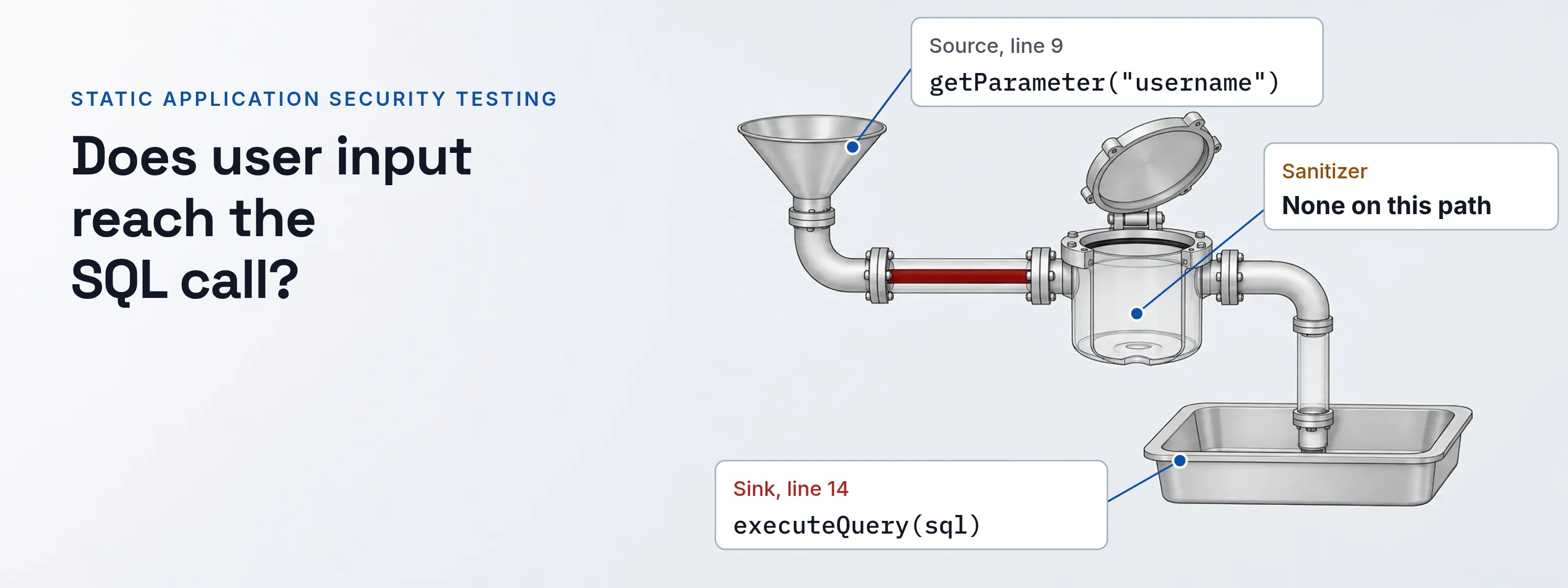
A SAST analyzer parses the code into a model of calls and data flow. Each security rule names a source, such as an HTTP parameter, and a sink, such as a SQL call.
When data can travel from one to the other without a check, the analyzer reports the file, the line and every step of the path. It runs on each commit or pull request, before anything is deployed.
SAST in one login handler: three findings
The servlet below was written for this page. Three marked lines match three CodeQL queries for Java. The table gives each query’s published metadata from the CodeQL query help, read November 18, 2026. The path column is our reading of the code, not output from a scan.
@WebServlet("/login")public class LoginServlet extends HttpServlet {  private static final Logger log = LoggerFactory.getLogger(LoginServlet.class);  private DataSource ds;
@Override protected void doPost(HttpServletRequest request, HttpServletResponse response) throws IOException { String username = request.getParameter("username"); String password = request.getParameter("password"); String next = request.getParameter("next"); String sql = "SELECT pw_hash FROM users WHERE name = '" + username + "'"; try (Connection c = ds.getConnection(); ResultSet rs = c.createStatement().executeQuery(sql)) { // [1] if (rs.next() && Passwords.matches(password, rs.getString(1))) { request.getSession().setAttribute("user", username); response.sendRedirect(next); // [2] return; } } catch (SQLException e) { throw new IOException(e); } log.warn("Failed login for " + username); // [3] response.sendError(HttpServletResponse.SC_UNAUTHORIZED); }}| Marker | CodeQL query and CWE | Path, source to sink | Security severity | Precision and query suites |
|---|---|---|---|---|
| [1] | java/sql-injection, CWE-89 SQL injection (also CWE-564) |
line 9 getParameter("username"), line 12 sql, line 14 executeQuery(sql) |
8.8, high | High; all three Java suites, including the default java-code-scanning |
| [2] | java/unvalidated-url-redirection, CWE-601 open redirect |
line 11 getParameter("next"), line 17 sendRedirect(next) |
6.1, medium | High; all three Java suites |
| [3] | java/log-injection, CWE-117 improper output neutralization for logs |
line 9 getParameter("username"), line 23 log.warn(...) |
6.1, medium | Medium; security-extended and security-and-quality only |
All three queries are of kind path-problem with severity error, so each alert carries the whole path, not only the last line. Finding 3 is the one teams miss. The default suite leaves out the medium-precision query, so a scan with that suite never flags the log line.
The fixes follow each query’s own recommendation. Use a PreparedStatement with a ? placeholder for [1]. Pick the redirect target from a server-side list for [2]. Remove line breaks from username before logging it for [3]. SQL injection sits under A05 Injection in the OWASP Top 10.
How SAST follows tainted data
Taint analysis gives every expression one of four roles. Semgrep names them as rule operators in a rule with mode: taint; only pattern-sources is required.
- Source.
request.getParameter("username")on line 9. Data an attacker controls enters the program here. - Propagator. The string concatenation on line 12. In Semgrep, taint moves through assignments, operators and function calls by default, so
sqlis now tainted. - Sanitizer. None on this path. The redirect fix further down adds one,
isLocalPath(next). - Sink.
executeQuery(sql)on line 14. Tainted data reaching this call is the finding.
A query sees only the sanitizers it models. A check written in your own code is invisible to the analyzer until someone tells it what that method guarantees.
Reading a SARIF result
SARIF 2.1.0 is the OASIS standard format for analyzer results, and GitHub code scanning imports it. Seven fields decide how you read an alert. The values are those of finding [1].
| Field | Finding [1] | What it tells you |
|---|---|---|
ruleId |
java/sql-injection |
The rule. GitHub needs it unchanged across runs to track the alert. |
level |
error |
One of error, warning, note or none (SARIF 3.27.10). |
message.text |
This query depends on a user-provided value. | GitHub shows it as the alert title. |
locations |
LoginServlet.java, line 14 |
Where the alert sits: the sink. |
codeFlows[].threadFlows[] |
Lines 9, 12, 14 | The path, one step per location. GitHub expands it on the alert. |
rule properties.security-severity |
"8.8" |
Any value above 0.0 marks a security result. 8.8 falls in GitHub’s high band. |
rule properties.tags |
external/cwe/cwe-089 |
The CWE, usable as a filter. |
GitHub maps the score to four bands: over 9.0 is critical, 7.0 to 8.9 high, 4.0 to 6.9 medium and 0.1 to 3.9 low. A separate field, partialFingerprints, lets GitHub recognize the same result in the next run.
{ "ruleId": "java/sql-injection", "level": "error", "message": { "text": "This query depends on a [user-provided value](1)." }, "locations": [{ "physicalLocation": { "artifactLocation": { "uri": "src/main/java/com/acme/LoginServlet.java" }, "region": { "startLine": 14 } } }], "relatedLocations": [{ "id": 1, "physicalLocation": { "region": { "startLine": 9 } } }], "codeFlows": [{ "threadFlows": [{ "locations": [ { "location": { "physicalLocation": { "region": { "startLine": 9 } } } }, { "location": { "physicalLocation": { "region": { "startLine": 12 } } } }, { "location": { "physicalLocation": { "region": { "startLine": 14 } } } } ] }] }]}Triage a SAST false positive
Find the check the analyzer missed, then record the decision where the next scan reads it. GitHub lists a sanitizer the analyzer does not support as one cause of a false positive.
Before the fix, response.sendRedirect(next) sends the browser wherever next points, including https://phish.example/login. After it, only local paths pass: the handler calls sendRedirect(next) only when isLocalPath(next) returns true.
      if (rs.next() && Passwords.matches(password, rs.getString(1))) {        request.getSession().setAttribute("user", username);        response.sendRedirect(next);        if (isLocalPath(next)) {          response.sendRedirect(next);        }        return;      }    } catch (SQLException e) {      throw new IOException(e);    }    log.warn("Failed login for " + username);    response.sendError(HttpServletResponse.SC_UNAUTHORIZED);  }
  static boolean isLocalPath(String next) {    return next != null        && next.startsWith("/") && !next.startsWith("//")        && next.chars().allMatch(ch -> ch > 0x20 && ch < 0x7f && ch != '\\');  }}
The alert can stay open, because the query does not know what isLocalPath checks.
Follow the path
Open the alert’s code flow. It runs from
getParameter("next")on line 11 tosendRedirect(next).Find the check
Look for a guard on that path. Here
isLocalPath(next)decides whether the redirect happens.Prove it for every input
Test
https://phish.example,//phish.example,/\phish.exampleand a tab after the first slash. Each must return false, or the alert is real.Record the decision
On GitHub, dismiss as
false positiveand add a comment; the comment stays on the alert timeline. The other reasons arewon't fix,used in testsandmitigated. In Semgrep, put// nosemgrep: rule-idon the line or the line before.
If isLocalPath guards more than one redirect, model it instead of dismissing each alert. Declare it in Semgrep’s pattern-sanitizers, or add a model for it to CodeQL. One model clears every call site on the next scan, while a dismissal covers one alert.
What a SAST scan cannot see
A scan of code at rest reads what the team wrote. Three gaps need a different check.
| What SAST misses | The check that covers it |
|---|---|
| Known CVEs in the libraries you import | Software composition analysis, such as OWASP Dependency-Check for Java |
| An API key committed in an old revision | Secret scanning across the git history |
| Behavior of the deployed application, its configuration and its responses | Dynamic testing of the running app, compared in SAST vs DAST |
Take the password check out of the application
Every finding above sits in a sign-in handler the team wrote and maintains.
Questions people ask
What is static code analysis?
Static code analysis examines source code or compiled code without executing it. Compilers, linters and type checkers use it to find bugs and style problems. SAST is the security part of that work: its rules describe weaknesses, map them to CWE numbers and report the data path from an untrusted source to a dangerous call.
Sources, read 2026-11-18
- CodeQL query help: java/sql-injection, java/unvalidated-url-redirection and java/log-injection; the message text from the query source SqlTainted.ql.
- GitHub Docs: SARIF support for code scanning, resolving code scanning alerts and the code scanning REST API.
- OASIS SARIF 2.1.0 with errata 01, sections 3.27.5, 3.27.10 and 3.27.18.
- Semgrep Docs: taint analysis overview and ignoring files, folders and code.
- MITRE CWE: CWE-89, CWE-601 and CWE-117.
Updated