SSOGEN / Learn / CIS Controls (CIS Critical Security Controls)
Learn
CIS Controls (CIS Critical Security Controls)
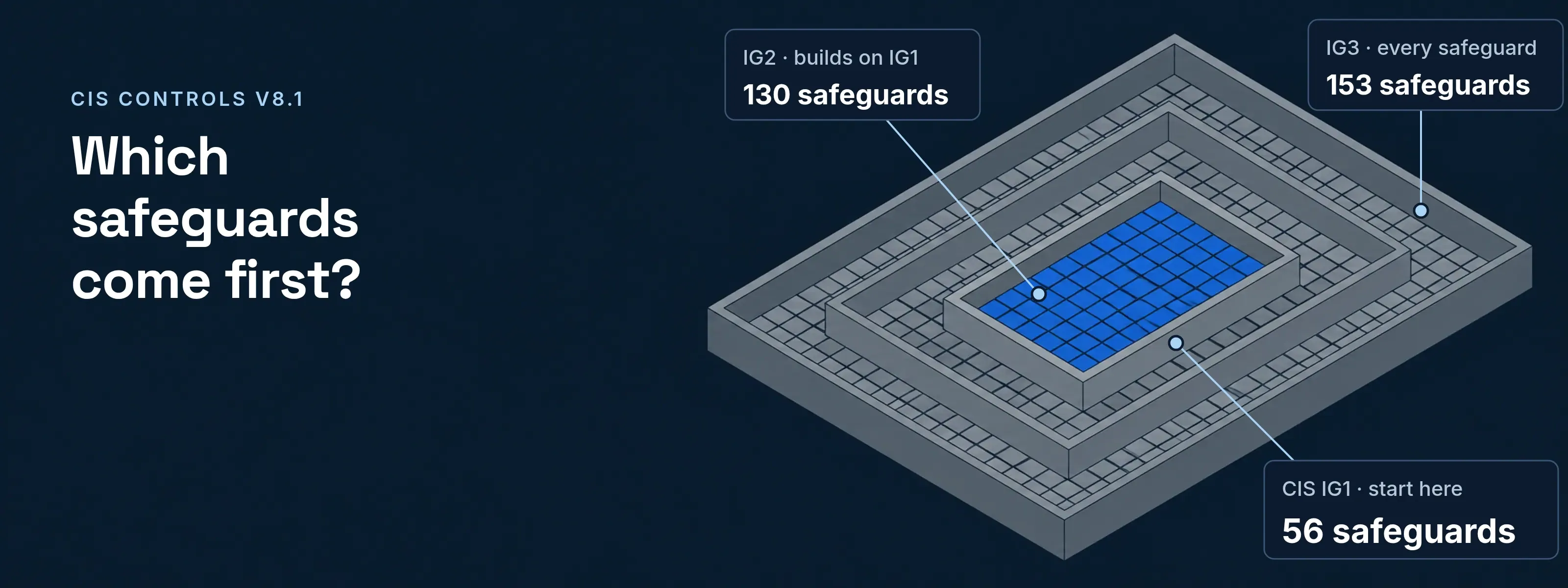
Eighteen prioritized controls with 153 safeguards make up the CIS Controls, published by the Center for Internet Security. Version 8.1 sorts the safeguards into three Implementation Groups, and every organization starts with the 56 in IG1.
CIS describes the list as a prioritized set of safeguards against the most prevalent attacks on systems and networks. Many legal, regulatory and policy frameworks map to it.
Version 8.1, often written CIS CSC v8.1, keeps the 153 safeguards of CIS Controls v8 and adds the Govern function from NIST CSF 2.0. The table shows what applies first when you are asked to align with the CIS framework.
The 18 CIS Controls and their IG1 safeguards
Each row of the CIS controls list shows how many safeguards a control holds, and how many of them sit in IG1 and IG2. IG3 is all 153.
| Control | Safeguards | IG1 | IG2 |
|---|---|---|---|
| 1. Inventory and Control of Enterprise Assets | 5 | 2 | 4 |
| 2. Inventory and Control of Software Assets | 7 | 3 | 6 |
| 3. Data Protection | 14 | 6 | 12 |
| 4. Secure Configuration of Enterprise Assets and Software | 12 | 7 | 11 |
| 5. Account Management | 6 | 4 | 6 |
| 6. Access Control Management | 8 | 5 | 7 |
| 7. Continuous Vulnerability Management | 7 | 4 | 7 |
| 8. Audit Log Management | 12 | 3 | 11 |
| 9. Email and Web Browser Protections | 7 | 2 | 6 |
| 10. Malware Defenses | 7 | 3 | 7 |
| 11. Data Recovery | 5 | 4 | 5 |
| 12. Network Infrastructure Management | 8 | 1 | 7 |
| 13. Network Monitoring and Defense | 11 | 0 | 6 |
| 14. Security Awareness and Skills Training | 9 | 8 | 9 |
| 15. Service Provider Management | 7 | 1 | 4 |
| 16. Application Software Security | 14 | 0 | 11 |
| 17. Incident Response Management | 9 | 3 | 8 |
| 18. Penetration Testing | 5 | 0 | 3 |
| Total | 153 | 56 | 130 |
Counts from the CIS Controls Navigator (v8.1) at cisecurity.org, read November 18, 2026. The marked rows, 5, 6 and 8, hold the safeguards an identity system answers, covered below.
Controls 13, 16 and 18 have no IG1 safeguard. Control 14, security awareness training, has 8 of its 9 in IG1.
How do IG1, IG2 and IG3 differ?
Each Implementation Group adds safeguards to the one before it: IG1 has 56, IG2 has 130 and IG3 has all 153. CIS calls IG1 essential cyber hygiene and says every enterprise should start there. It fits small and mid-sized organizations with limited IT and security staff, facing general, non-targeted attacks.
- CIS IG1 · start here
- 56 safeguards
- IG2 · builds on IG1
- 130 safeguards
- IG3 · every safeguard
- 153 safeguards
Control 5 and Control 6: the identity safeguards
These 14 CIS safeguards decide who holds an account and how they sign in. Nine of them are in IG1.
Control 5, Account Management
- 5.1 Inventory of accounts: IG1. Users, administrators and service accounts, with name, username, start and stop dates and department. Confirm every active account at least quarterly.
- 5.2 Unique passwords: IG1. At least 8 characters on accounts with MFA, 14 on accounts without.
- 5.3 Disable dormant accounts: IG1. Delete or disable an account after 45 days without activity, where supported. A worked finding is on the identity security posture management page.
- 5.4 Dedicated administrator accounts: IG1. Admin rights live on a separate account; email and browsing stay on the everyday one. More in privileged access management.
- 5.5 Inventory of service accounts: IG2. Owning department, review date and purpose, reviewed at least quarterly.
- 5.6 Central account management: IG2. Through a directory or identity service.
Control 6, Access Control Management
- 6.1 Access granting process: IG1. Documented, preferably automated, for new hires and role changes.
- 6.2 Access revoking process: IG1. Disable accounts immediately on termination or role change. CIS adds that disabling instead of deleting can preserve audit trails.
- 6.3 to 6.5 MFA: IG1. Compared in the next section.
- 6.6 Inventory of authentication and authorization systems: IG2. On-site and hosted, reviewed at least annually.
- 6.7 Central access control: IG2. Through a directory service or SSO provider, where supported.
- 6.8 Role-based access control: IG3. Document the access each role needs, and review privileges at least annually.
MFA three times: 6.3, 6.4 and 6.5
All three are in IG1. They differ in what must ask for a second factor.
| Safeguard | What needs MFA | CIS condition |
|---|---|---|
6.3 |
Every externally exposed enterprise or third-party application |
Where supported |
6.4 |
Remote network access |
None stated |
6.5 |
All administrative access accounts, on-site or through a service provider |
Where supported |
None of the three names a method. For administrators, a phishing-resistant MFA method closes the relay attacks that codes leave open.
Records an SSO system gives a CIS assessment
An assessor asks who holds an account, who must use MFA and who left. In SSOGEN those answers sit in the Users list, the sign-in policies and the audit log.
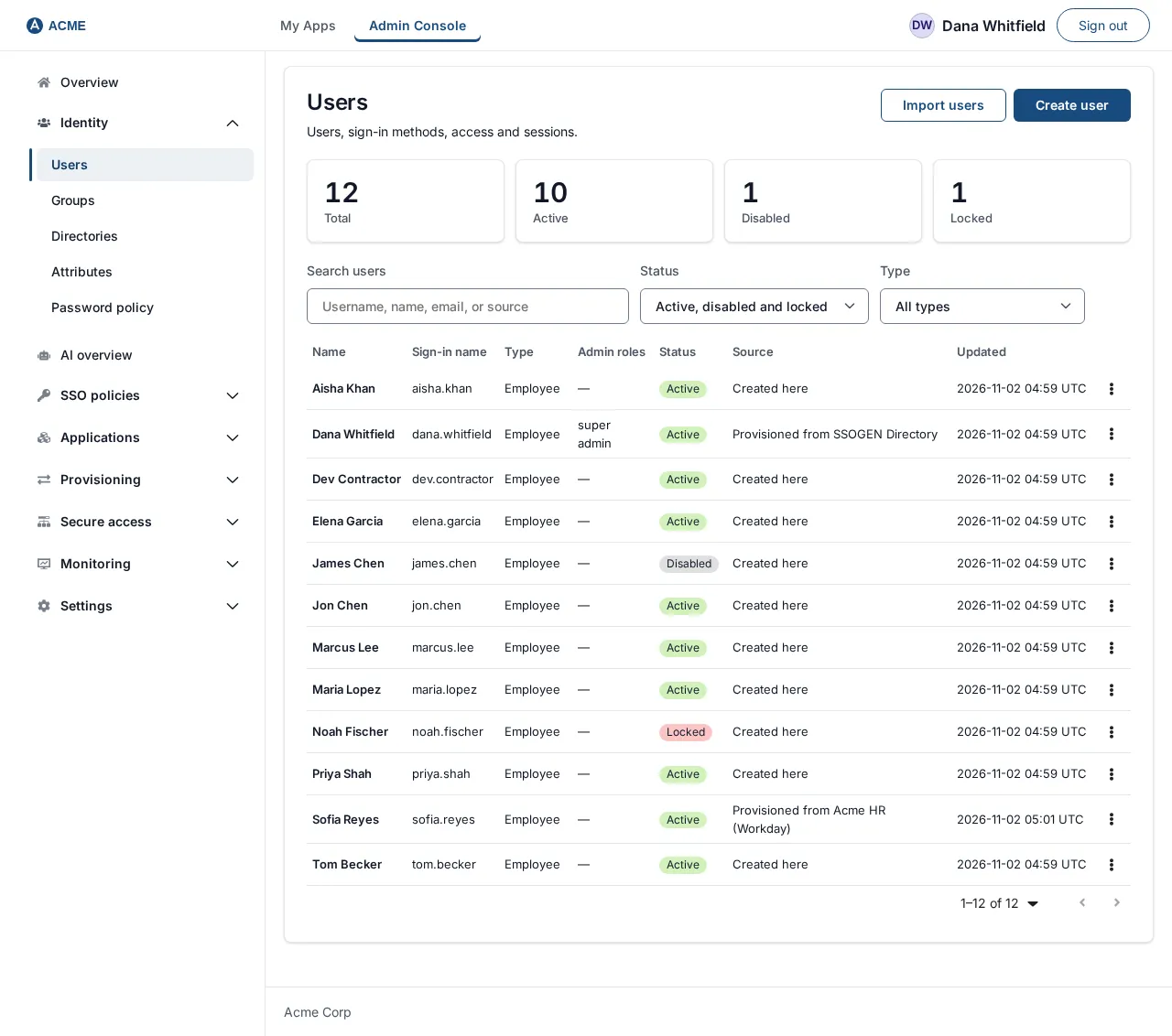
- 5.1 Account inventory. Every account with its type, admin roles and status. Source reads Created here or Provisioned from the named directory or HR system.
- 6.2 Leavers. An HR system sends SCIM
active: falseand the account is disabled. Nothing is deleted, and its history stays in the audit trail. - 6.3 Applications. A sign-in policy with Second factor set to Required applies to every application assigned to it. Email and text codes stay off unless the policy lists them. Setup is in the multi-factor authentication guide.
- Remote sessions. SSOGEN Remote Access opens SSH, RDP and VNC in the browser through the SSOGEN Gateway, with no VPN or client. The sign-in strength follows the application’s sign-in policy.
- 6.5 Administrators. The Admin Console has its own policy: a password, then an SSOGEN Authenticator approval with number matching, its code or a recovery code. It never accepts email or text codes and asks for a new sign-in after an hour.
- 8.2, 8.9 and 8.10 Audit logs. The hash-chained audit log records each
authentication.succeededevent, which gives a 5.3 review its last sign-in dates. Exports cover 24 hours up to a year, automatic retention keeps 90 to 2,555 days, and signed webhooks carry the same events to a SIEM.
Short answers on CIS, Benchmarks and MFA
What does CIS stand for in cybersecurity?
CIS stands for the Center for Internet Security, a 501(c)(3) nonprofit organization. It publishes two sets of guidance: the CIS Controls and the CIS Benchmarks. The Controls were known as the SANS Critical Security Controls, or the SANS Top 20, before they took the CIS name. Today their full title is the CIS Critical Security Controls.
What is the purpose of the CIS?
The purpose of the CIS Controls is a prioritized defense against the attacks seen most often. CIS orders the safeguards so a small team can start with 56 and grow toward 153 as staff and risk grow. Many legal, regulatory and policy frameworks map to or reference the Controls.
Are CIS Controls the same as CIS Benchmarks?
No: the Controls say what an organization should do, and the Benchmarks say how to configure one product securely. CIS describes the Benchmarks as prescriptive configuration recommendations for more than 25 vendor product families. Control 4 asks for a documented secure configuration process, and a Benchmark can supply the settings for one product inside it.
Does CIS require MFA?
Yes: Safeguards 6.3, 6.4 and 6.5 require MFA for external applications, remote network access and administrative access, all in IG1. CIS adds “where supported” to 6.3 and 6.5. Safeguard 5.2 ties MFA to password length as well: 8 characters are enough on an account with MFA, and 14 are needed on one without.
Sources
Sources, all read 2026-11-18: CIS Controls v8.1; CIS Critical Security Controls list; Implementation Groups; IG1; CIS Controls Navigator, version 8.1 (safeguard text, IG tags and the counts above); CIS Benchmarks.
Updated