SSOGEN / Learn / Identity Security Posture Management (ISPM)
Learn
Identity Security Posture Management (ISPM)
Before anyone attacks, identity security posture management (ISPM) checks how identities are configured: roles, sign-in factors, app consents and account activity. Every finding comes with a fix.
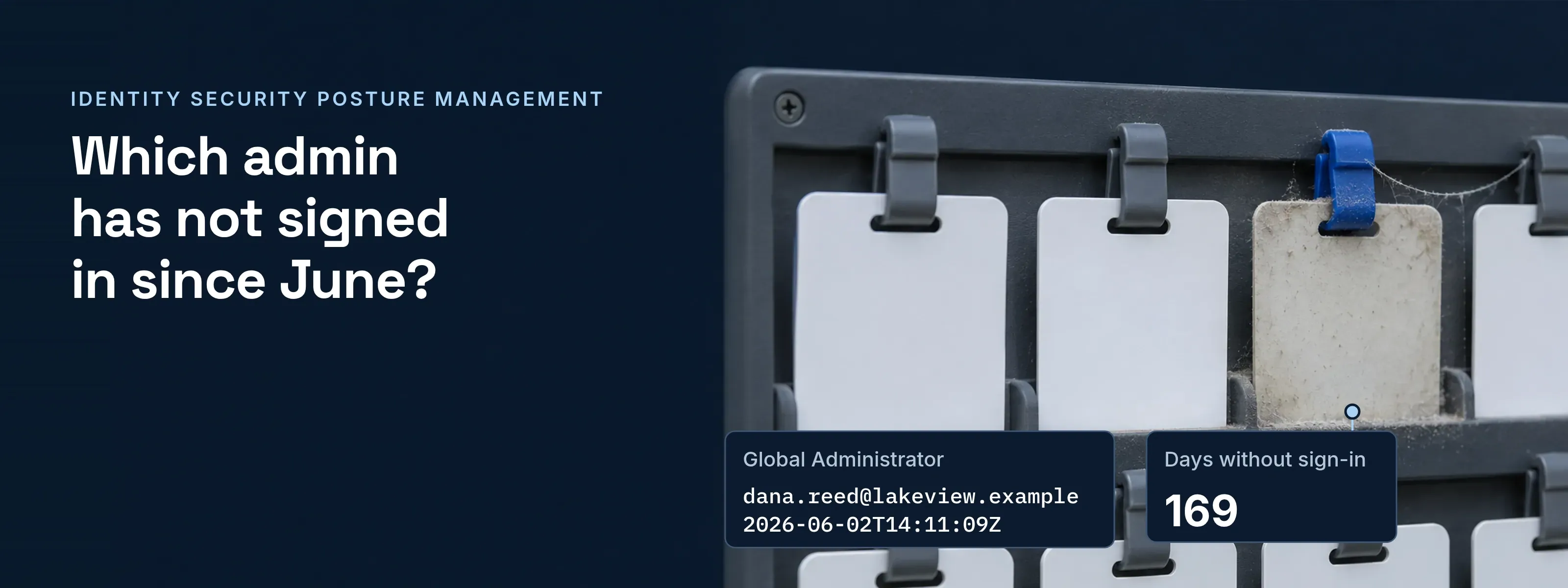
A Global Administrator account that nobody has used since June raises no alert, because nothing has happened to it yet. Identity security posture management finds such gaps: it compares the identity setup with a baseline and reports each weak spot with the change that closes it.
In NIST CSF 2.0 terms, the work sits in the Identify and Protect functions. Its policies and risk register sit in Govern, which a GRC program maintains.
Six findings from one example tenant
Lakeview Logistics (lakeview.example) is a made-up company; the report is dated November 18, 2026. Records show the values a scanner read; the table gives the attack and the fix.
- Critical
- 1
- High
- 3
- Medium
- 1
- Low
- 1
- Accounts in scope
- About 600
- Account
- dana.reed@lakeview.example
- Role
- Global Administrator
- lastSuccessfulSignInDateTime
- 2026-06-02T14:11:09Z
- Days without sign-in
- 169
- Threshold
- 45 days, CIS Safeguard 5.3
- Report
- userRegistrationDetails
- isMfaRegistered
- false, 41 accounts
- Signed in this month
- 9 of the 41
- Example
- mark.chen@lakeview.example
- Accounts
- 2, both isAdmin true
- methodsRegistered
- mobilePhone
- systemPreferredAuthenticationMethods
- sms
- Application
- PDF Merge Pro, unverified publisher
- consentType
- Principal
- scope
- Mail.Read offline_access
- Grants
- 23 users
- sAMAccountName
- svc-reporting
- pwdLastSet
- 2019-03-11
- lastLogonTimestamp
- 2026-04-18, 214 days ago
- servicePrincipalName
- HTTP/reports.lakeview.example
- Owner
- None recorded
- Setting
- Sign-in idle timeout
- Value
- 45 minutes
- Default
- 30 minutes
| Finding | Attack it opens | Fix |
|---|---|---|
| 1 · Critical · Inactive global admins | Takeover of an admin account that no owner watches, where a sign-in surprises nobody. | Remove the role from all three. Keep two named break-glass accounts, documented and monitored. |
| 2 · High · Password only | Password spraying and credential stuffing. One guessed password is the whole sign-in. | Require a second factor, and have each person register one at the next sign-in. |
| 3 · High · Text-message codes for admins | SIM swapping, and phishing pages that relay the code in real time. | Move administrators to a phishing-resistant method, such as a passkey or a security key. |
| 4 · High · Mailbox consent grant | Consent phishing. The app reads mail with a refresh token and never needs a password. | Revoke the 23 grants. Limit user consent to verified publishers and low-impact permissions, and send other requests to admin approval. |
| 5 · Medium · Dormant service account | Kerberoasting. Any account with a valid ticket can request a service ticket for the SPN and crack the password offline. | Assign an owner. Disable the account, or move the service to a group managed service account. Otherwise set a password of 25 or more characters. |
| 6 · Low · Long idle timeout | A longer window for a stolen session or an unattended browser. | Return the timeout to 30 minutes or less. |
- In SSOGEN, for finding 1. Six built-in admin roles, and only a Super admin grants or revokes one. Admin mode ends after 15 idle minutes by default.
- In SSOGEN, for finding 2. An authentication policy sets Second factor to Required. “Offer to set one up during sign-in” is the default for anyone who never had a second factor.
- In SSOGEN, for finding 3. The Admin Console always asks for a second factor, and emailed or texted codes never open it. Text-message and email codes are off by default; a policy can require passkeys or security keys only.
Every finding traces to a field you can query
A posture finding is a query result compared with a threshold. These fields produced the six records; the names are Microsoft’s.
| Field | Where it lives | What it holds | Feeds finding |
|---|---|---|---|
signInActivity |
Microsoft Graph, user | Last interactive, non-interactive and successful sign-in. The successful value exists since December 1, 2023, and needs Entra ID P1 or P2 | 1 |
userRegistrationDetails |
Microsoft Graph, reports | isMfaRegistered, methodsRegistered and isAdmin for each user |
2, 3 |
oauth2PermissionGrant |
Microsoft Graph | Delegated grants: clientId, consentType (Principal or AllPrincipals) and scope |
4 |
lastLogonTimestamp |
Active Directory | Last logon, replicated to every domain controller. Because of msDS-LogonTimeSyncInterval, it can trail the real logon by 9 to 14 days |
5 |
pwdLastSet |
Active Directory | When the password last changed | 5 |
servicePrincipalName |
Active Directory | Kerberos service names, set on service accounts that run a Windows service | 5 |
Okta and Google Workspace hold the same facts under other field names.
Posture before an attack, detection during one
In cyber security, IAM (identity and access management) decides who signs in and to what. ISPM checks how well that IAM is set up. Timing separates it from its neighbors.
| Discipline | Question it answers | When it acts | What it produces |
|---|---|---|---|
| IAM | Who may sign in, and to which application? | At every sign-in | An allow or deny decision and a session |
| IGA | Should this person still hold this access? | Joiner, mover and leaver events; review campaigns | Provisioning changes and signed reviews |
| ISPM | Where is the identity setup weak? | Continuously, before an attack | Findings, each with evidence and a fix |
| ITDR | Is someone attacking an identity right now? | During an attack | Alerts and response actions; see ITDR |
| AI-SPM | Which AI models, agents and data paths are in use? | Continuously | An inventory of AI use; see AI-SPM |
SSOGEN flags a weaker sign-in setting where you change it
SSOGEN shows finding 6 on its own Security page.
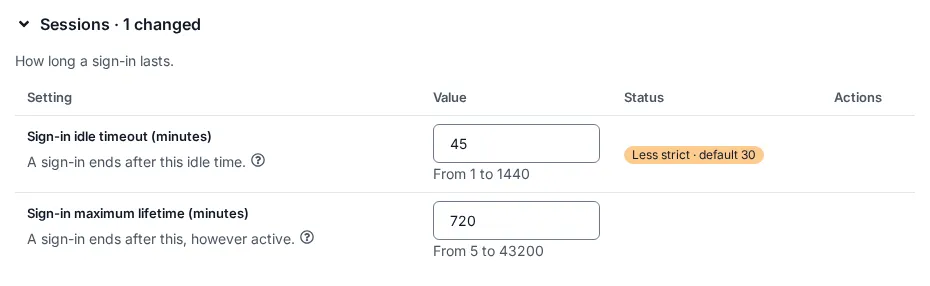
- Less strict · default 30. The orange status on a row whose value is weaker than its default: a protection turned off, or a limit or time raised. A stricter change reads Changed · default 30.
- 1 setting is less strict than its default. The notice at the top of the page while any row is weaker. Type the default and select Save to clear it.
Posture terms, answered
What does security posture mean?
Security posture is the measured state of an organization’s defenses at a given time. It covers configuration, coverage and known gaps, not attacks in progress. A posture check compares the current setup with a baseline, such as CIS Controls v8, and lists the differences. ISPM is the identity part: accounts, roles, sign-in factors and grants.
What does CSPM stand for?
CSPM stands for cloud security posture management. It checks cloud resources, such as storage buckets, security groups and encryption settings, against a baseline. ISPM runs the same check on identities: admin role holders, accounts without a second factor, app consent grants. Many cloud findings start with an identity, so the two overlap.
What is application security posture management?
Application security posture management (ASPM) gathers findings from code scanning, dependency checks and build pipelines into one ranked view per application. Its subject is software: vulnerable libraries, exposed secrets, weak pipeline settings. ISPM looks at the accounts and permissions around that software instead.
Four checks to run this week
The Graph calls need the read permissions listed on Microsoft Learn.
Admins without a sign-in in 45 days (finding 1)
List admin role holders, then read
GET /users?$select=userPrincipalName,signInActivity. Remove the role from anyone past 45 days who is not a named break-glass account.Accounts without a second factor (finding 2)
Run
GET /reports/authenticationMethods/userRegistrationDetails?$filter=isMfaRegistered eq false. Start with the accounts that signed in this month.Delegated consent grants (finding 4)
Run
GET /oauth2PermissionGrantsand sort byscope. Check the publisher of each app that holds mail or file scopes, and revoke the grants you cannot explain.Service accounts with an SPN (finding 5)
In PowerShell, run
Get-ADUser -Filter 'servicePrincipalName -like "*"' -Properties servicePrincipalName,pwdLastSet,lastLogonTimestamp. Give every account with a password older than a year an owner, then a managed service account or a new long password.
Sources, all read 2026-11-18: CIS Controls v8, Safeguard 5.3; NIST CSF 2.0; Microsoft Graph signInActivity; Manage inactive user accounts; userRegistrationDetails; oAuth2PermissionGrant; Configure user consent; Last-Logon-Timestamp attribute; MITRE ATT&CK T1558.003.
Updated