SSOGEN / What Does SSOGEN Do? Every Capability, With the Console's Names
SSOGEN
What Does SSOGEN Do? Every Capability, With the Console's Names
Applications trust SSOGEN once as a SAML 2.0 and OpenID Connect provider, and four connection types reach the applications that speak neither.
What does SSOGEN do? It is a complete identity provider. Your applications register it as a SAML 2.0 identity provider and an OpenID Connect provider, and any application that speaks either protocol connects now, with no catalog entry needed.
- Users sign in through the sources you allow: local accounts, LDAP or Active Directory, and other SAML or OpenID Connect providers.
- Applications that speak neither protocol get a Web Agent for Apache and Oracle HTTP Server, or a Gateway.
- AI agents get their own identity, and SSOGEN checks every MCP tool call.
SSOGEN Corporation has built it since 2016.
The capabilities, one row each
| Capability | What it does | Where it is explained |
|---|---|---|
| SAML 2.0 identity provider | Applications that act as SAML service providers trust SSOGEN; register once, assign people, test before activating | SAML IdP |
| OpenID Connect provider | Web, single-page, mobile and service applications sign in through SSOGEN | OpenID Connect provider |
| Several sign-in sources for one application | A policy decides, application by application, whether people sign in with local accounts, a directory, a SAML provider or an OpenID Connect provider | Multiple identity providers |
| Home realm discovery | The email domain a person types sends them to the provider that owns it | The sign-in page |
| Identity broker pattern | Applications trust SSOGEN once while people sign in through their own providers | Identity broker |
| Web Agent | An Apache and Oracle HTTP Server module signs people in for applications that cannot speak SAML or OpenID Connect, such as Oracle E-Business Suite, PeopleSoft and JD Edwards | Web Agent |
| Gateway and App Proxy | Publishes internal web applications at their own address after checking the sign-in, with nothing installed next to the application | Gateway, SSO gateway |
| AI agent identity and MCP gateway | Each agent is registered with human owners and a short credential; the Gateway checks every MCP tool call | AI agent identity, MCP gateway |
| Sign-in policy and second factors | One policy engine decides how strongly each person must sign in, and asks for more proof when risk calls for it | Adaptive authentication, MFA |
| Provisioning and directories | SCIM 2.0 provisioning, LDAP and Active Directory connections that the Directory Connector can test from inside your network, SSOGEN Directory for suppliers | User provisioning, Directory Connector, SSOGEN Directory |
| Remote access | Reach servers from the browser through the Gateway | Secure remote access |
| Audit | A tamper-evident record of sign-ins and decisions | SSO audit log |
| Deployment | On your own servers, or an organization hosted by SSOGEN | Self-hosted or hosted, Self-hosted identity provider |
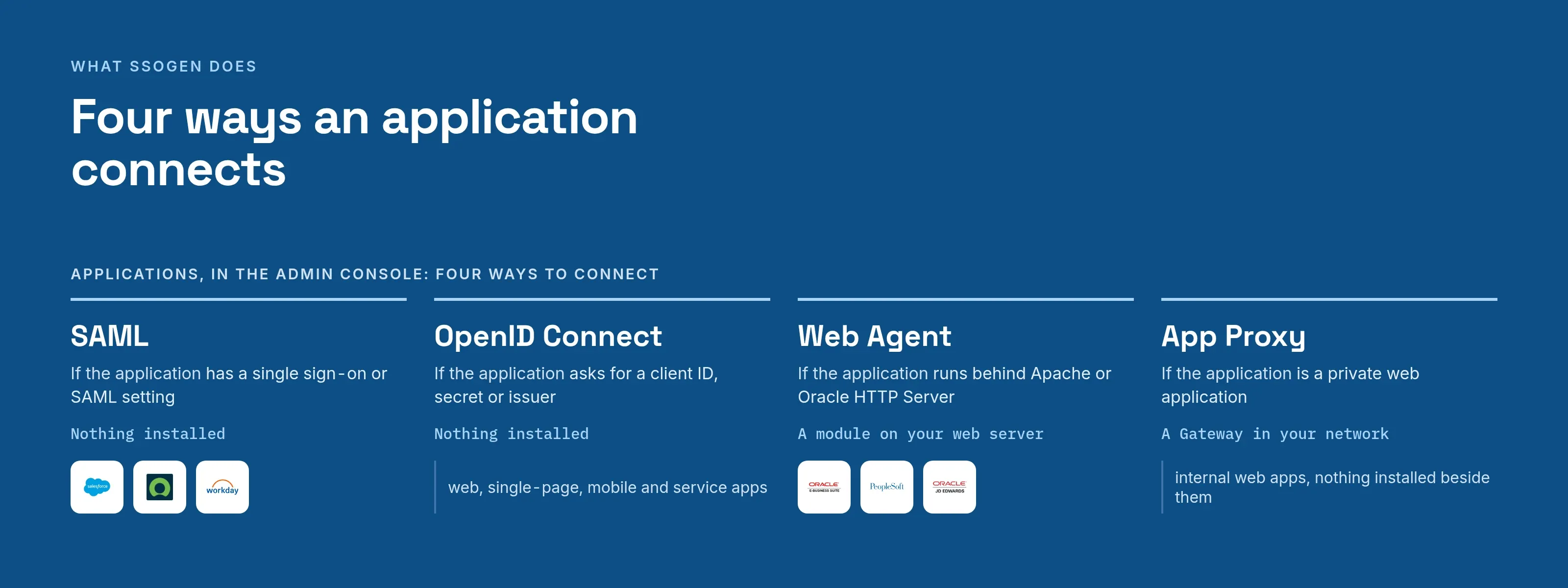
Four ways an application connects
The Admin Console lists them under Applications: SAML, OpenID Connect, Web Agent and App Proxy. Choose the first one in the table that fits.
| If the application | Connect it with | What runs where |
|---|---|---|
| has a single sign-on or SAML setting | SAML: SSOGEN is its identity provider | Nothing is installed |
| asks for a client ID, secret or issuer address | OpenID Connect: SSOGEN is its provider | Nothing is installed |
| runs behind Apache or Oracle HTTP Server and cannot speak either | Web Agent: an Apache module | The module on your web server |
| is a private web application and you want no software next to it | App Proxy on the Gateway | A program in your network |
All four share one model: assignments and sign-in policy decide who may open the application and how strongly users must sign in. For the steps, see choose how to connect an application.
Several sign-in sources for the same application
One application can offer several ways to sign in: SSOGEN’s own accounts, a directory, one SAML provider (identity provider 1), another (identity provider 2), or an OpenID Connect provider (identity provider 3).
The application’s authentication policy decides which ones users see:
- One source: the user sees one form, or goes straight to it.
- Several sources: the user sees a choice.
- Sign-in domains set: the user gets an email-first screen that routes by domain.
A second factor can follow whichever source the user chose. Details: multiple identity providers.
How SSOGEN connects to each type of system
| System | How SSOGEN connects |
|---|---|
| MCP servers | The SSOGEN Gateway checks each tool call |
| SaaS applications such as Salesforce, ServiceNow and Workday | SAML 2.0 or OpenID Connect |
| Web applications on Apache and Oracle HTTP Server | The Web Agent, with SSOGEN, SAML 2.0 or OpenID Connect; or Gateway web routes, with Kerberos delegation |
| Oracle E-Business Suite, PeopleSoft, JD Edwards, Hyperion and Siebel | The Web Agent, with SSOGEN, SAML 2.0 or OpenID Connect |
| Internal web applications | Gateway web routes, with Kerberos delegation |
| Servers | SSH, RDP and VNC in the browser through Remote Access, just in time |
People sign in through SSOGEN, with MFA, wherever a person is involved.
Six safeguards
- Deterministic policy. Access comes from fixed policy. An automated test keeps AI out of its inputs.
- Tamper-evident audit. A SHA-256 hash chain per realm, sealed daily.
- Signed configuration. A bundle that fails verification is refused whole, and the last good one keeps running.
- Write-only secrets. Secrets are stored encrypted and referenced, and the console never shows them again.
- Test before you activate. Ask the real policy what it would decide, without issuing anything.
- Kill switch. New credentials stop at once, and every enforcement point refuses the agent within five minutes.
Standards, by the scale at which each acts
SSOGEN implements open standards from the enterprise directory down to a single claim in a credential. Nothing on this list is proprietary.
| Scale | Standards |
|---|---|
| Enterprise | SAML 2.0, OpenID Connect, SCIM 2.0 (RFC 7643 and 7644), LDAP directories over LDAPS and StartTLS |
| Person | Passkeys (WebAuthn), authenticator codes (TOTP), Kerberos delegation through the SSOGEN Gateway |
| Agent | The MCP authorization profile, OAuth 2.0 with PKCE and PAR |
| Request | Token exchange and delegation (RFC 8693), approval for sensitive scopes (OpenID CIBA) |
| Credential | JWT access tokens (RFC 9068), sender-constrained tokens with DPoP (RFC 9449) |
| Claim | The NumericDate exp claim (RFC 7519): an agent credential expires in under five minutes |
A sample realm: four identities, three stores
| User | Kind | Stored in | Signs in with |
|---|---|---|---|
| m.kim | Employee | Active Directory, over LDAPS | Passkey |
| v.rao@acme-supply.example | Supplier | SSOGEN Directory | Password and authenticator code |
| k.wilson@partner.example | Contractor | SSOGEN Directory | Email code |
| agt_AP71 | AI agent | SSOGEN agent registry; owners r.miller and s.taylor | Its own key, no password |
One sign-in screen routes each person by email domain or a provider list. Microsoft Entra ID, Okta, Ping Identity and Keycloak connect by SAML or OpenID Connect when your organization requires one.
Names you may have seen
These patterns once went by gateway names. Each maps to a current capability above.
| Earlier name | What it described | Today |
|---|---|---|
| SP SAML Gateway (also called Okta SPGW) | SSOGEN registered as a service provider with a SAML identity provider such as Okta, OneLogin or Oracle IDCS, passing the identity to an application that cannot speak SAML | Add the provider as a SAML identity provider in SSOGEN and protect the application with the Web Agent; the Web Agent can also act as a SAML service provider directly against another provider |
| IdP SAML Gateway | SSOGEN as the SAML identity provider for SAML service provider applications | SAML IdP |
| OpenID Gateway | SSOGEN extending an OpenID provider’s sign-in to applications that do not speak OpenID Connect | OpenID Connect provider and the Web Agent in OpenID Connect mode |
| SSO Gateway | The umbrella name for all of the above | SSO gateway |
Microsoft lists SSOGEN in the Microsoft Entra gallery. The tutorial is titled “SSOGEN - Microsoft Entra SSO Gateway for Oracle E-Business Suite - EBS, PeopleSoft, and JDE” (Microsoft Learn, page dated 2025-05-20, read 2026-10-12).
The tutorial sets up SAML single sign-on from Microsoft Entra ID to SSOGEN, in both service-provider-initiated and identity-provider-initiated modes. It then links to SSOGEN’s guides for Oracle E-Business Suite, PeopleSoft, JD Edwards and Apache.
Where to start
| You have | Start here |
|---|---|
| Oracle E-Business Suite, PeopleSoft or JD Edwards | Oracle EBS SSO, PeopleSoft SSO, JD Edwards SSO |
| Applications that need SAML or OpenID Connect | SAML IdP, OpenID Connect provider |
| Several directories or providers after a reorganization | Multiple identity providers, Identity broker |
| An old access manager to replace | SiteMinder alternative, Oracle Access Manager alternative |
| AI agents calling tools | AI agent identity, MCP gateway |
Questions people ask
What is SSOGEN?
Is SSOGEN an identity provider?
Can one application offer several ways to sign in?
Which applications can SSOGEN protect without changing them?
Where does SSOGEN run?
Where to go next
- Documentation. Browse the documentation.
- Comparisons. See how SSOGEN compares on the comparison hub.
- Trial. Get trial access with one application of your own.
Sources, all read 2026-10-12: Microsoft Learn, Configure SSOGEN - Microsoft Entra SSO Gateway for Oracle E-Business Suite - EBS, PeopleSoft, and JDE.